
Cospa – Coworking Space & Virtual Office Elementor Template Kit
- Updated on April 29, 2026
- 100% Original Product & Well Documented
- Unlimited Domain Usage
*Important Note:
The image should not be Part of the template kit. You need to use your own reliable Source.


- Coupon "b2g1" has expired.
- Coupon "b2g1" has expired.
- Coupon "b2g1" has expired.
- Coupon "b2g1" has expired.
- Coupon "b2g1" has expired.
Original price was: ₹999.00.₹299.00Current price is: ₹299.00.
Launch a coworking site in a single afternoon. Cospa includes 15 sections, pricing tables, and a virtual office page — swap in your photos, change the colors, hit publish. No code required, no developer needed.
- Secured & Scanned by Virus total & McAfee.
- Access to Free updates for Lifetime
- All products are Under GPL License (Unlimited Domain Usage)
- We Not Provide any Support For this Product

Lifetime Membership
Access 6700+ Premium WordPress Themes & Plugins, Elementor Templates, Mobile Apps, PHP scripts with Lifetime Updates.
Join Premium MembershipRecently Viewed
Best Coworking Space Website Template for Modern Workspaces
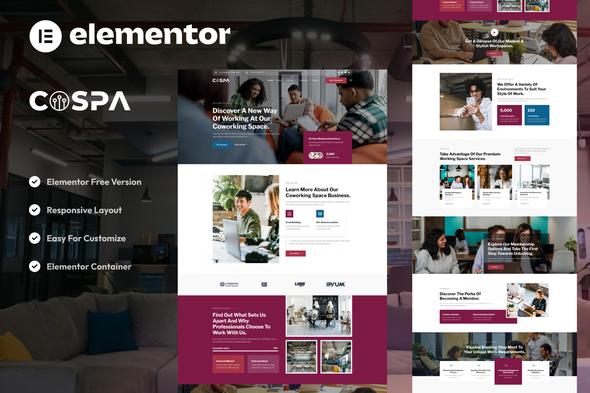
Most coworking spaces have great spaces — but websites that feel like an afterthought. Cospa fixes that. It’s an Elementor template kit built specifically for coworking, shared offices, and virtual office providers. You get 15+ sections, pricing tables that actually explain your membership options, team profiles, facility showcases, and working contact forms. Everything you need to turn website visitors into paying members.
What Cospa Is All About
It’s a WordPress template kit that works with Elementor — the free page builder millions already use. You don’t need to know code. You don’t need to hire anyone. The layouts target the right audience: freelancers hunting for desk space, startups needing flexibility, remote teams, and small businesses tired of coffee shop WiFi. Each section is built to convert — bold headlines that grab attention, pricing displays that make your tiers clear, and call-to-action buttons that actually get clicked.
Key Features Built for Coworking Businesses
- 15+ sections covering home, pricing, services, team, testimonials, and contact — pick what you need, ignore the rest
- Dedicated virtual office pages with layouts for mail handling, business addresses, and receptionist services
- Pricing tables that show daily passes, hot desks, dedicated desks, and private offices without confusion
- Mobile-responsive design — looks good on phones, tablets, and whatever screen a potential member is using
- One-click demo import — set up your site and start editing within minutes of opening the file
- Works with both free Elementor and Elementor Pro for deeper customization when you want it
- Clean code structure that loads fast and plays nice with search engines
Who This Template Kit Is For
Coworking owners running single locations or managing spaces across cities. Shared office managers. Virtual office providers. Incubators and accelerators building their online presence. Freelancers organizing events and workshops can use it too — zero design skills required, seriously. It scales to your brand, not the other way around.
How to Get Started Fast
Install Elementor. Install the template kit. Import the layouts you want. Swap the placeholder text with your own, drop in your facility photos, change the colors to match your brand. Publish. Most people have a live website the same day they download it. No developer. No code. Drag, drop, done.
Why Buy This Coworking Template Kit
Building from scratch eats weeks. Using a generic template means fighting with layouts designed for restaurants or fashion blogs. Cospa is built for your industry — every section, button, and layout decision was made with coworking members in mind. Commercial license included, so use it for client work or your own business. Lifetime updates. One payment, instant download, and support if you get stuck.
Ready to Get Started?
Ditch the expensive developer and agency timelines. Download Cospa, open it in Elementor, and have a professional coworking website live today — one that actually attracts the members you want.
Only logged in customers who have purchased this product may leave a review.
How to use Kit:
Install and activate the “Template Kit – Import” plugin from Plugins > Add New in WordPress.
Do not unzip.
Go to Template Kit – Import > Upload Template Kit Zip File button.
Before importing a template, ensure the Install Requirements button is clicked to activate required plugins.
For best results, do not import more than one template at a time.
RELATED PRODUCTS

DIVI – Original License | One Time Payment – Exclusive Deal

Elementor Pro 4.1.3 + Elementorism Landing Pages WordPress Plugin

907 5.3.6 – Responsive Multi-Purpose WordPress Theme

Element Pack Pro 9.1.0 – Addon For Elementor

Lifetime Mini Membership





 Mobile Apps
 php script
 How to

Reviews
There are no reviews yet