
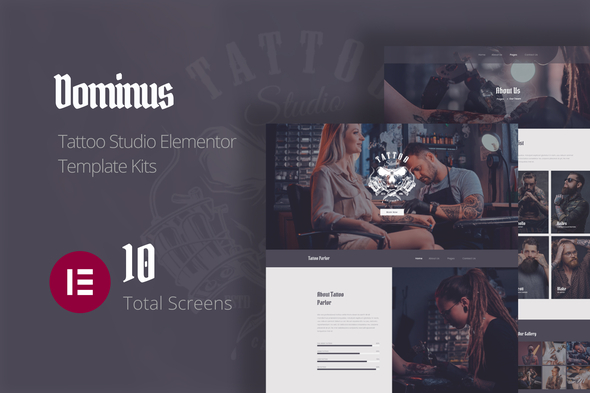
Dominus – Tattoo Studio Elementor Template Kits
- Updated on May 2, 2026
- 100% Original Product & Well Documented
- Unlimited Domain Usage
*Important Note:
The image should not be Part of the template kit. You need to use your own reliable Source.


- Coupon "b2g1" has expired.
- Coupon "b2g1" has expired.
- Coupon "b2g1" has expired.
- Coupon "b2g1" has expired.
- Coupon "b2g1" has expired.
Original price was: ₹999.00.₹299.00Current price is: ₹299.00.
A dark, premium tattoo studio website template built for Elementor. Launch your online presence today — no coding, no confusion, just a site that matches your craft.
- Secured & Scanned by Virus total & McAfee.
- Access to Free updates for Lifetime
- All products are Under GPL License (Unlimited Domain Usage)
- We Not Provide any Support For this Product

Lifetime Membership
Access 6700+ Premium WordPress Themes & Plugins, Elementor Templates, Mobile Apps, PHP scripts with Lifetime Updates.
Join Premium MembershipRecently Viewed
Dominus Tattoo Studio Template Kit for Elementor
Your tattoo art deserves a website that hits as hard as your work. Dominus gives you a complete, professionally designed website template built specifically for tattoo studios, piercing shops, and body art artists. No coding required — just drag, drop, and launch. This isn’t a generic template with some ink clipart thrown in. It’s a fully realized digital space designed to showcase your portfolio, attract new clients, and book appointments without the usual website headaches.
What You Get with Dominus
This template kit includes everything you need to launch a complete tattoo studio website. Each section, button, and layout works with Elementor’s free page builder, so you can customize every detail without touching code. The design balances dark aesthetics with clean functionality — premium-looking without the visual clutter.
Key Features of Dominus
- 10+ pre-built pages: home, portfolio, artist profiles, services, pricing, and contact
- Fully responsive design that looks sharp on mobile, tablet, and desktop
- Appointment booking section built to turn visitors into clients
- Gallery layouts optimized for high-resolution tattoo photography
- Social media integration to grow your following alongside your site
- Works with Elementor Pro for forms, popups, and advanced features
- Global colors and fonts that make rebranding effortless
Who Is This Template For?
Dominus works best for tattoo artists and studio owners who want a professional online presence without the cost of custom web development. Whether you run a solo piercing service, a multi-artist tattoo studio, or a specialized body modification shop, this template kit scales to fit your needs. If you’ve been putting off building your website because the technical side feels overwhelming, this kit removes that barrier completely.
How to Get Started
After purchase, you’ll receive an instant download with all template files and a step-by-step setup guide. Install the template kit through Elementor’s import feature, swap in your own images and branding, and publish. Most users have their site live within a single afternoon. If you run into questions during setup, lifetime support means you’re never left hanging.
Why Choose Dominus Over Free Templates?
Free templates often come with limited customization, generic layouts, and no support when things break. Dominus includes a commercial license so you can use it for client projects or your own studio without legal concerns. Lifetime free updates keep your site current as Elementor evolves. One simple one-time payment covers everything — no subscriptions, no surprise fees. You’re getting a polished result that would cost hundreds to thousands if hired out, at a fraction of the price.
Ready to Get Started?
Download Dominus today and have a professional tattoo studio website ready before your next booking inquiry. Whether you’re setting up your first site or rebuilding an outdated one, this kit gets you live fast. Get instant access now.
Only logged in customers who have purchased this product may leave a review.
How to use Kit:
Install and activate the “Template Kit – Import” plugin from Plugins > Add New in WordPress.
Do not unzip.
Go to Template Kit – Import > Upload Template Kit Zip File button.
Before importing a template, ensure the Install Requirements button is clicked to activate required plugins.
For best results, do not import more than one template at a time.
RELATED PRODUCTS

DIVI – Original License | One Time Payment – Exclusive Deal

Elementor Pro 4.1.3 + Elementorism Landing Pages WordPress Plugin

907 5.3.6 – Responsive Multi-Purpose WordPress Theme

Element Pack Pro 9.1.0 – Addon For Elementor

Lifetime Mini Membership





 Mobile Apps
 php script
 How to
Reviews
There are no reviews yet