
Drago – Creative Digital Agency Elementor Template Kit
- Updated on May 2, 2026
- 100% Original Product & Well Documented
- Unlimited Domain Usage
*Important Note:
The image should not be Part of the template kit. You need to use your own reliable Source.


Original price was: ₹999.00.₹299.00Current price is: ₹299.00.
Build a real agency website this afternoon. Drago gives you 15+ pages of polished layouts, portfolio grids, and service sections — no coding required.
- Secured & Scanned by Virus total & McAfee.
- Access to Free updates for Lifetime
- All products are Under GPL License (Unlimited Domain Usage)
- We Not Provide any Support For this Product

Lifetime Membership
Access 6700+ Premium WordPress Themes & Plugins, Elementor Templates, Mobile Apps, PHP scripts with Lifetime Updates.
Join Premium MembershipRecently Viewed
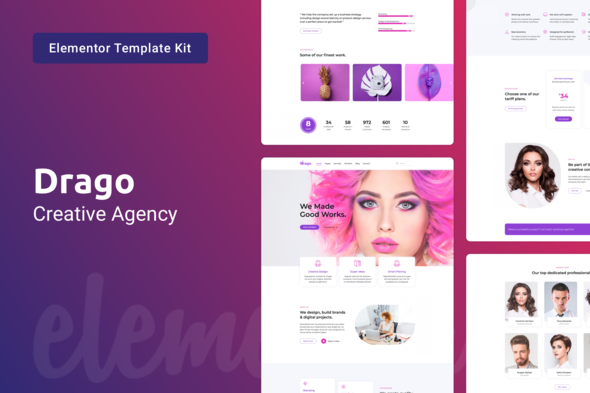
Drago Creative Digital Agency Elementor Template Kit
Your portfolio speaks before you do. When a potential client lands on your site, they make judgments in seconds — about your taste, your professionalism, your attention to detail. The Drago Creative Digital Agency Elementor Template Kit gives you a polished website that does the selling for you. No coding required. No expensive designers. Just a ready-to-use toolkit that gets you online fast.
What It Is
Drago is a complete Elementor template kit built for creative studios, digital agencies, design firms, and freelancers who need a professional online presence without the agency price tag. Every section, every layout, every interaction has been crafted to showcase your work and win more clients. You get a cohesive design system with 15+ pre-built pages and sections that work together.
Key Features
This kit covers everything your agency site needs: homepage variations, service pages, portfolio showcases, team sections, testimonial sliders, pricing tables, contact forms, and blog layouts. All templates work with Elementor’s free version — no Pro required. Each design uses clean typography, strategic white space, and smooth scroll animations that impress visitors without slowing load times.
- 15+ professionally designed pages and sections
- Fully responsive — looks perfect on mobile, tablet, and desktop
- Drag-and-drop customization — no coding knowledge needed
- Clean structure that plays nice with SEO
- Fast-loading code that keeps visitors engaged
Who It’s For
Drago works for creative professionals who want to stop DIY-ing their website and start looking like an established agency. It’s built for web designers selling services, branding consultants building credibility, marketing agencies needing a quick launch, photographers and videographers showcasing portfolios, and any freelancer tired of generic WordPress themes that make their work look amateurish.
How To Use It
After purchase, you download the template kit files and import them directly into Elementor. Each template section can be used as-is or mixed and matched to create your unique layout. Swap in your own images, colors, and branding. The organized structure means you can build a complete agency website in a single afternoon. Need a new service page? Choose a section, drag it in, update the text. Done.
Why Buy This Template Kit
Buying pre-made doesn’t mean buying generic. Drago was designed by professionals who understand what agency clients look for — credibility signals, clear service explanations, social proof, and clear paths to contact. Compare that to spending weeks building from scratch or paying a developer $3,000+ for a custom site. With Drago, you get premium design at a fraction of the cost. Your one-time purchase includes lifetime updates and commercial licensing, so you can use it for client projects without restrictions.
Ready to Get Started?
Stop delaying your online presence. Download Drago today and launch a website that actually converts visitors into paying clients. Instant delivery, beginner-friendly setup, and lifetime support included.
Only logged in customers who have purchased this product may leave a review.
How to use Kit:
Install and activate the “Template Kit – Import” plugin from Plugins > Add New in WordPress.
Do not unzip.
Go to Template Kit – Import > Upload Template Kit Zip File button.
Before importing a template, ensure the Install Requirements button is clicked to activate required plugins.
For best results, do not import more than one template at a time.
RELATED PRODUCTS

DIVI – Original License | One Time Payment – Exclusive Deal

Elementor Pro 4.1.3 + Elementorism Landing Pages WordPress Plugin

907 5.3.6 – Responsive Multi-Purpose WordPress Theme

Element Pack Pro 9.1.0 – Addon For Elementor

Lifetime Mini Membership





 Mobile Apps
 php script
 How to
Reviews
There are no reviews yet