
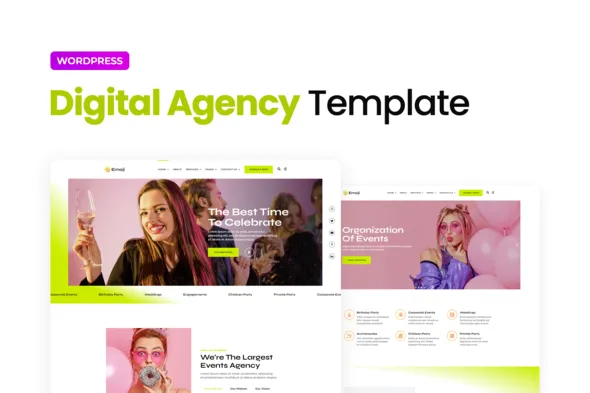
Emoji – Event Agency Elementor Template Kit
- Updated on May 2, 2026
- 100% Original Product & Well Documented
- Unlimited Domain Usage
*Important Note:
The image should not be Part of the template kit. You need to use your own reliable Source.


- Coupon "b2g1" has expired.
- Coupon "b2g1" has expired.
- Coupon "b2g1" has expired.
Original price was: ₹999.00.₹299.00Current price is: ₹299.00.
Launch your event agency website today. 10+ layouts, drag-and-drop customization, commercial license, and lifetime updates — no coding required. Instant download included.
- Secured & Scanned by Virus total & McAfee.
- Access to Free updates for Lifetime
- All products are Under GPL License (Unlimited Domain Usage)
- We Not Provide any Support For this Product

Lifetime Membership
Access 6700+ Premium WordPress Themes & Plugins, Elementor Templates, Mobile Apps, PHP scripts with Lifetime Updates.
Join Premium MembershipRecently Viewed
Event Agency Elementor Template Kit for Professional Websites
Building a professional event agency website shouldn’t take months or drain your budget. This Emoji template kit gives you everything you need to launch a polished site using the free Elementor plugin — no Pro version required. It’s yours to keep, forever.
What Is the Emoji Event Agency Template Kit?
Specifically built for event planning agencies, wedding planners, corporate event managers, and holiday event organizers. The kit includes 10+ pre-designed sections covering every key page: homepage hero, services showcase, portfolio grid, team profiles, client testimonials, pricing packages, and contact form.
Every layout looks sharp on any device. Desktop, tablet, phone — your clients will see the same professional presentation everywhere. No code, no headaches.
Key Features of the Emoji Template Kit
Here’s what’s included:
- 10+ pre-built page sections covering all major website areas
- Fully responsive design that works perfectly on any screen size
- Clean, modern layout built for event and celebration brands
- One-time purchase — no subscriptions, no recurring fees
- Commercial license — use it for client projects or your own business
- Lifetime free updates whenever new versions release
Install directly from your WordPress dashboard. Swap colors, update images, edit text — everything happens visually. If you can point and click, you can customize it.
Who Is This Template Kit For?
This kit works best if you’re:
- A freelance event planner building your online presence from scratch
- A small to mid-size agency refreshing your current website
- A wedding planner or celebration coordinator
- A holiday event organizer promoting seasonal services
- A corporate event manager needing a professional site on a tight deadline
If you’ve been dreading the website build — or dreading the quote from a design agency — this kit was made for you.
How to Get Started with the Emoji Template Kit
Getting live is simple. Install the free Elementor plugin on your WordPress site, upload the kit from your dashboard, and start customizing. Pick the sections you need, add your own branding, and publish. Most people have a working site up within a few hours.
No coding knowledge needed. No expensive agency contract. Just a professional event agency website on your schedule.
Why Buy This Template Kit?
Compare the alternatives. Custom design agencies typically charge $3,000 to $10,000+ for a site like this. This kit delivers the same polished result for a fraction of the cost — and you own it outright.
The commercial license means you can also use it to build client websites and charge for your setup time. One purchase that pays for itself.
Ready to Get Started?
Get professional design, instant download, a commercial license, and lifetime updates — all in one purchase. Build the site your event agency deserves today.
Only logged in customers who have purchased this product may leave a review.
How to use Kit:
Install and activate the “Template Kit – Import” plugin from Plugins > Add New in WordPress.
Do not unzip.
Go to Template Kit – Import > Upload Template Kit Zip File button.
Before importing a template, ensure the Install Requirements button is clicked to activate required plugins.
For best results, do not import more than one template at a time.
RELATED PRODUCTS

DIVI – Original License | One Time Payment – Exclusive Deal

Elementor Pro 4.1.3 + Elementorism Landing Pages WordPress Plugin

907 5.3.6 – Responsive Multi-Purpose WordPress Theme

Element Pack Pro 9.1.0 – Addon For Elementor

Lifetime Mini Membership





 Mobile Apps
 php script
 How to
Reviews
There are no reviews yet