
Eyee – Eye Clinic & Vision Care Elementor Template Kit
- Updated on April 28, 2026
- 100% Original Product & Well Documented
- Unlimited Domain Usage
*Important Note:
The image should not be Part of the template kit. You need to use your own reliable Source.


Original price was: ₹999.00.₹299.00Current price is: ₹299.00.
Build your eye clinic website this afternoon. Eyee gives you 10+ pages with appointment booking, service showcases, and doctor profiles — ready to customize in Elementor. Instant download. Lifetime updates included.
- Secured & Scanned by Virus total & McAfee.
- Access to Free updates for Lifetime
- All products are Under GPL License (Unlimited Domain Usage)
- We Not Provide any Support For this Product

Lifetime Membership
Access 6700+ Premium WordPress Themes & Plugins, Elementor Templates, Mobile Apps, PHP scripts with Lifetime Updates.
Join Premium MembershipRecently Viewed
Eyee Eye Clinic Template Kit for Elementor
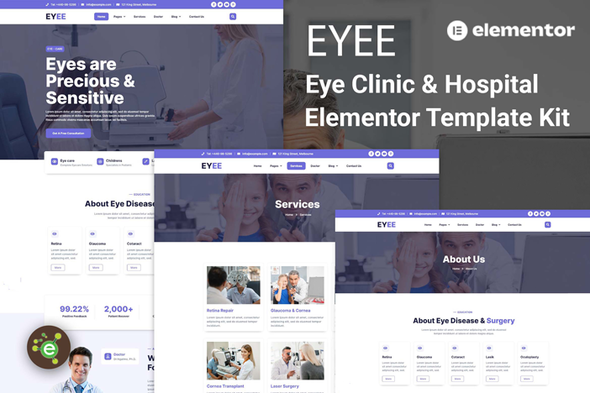
Most eye clinic websites take forever to build. Back-and-forth emails with developers, endless revisions, costs that spiral. Eyee changes that. It’s a complete website foundation you can customize and launch in a single afternoon — no coding, no waiting.
Built specifically for eye care businesses. Eyee includes everything: a homepage that actually shows what you do, pages for LASIK, cataract treatment, eye exams and eyewear, team profiles your patients will actually read, an appointment booking section, testimonials, and a contact page with maps. Not some generic medical template with stock photos of smiling doctors — every element is designed for vision care patients.
What’s Inside This Template Kit
- 10+ pages ready to import — homepage, services, team, appointments, contact, and more
- Appointment booking with contact forms patients can fill out right now
- Service layouts for optometry, ophthalmology, and optical retail
- Doctor profile sections that actually look like doctor profiles
- Testimonial blocks to build trust before they call
- Mobile-responsive — looks good on phones, tablets, desktops
- Works with free Elementor and Elementor Pro
- Drag-and-drop editing — update your hours tomorrow without touching code
Who This Is For
Optometrists starting a new practice. Ophthalmology clinics refreshing their online presence. Optical shops that want patients to actually find them. Pediatric eye specialists. Vision therapy centers. Even freelancers building sites for eye care clients — this kit cuts your dev time significantly while delivering something that looks premium.
Getting Started
Install the free Elementor plugin, upload the template kit from your WordPress dashboard, and start importing pages. Each section is organized logically. Swap in your clinic name, upload your photos, adjust colors to match your brand, publish. Done. Your receptionist can update clinic hours without asking you for help.
Why Eyee Over Other Templates
Generic templates make practices look like every other practice. Eyee is built specifically for eye clinics — the design language, the layout choices, even the color options communicate trust and medical expertise. One payment. Lifetime updates included. As WordPress and Elementor evolve, your site stays current. Commercial license means you own it completely — no recurring subscriptions, no restrictions on client projects. Questions come up? Our support team is there.
Your patients are searching for an eye doctor right now. Make sure they find a website that doesn’t look like it was built in 2009.
Build Your Eye Clinic Website Today
Stop handing money to subscription-based builders that cap your customization at every turn. Get Eyee, own a professional eye clinic website, and launch this week. Instant download.
Only logged in customers who have purchased this product may leave a review.
How to use Kit:
Install and activate the “Template Kit – Import” plugin from Plugins > Add New in WordPress.
Do not unzip.
Go to Template Kit – Import > Upload Template Kit Zip File button.
Before importing a template, ensure the Install Requirements button is clicked to activate required plugins.
For best results, do not import more than one template at a time.
RELATED PRODUCTS

DIVI – Original License | One Time Payment – Exclusive Deal

Elementor Pro 4.1.3 + Elementorism Landing Pages WordPress Plugin

907 5.3.6 – Responsive Multi-Purpose WordPress Theme

Element Pack Pro 9.1.0 – Addon For Elementor

Lifetime Mini Membership





 Mobile Apps
 php script
 How to
Reviews
There are no reviews yet