
Fashly – Fashion & Clothing Designer Elementor Template Kit
- Updated on April 30, 2026
- 100% Original Product & Well Documented
- Unlimited Domain Usage
*Important Note:
The image should not be Part of the template kit. You need to use your own reliable Source.


Original price was: ₹999.00.₹299.00Current price is: ₹299.00.
Your fashion brand deserves a website as sharp as your designs. Fashly gives you 10+ pre-built pages, responsive layouts, and drag-and-drop editing — live in hours, not months.
- Secured & Scanned by Virus total & McAfee.
- Access to Free updates for Lifetime
- All products are Under GPL License (Unlimited Domain Usage)
- We Not Provide any Support For this Product

Lifetime Membership
Access 6700+ Premium WordPress Themes & Plugins, Elementor Templates, Mobile Apps, PHP scripts with Lifetime Updates.
Join Premium MembershipRecently Viewed
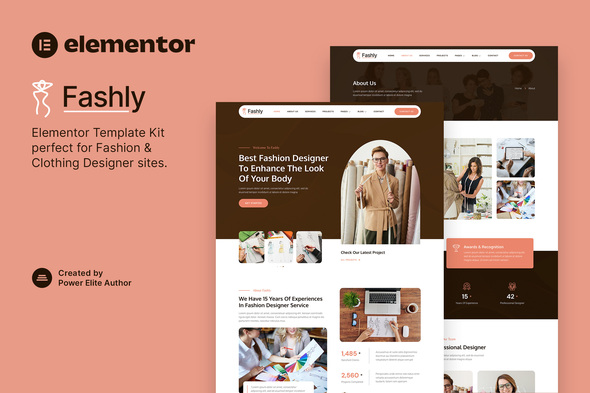
Fashly – Fashion & Clothing Designer Elementor Template Kit for WordPress
You’ve got the eye. Now you need a site that doesn’t let you down. Fashly is an Elementor Template Kit built for fashion designers, clothing brands, boutiques, and stylists who want a professional website — without learning code or waiting three months for a developer.
The kit includes 10+ pre-built pages, mobile-ready layouts, and design elements that actually make sense for clothing businesses. Install it on any WordPress site running Elementor Free (no Pro needed), and your new site is live before dinner.
What’s Inside
This isn’t some stock template with a fashion filter applied. Every section was built for apparel and style businesses. Here’s what you get:
- Homepage with hero slider, featured collections, and lookbook showcase
- About page with team profiles and brand story sections
- Shop and product pages built for clothing catalogs
- Services page for styling, consulting, or bespoke offerings
- Blog layout for fashion tips, trend guides, and behind-the-scenes content
- Contact page with appointment booking and store location
- Fully responsive — clean on mobile, tablet, and desktop
Who Is This For?
Fashly fits if you’re building for yourself or for clients. Fashion designers starting their personal brand. Clothing lines preparing to launch online. Boutiques that need a decent storefront. Stylists and personal shoppers showing off their services. Fashion bloggers who want an editorial look without touching code.
No WordPress expertise needed. If you can drag elements around, you can build with Fashly. The kit includes global styles, color palettes, and typography presets so your whole site stays consistent — no design background required.
How It Works
Set up takes about 10 minutes. Install the free Elementor plugin on your WordPress site, upload the kit file, and import the pages you need. Swap the placeholder images and text with your own. Hit publish.
No coding. No back-and-forth with developers. No waiting for revisions. Edit fonts, swap colors, reorder sections, add new pages — Elementor handles it all visually, in real-time.
Why Fashly?
Three reasons: speed, quality, and price. Custom fashion website designs run $3,000 to $10,000+ and take 6-12 weeks. Fashly delivers the same polished result for a fraction of that, ready in under an hour. Every template was designed by someone who understands the fashion industry — not a generic theme recycled for clothing brands.
You get instant download access, a commercial license covering client projects, lifetime updates, and direct support if you hit a snag. One-time payment. No subscriptions. No hidden fees. Use it on your site, five sites, or client work — the license covers it all.
Get Started Now
Download Fashly and have a professional fashion site live today. Commercial license included. Instant delivery. Yours to keep.
Only logged in customers who have purchased this product may leave a review.
How to use Kit:
Install and activate the “Template Kit – Import” plugin from Plugins > Add New in WordPress.
Do not unzip.
Go to Template Kit – Import > Upload Template Kit Zip File button.
Before importing a template, ensure the Install Requirements button is clicked to activate required plugins.
For best results, do not import more than one template at a time.
RELATED PRODUCTS

DIVI – Original License | One Time Payment – Exclusive Deal

Elementor Pro 4.1.3 + Elementorism Landing Pages WordPress Plugin

907 5.3.6 – Responsive Multi-Purpose WordPress Theme

Element Pack Pro 9.1.0 – Addon For Elementor

Lifetime Mini Membership





 Mobile Apps
 php script
 How to
Reviews
There are no reviews yet