
Fireforce – Firefighter & Fire Department Elementor Template Kit
- Updated on May 1, 2026
- 100% Original Product & Well Documented
- Unlimited Domain Usage
*Important Note:
The image should not be Part of the template kit. You need to use your own reliable Source.


Original price was: ₹999.00.₹299.00Current price is: ₹299.00.
Most fire departments run on shoestring budgets and zero web expertise. Fireforce gives you 12 pages — emergency alerts, station info, volunteer forms, donation buttons — that work in Elementor. No coding, no agency fees. Launch this week.
- Secured & Scanned by Virus total & McAfee.
- Access to Free updates for Lifetime
- All products are Under GPL License (Unlimited Domain Usage)
- We Not Provide any Support For this Product

Lifetime Membership
Access 6700+ Premium WordPress Themes & Plugins, Elementor Templates, Mobile Apps, PHP scripts with Lifetime Updates.
Join Premium MembershipRecently Viewed
Fireforce Elementor Template Kit for Fire Departments
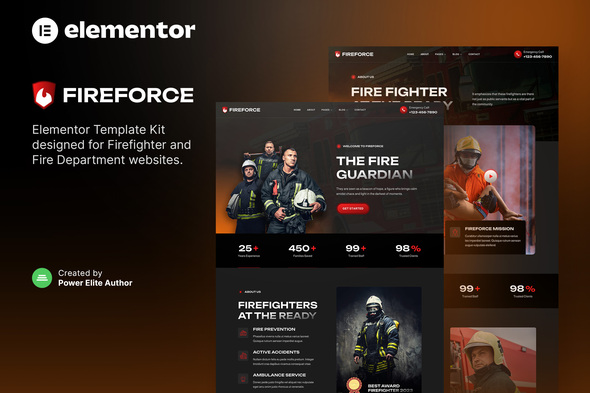
When someone searches for your station at 2am, what do they find? Fireforce is built for that reality — 12 pages designed specifically for fire departments, rescue teams, and public safety organizations. Every template works inside Elementor, the free WordPress page builder, so you can update content without touching code. Emergency alerts, crew profiles, equipment galleries, volunteer applications, donation forms — all ready to drop in and customize.
What’s Inside the Kit
Twelve complete pages covering every section a modern fire department needs:
- Homepage with hero banner, services overview, and call-to-action buttons
- About Us and History pages for station storytelling
- Services hub listing rescue types, prevention programs, and response capabilities
- Equipment and Apparatus showcase with image galleries
- Individual and Crew Member profile templates
- News and Announcements section for community updates
- Volunteer Application form ready for integration
- Donation Page with payment button support
- Contact page with station locations and inquiry form
- 404 Error page matching the design system
The color palette centers on bold fire-engine red with dark backgrounds for contrast. Typography stays clean and readable — critical when every word in an emergency announcement needs to land instantly. The layout adapts to phones, tablets, and desktops automatically.
Who It’s For
Fireforce works for:
- Volunteer departments wanting a professional online presence without agency fees
- Career departments modernizing outdated websites
- Fire prevention organizations sharing safety resources
- Individual firefighters building career portfolios
Whether you run a three-truck rural station or a metropolitan fire bureau, Fireforce scales to match. Start with the homepage, add your history page, build out services — piece by piece or all at once.
How to Build Your Site
Three steps to a live fire department website:
- Install the free Elementor plugin on your WordPress site
- Import the Fireforce template kit with one click
- Replace placeholder text with your station information and publish
No coding. No developer calls. No monthly subscriptions for updates. You own the templates outright after your one-time purchase.
Why Fireforce Works for Public Safety
Running a fire department means wearing dozens of hats. Your website shouldn’t be another burden. You need emergency announcements front and center. You need trust signals — clear station locations, visible response times, team photos. You need working forms for volunteers, donations, and public inquiries without wrestling with third-party plugins.
Fireforce handles all of it. The design commands respect without feeling sterile. Navigation stays simple for stressed families during emergencies. Volunteer and donation forms are built in — no extra plugins required. Commercial license covers fire departments, municipal agencies, and related nonprofits.
Ready to Build Your Fire Department Website?
Stop paying agencies to rebuild what you can create in an afternoon. Fireforce gives you 12 professional pages, lifetime updates, and direct support — one flat payment, no recurring costs. Download instantly, import into Elementor, and launch your station’s new website today.
Only logged in customers who have purchased this product may leave a review.
How to use Kit:
Install and activate the “Template Kit – Import” plugin from Plugins > Add New in WordPress.
Do not unzip.
Go to Template Kit – Import > Upload Template Kit Zip File button.
Before importing a template, ensure the Install Requirements button is clicked to activate required plugins.
For best results, do not import more than one template at a time.
RELATED PRODUCTS

DIVI – Original License | One Time Payment – Exclusive Deal

Elementor Pro 4.1.3 + Elementorism Landing Pages WordPress Plugin

907 5.3.6 – Responsive Multi-Purpose WordPress Theme

Element Pack Pro 9.1.0 – Addon For Elementor

Lifetime Mini Membership





 Mobile Apps
 php script
 How to
Reviews
There are no reviews yet