
Foodie – Fast Food Elementor Template Kit
- Updated on May 2, 2026
- 100% Original Product & Well Documented
- Unlimited Domain Usage
*Important Note:
The image should not be Part of the template kit. You need to use your own reliable Source.


- Coupon "b2g1" has expired.
- Coupon "b2g1" has expired.
- Coupon "b2g1" has expired.
- Coupon "b2g1" has expired.
- Coupon "b2g1" has expired.
Original price was: ₹999.00.₹299.00Current price is: ₹299.00.
Build stunning fast food restaurant websites in hours with this ready-to-use Elementor template kit. Includes 10+ pre-designed pages, commercial license, and lifetime updates. Get instant access now.
- Secured & Scanned by Virus total & McAfee.
- Access to Free updates for Lifetime
- All products are Under GPL License (Unlimited Domain Usage)
- We Not Provide any Support For this Product

Lifetime Membership
Access 6700+ Premium WordPress Themes & Plugins, Elementor Templates, Mobile Apps, PHP scripts with Lifetime Updates.
Join Premium MembershipRecently Viewed
Foodie – Fast Food Elementor Template Kit
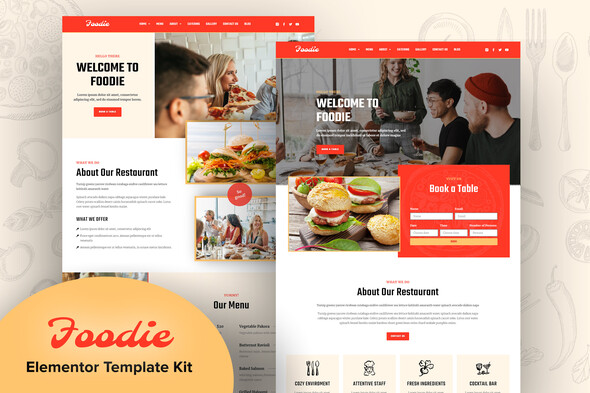
If you’re building websites for fast food restaurants, cafes, or takeaway businesses, you need a solid starting point. Foodie gives you just that — a complete Elementor template kit packed with 10+ pre-designed pages that look professional from day one. No staring at blank screens or wrestling with layout ideas for hours. Just open Elementor, import what you need, and deliver a polished site to your client by end of day.
What You Get With This Template Kit
Foodie comes loaded with everything a fast food or casual dining website needs. Each page is designed with the food industry in mind — think bold food imagery, clear menu sections, easy-to-find locations, and smooth customer journeys from homepage to order.
- 10+ ready-to-use pages: Homepage, menu, about, gallery, contact, and more
- Fully responsive design that looks great on mobile, tablet, and desktop
- Clean, organized sections you can mix and match
- Compatible with Elementor and the free Hello Elementor theme
- No coding required — drag, drop, and customize
Who This Template Kit Is For
Freelance designers and agencies will save the most time here. Instead of building every fast food website from scratch, you import Foodie, swap in the client’s branding, and you’re done. Small business owners who want a professional-looking site without hiring a developer will also find this kit incredibly helpful. If you know your way around WordPress and Elementor, you’ll be up and running in under an hour.
How to Use Foodie
Getting started is straightforward. Install the free Hello Elementor theme, make sure Elementor is active, then import the template kit directly from your WordPress dashboard. Browse the pre-made sections, add them to your pages, and replace the placeholder content with your client’s real information. Every section is designed to work together, so you won’t end up with a mismatched look. Change colors, fonts, and images to match the brand — it’s all built on Elementor’s native widgets, so customization feels intuitive.
Why Buy This Template Kit
Time is money. Every hour you spend creating layout concepts is an hour you’re not billing. Foodie cuts that process down significantly. You get a professional, industry-specific design that clients in the food business actually want — not a generic template that feels out of place. One-time payment gets you instant download, a commercial license so you can use it for client projects without restrictions, and lifetime free updates. If anything changes in Elementor or WordPress, you’ll always have the latest version. Plus, you get lifetime support if you run into questions.
Ready to Get Started?
Download the Foodie Fast Food Elementor Template Kit today and start building fast food websites that impress clients. This is the best value template kit for food-related client projects — affordable, ready-to-use, and designed to save you serious time. Buy it once, use it for every fast food or restaurant website you build.
Only logged in customers who have purchased this product may leave a review.
How to use Kit:
Install and activate the “Template Kit – Import” plugin from Plugins > Add New in WordPress.
Do not unzip.
Go to Template Kit – Import > Upload Template Kit Zip File button.
Before importing a template, ensure the Install Requirements button is clicked to activate required plugins.
For best results, do not import more than one template at a time.
RELATED PRODUCTS

DIVI – Original License | One Time Payment – Exclusive Deal

Elementor Pro 4.1.3 + Elementorism Landing Pages WordPress Plugin

907 5.3.6 – Responsive Multi-Purpose WordPress Theme

Element Pack Pro 9.1.0 – Addon For Elementor

Lifetime Mini Membership





 Mobile Apps
 php script
 How to
Reviews
There are no reviews yet