
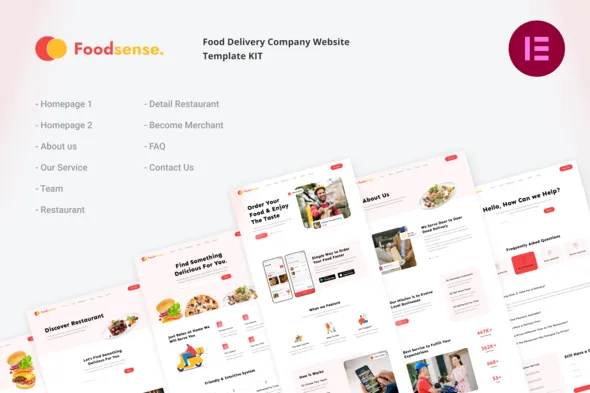
FoodSense | Food Delivery Elementor Template Kit
- Updated on May 2, 2026
- 100% Original Product & Well Documented
- Unlimited Domain Usage
*Important Note:
The image should not be Part of the template kit. You need to use your own reliable Source.


Original price was: ₹999.00.₹299.00Current price is: ₹299.00.
Launch your food delivery website in hours, not weeks. FoodSense gives you a polished, ready-to-use Elementor template kit with professional layouts — no coding required. Get instant access now.
- Secured & Scanned by Virus total & McAfee.
- Access to Free updates for Lifetime
- All products are Under GPL License (Unlimited Domain Usage)
- We Not Provide any Support For this Product

Lifetime Membership
Access 6700+ Premium WordPress Themes & Plugins, Elementor Templates, Mobile Apps, PHP scripts with Lifetime Updates.
Join Premium MembershipRecently Viewed
FoodSense Elementor Template Kit for Food & Grocery Delivery
Building a food delivery website shouldn’t take months of development work. FoodSense is a complete Elementor template kit that lets you launch a professional, conversion-focused site for your food or grocery delivery service — using drag-and-drop simplicity. No coding skills needed. No expensive developers required. Just pick your layouts, customize your colors and branding, and go live today.
What You Get with FoodSense
This isn’t a basic page template. FoodSense comes packed with carefully designed sections for restaurant listings, menu displays, order tracking, delivery zones, testimonial sections, and call-to-action blocks that turn visitors into paying customers. Every element is built for the food delivery niche — from hero sections that showcase your brand to footer layouts that display contact info and app download links.
Key Features
- 15+ pre-built pages and sections optimized for food delivery conversion
- Fully responsive design that looks stunning on mobile, tablet, and desktop
- Compatible with free Elementor and Elementor Pro widgets
- Customizable color schemes, typography, and imagery
- Restaurant profile templates with menu and pricing layouts
- Order and checkout page designs built for food services
- Fast-loading, SEO-friendly structure for better Google rankings
- Lifetime updates included — always get the latest version free
Who It’s Built For
FoodSense works perfectly for food delivery startups, local grocery stores launching online ordering, restaurant aggregators, meal prep services, and anyone needing a professional web presence fast. Whether you’re a restaurant owner tired of expensive web developers or a startup founder building your MVP, this template kit saves you weeks of work.
How to Use It
Getting started takes minutes. Install the free Elementor plugin on your WordPress site, upload the FoodSense template kit, and start building. All layouts are drag-and-drop — swap images, change text, adjust spacing, and publish. You don’t need to touch a single line of code. The kit includes starter templates for homepages, about pages, menu listings, contact forms, and more. Replace placeholder content with your own, and your food delivery site is ready to accept orders.
Why Choose FoodSense Over Other Options
Generic website templates make you fight the design to fit your needs. FoodSense starts with food delivery in mind — every section, every layout, every button placement serves one purpose: getting visitors to order food. Compare that to hiring a developer ($3,000-$10,000 average) or buying generic templates that require extensive customization. With FoodSense, you get a commercial license included, lifetime support, and instant download. Pay once, use forever, and launch your food delivery website this week.
Ready to Get Started?
Stop paying ongoing fees for website builders or waiting months for custom development. Download FoodSense today and have a professional food delivery website live within hours. One-time payment, commercial license included, lifetime updates, and dedicated support whenever you need help. Buy FoodSense now and start accepting orders.
Only logged in customers who have purchased this product may leave a review.
How to use Kit:
Install and activate the “Template Kit – Import” plugin from Plugins > Add New in WordPress.
Do not unzip.
Go to Template Kit – Import > Upload Template Kit Zip File button.
Before importing a template, ensure the Install Requirements button is clicked to activate required plugins.
For best results, do not import more than one template at a time.
RELATED PRODUCTS

DIVI – Original License | One Time Payment – Exclusive Deal

Elementor Pro 4.1.3 + Elementorism Landing Pages WordPress Plugin

907 5.3.6 – Responsive Multi-Purpose WordPress Theme

Element Pack Pro 9.1.0 – Addon For Elementor

Lifetime Mini Membership





 Mobile Apps
 php script
 How to
Reviews
There are no reviews yet