
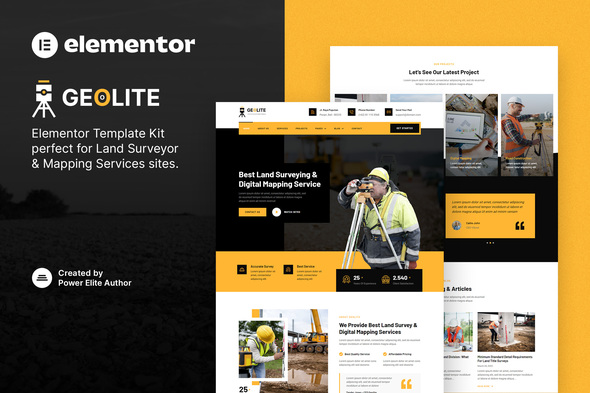
Geolite – Land Surveying & Digital Mapping Elementor Template Kit
- Updated on April 29, 2026
- 100% Original Product & Well Documented
- Unlimited Domain Usage
*Important Note:
The image should not be Part of the template kit. You need to use your own reliable Source.


- Coupon "b2g1" has expired.
- Coupon "b2g1" has expired.
- Coupon "b2g1" has expired.
- Coupon "b2g1" has expired.
- Coupon "b2g1" has expired.
Original price was: ₹999.00.₹299.00Current price is: ₹299.00.
Launch a land surveying website in minutes — no coding needed. Eight pre-built pages, clean designs, and client-ready contact forms. Your site could be live today.
- Secured & Scanned by Virus total & McAfee.
- Access to Free updates for Lifetime
- All products are Under GPL License (Unlimited Domain Usage)
- We Not Provide any Support For this Product

Lifetime Membership
Access 6700+ Premium WordPress Themes & Plugins, Elementor Templates, Mobile Apps, PHP scripts with Lifetime Updates.
Join Premium MembershipRecently Viewed
Geolite Elementor Template Kit — Land Surveying Website Design Made Simple
You know your craft. Centimeter-accurate measurements, precise digital maps, data that keeps construction projects moving. But when it comes to your website, you’re not a designer — and that’s exactly why we built Geolite. This ready-made Elementor Template Kit gets you a professional land surveying website without writing code or waiting weeks for a developer.
What Is Geolite?
Geolite is a premium Elementor Template Kit built for digital land surveying, mapping services, and construction businesses. Eight complete pages: a homepage that earns trust, service pages that explain what you do, project portfolios, team profiles, and contact forms that actually get filled out. The design communicates precision and reliability — the same qualities clients expect from your fieldwork.
Key Features That Set Geolite Apart
This isn’t a generic template with stock photos of theodolites. Every section was built for land surveying professionals:
- 8 complete page templates: Homepage, About, Services (3 variations), Projects, Team, FAQ, and Contact
- Fully responsive design — looks sharp on phones, tablets, and desktops
- Drag-and-drop editing — change text, swap images, adjust colors without touching code
- Fast-loading pages optimized for search engines
- Works with free Elementor and WordPress — no Pro version needed
Who Is Geolite For?
Land surveying companies. Digital mapping specialists. GIS professionals. Construction firms. Independent surveyors who need a professional online presence without the agency invoice. Solo operators building their first website. Established firms giving their digital image a refresh. Works for freelancers offering drone mapping, topographic surveys, or boundary consultations too.
How to Use Geolite
Set up takes under 30 minutes. Install the free Elementor plugin on your WordPress site, upload the Geolite template kit, and start editing. Pick the pages you need, swap in your services and portfolio images, and publish. No development knowledge required. No monthly fees. Just a clean, professional website that shows clients you’re serious about your work.
Why Buy Geolite Instead of Building from Scratch?
Custom websites from agencies run $3,000 to $10,000 — and that excludes ongoing maintenance costs. Geolite delivers that same polished look for a fraction of the price. You’re not just buying a template; you’re buying back the hours you’d spend designing, revising, and troubleshooting. Lifetime updates and a commercial license are included, so your site stays current without extra charges. If you get stuck, support is available.
Ready to Get Started?
Somewhere right now, a potential client is searching for a surveyor. Geolite gives you a professional website that lets you compete — affordable, quick to launch, and built for your industry. Download and have your site live this week.
Only logged in customers who have purchased this product may leave a review.
How to use Kit:
Install and activate the “Template Kit – Import” plugin from Plugins > Add New in WordPress.
Do not unzip.
Go to Template Kit – Import > Upload Template Kit Zip File button.
Before importing a template, ensure the Install Requirements button is clicked to activate required plugins.
For best results, do not import more than one template at a time.
RELATED PRODUCTS

DIVI – Original License | One Time Payment – Exclusive Deal

Elementor Pro 4.1.3 + Elementorism Landing Pages WordPress Plugin

907 5.3.6 – Responsive Multi-Purpose WordPress Theme

Element Pack Pro 9.1.0 – Addon For Elementor

Lifetime Mini Membership





 Mobile Apps
 php script
 How to
Reviews
There are no reviews yet