
Gymplus – Gym & Fitness Elementor Template Kit
- Updated on April 29, 2026
- 100% Original Product & Well Documented
- Unlimited Domain Usage
*Important Note:
The image should not be Part of the template kit. You need to use your own reliable Source.


Original price was: ₹999.00.₹299.00Current price is: ₹299.00.
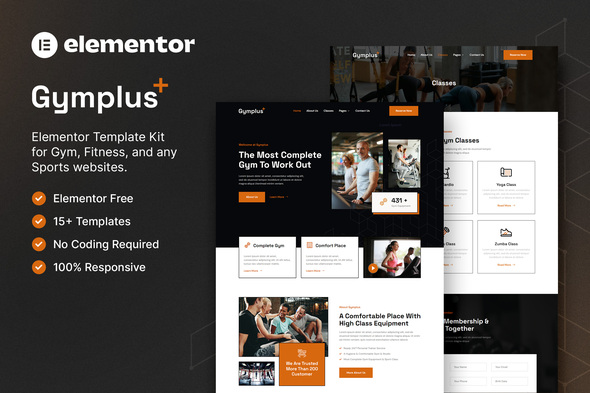
Gymplus gives you 10+ pages built specifically for gyms and trainers. Class schedules, trainer profiles, pricing tables, contact forms — everything’s ready to drop into your WordPress site. No coding required.
- Secured & Scanned by Virus total & McAfee.
- Access to Free updates for Lifetime
- All products are Under GPL License (Unlimited Domain Usage)
- We Not Provide any Support For this Product

Lifetime Membership
Access 6700+ Premium WordPress Themes & Plugins, Elementor Templates, Mobile Apps, PHP scripts with Lifetime Updates.
Join Premium MembershipRecently Viewed
Gymplus Elementor Template Kit – Build Your Fitness Website in Hours
Most gym owners spend months tinkering with website builders or hundreds hiring a developer. Gymplus cuts that down to an afternoon. This is a complete Elementor Template Kit built for fitness businesses — trainers, gym owners, studios, anyone who needs a professional site without touching code.
You get 10+ pages: a homepage that actually looks good, class schedules your members can actually read, trainer bios that sound human, and pricing tables that don’t make people click away. Plus contact forms, about pages, testimonials, and FAQ sections. All pre-designed, all responsive, all ready to customize in Elementor’s drag-and-drop builder.
What You Get With Gymplus
Here’s the rundown: homepage, classes page, trainer profiles, pricing plans, contact form, about section, testimonials, and FAQ. That’s your entire website mapped out. Each page is designed to convert — clean layouts, readable typography, calls-to-action that don’t scream at visitors. Swap colors to match your brand, drop in your photos, update the text. Done.
The templates resize automatically. Phone, tablet, desktop — everything looks clean. No extra work needed on your end.
Who It’s For
- Gym and fitness center owners who need a site up fast without sacrificing quality
- Personal trainers building credibility — because a serious website signals serious coaching
- Fitness studios running multiple class schedules and membership tiers
- Freelance developers working with fitness clients on tight deadlines
- Health coaches establishing a professional online presence
Key Features at a Glance
- 10+ pre-built pages covering homepage, classes, trainers, pricing, and more
- Drag-and-drop editing in Elementor — zero coding knowledge required
- Responsive designs that look good on every device
- Ready-made sections for testimonials, schedules, and trainer profiles
- Conversion-friendly layouts with clear calls-to-action
- Works with the free Elementor plugin
How To Use Gymplus
Straightforward process. Install Elementor on your WordPress site. Import the kit from your dashboard. Browse the pages, pick what you need, click to insert. Replace the placeholder text with your own, upload your photos, adjust colors if you want. The whole thing takes a few hours — not weeks. You can use the kit as a complete site or mix sections across different pages.
Why Buy This Template Kit
Here’s the thing: most template kits are either too bare-bones (you end up rebuilding half of it) or so elaborate you spend more time learning the system than actually launching. Gymplus sits in the middle — professional enough to impress, simple enough to customize in an afternoon.
One payment. Lifetime updates included. Commercial license so you can use it for client work. Download it today, have something live by end of week.
Ready to Get Started?
Gymplus gives you the pages, the design, and the tools to launch a gym website that actually represents your business. No subscriptions. No monthly fees. Download now and stop delaying your online presence.
Only logged in customers who have purchased this product may leave a review.
How to use Kit:
Install and activate the “Template Kit – Import” plugin from Plugins > Add New in WordPress.
Do not unzip.
Go to Template Kit – Import > Upload Template Kit Zip File button.
Before importing a template, ensure the Install Requirements button is clicked to activate required plugins.
For best results, do not import more than one template at a time.
RELATED PRODUCTS

DIVI – Original License | One Time Payment – Exclusive Deal

Elementor Pro 4.1.3 + Elementorism Landing Pages WordPress Plugin

907 5.3.6 – Responsive Multi-Purpose WordPress Theme

Element Pack Pro 9.1.0 – Addon For Elementor

Lifetime Mini Membership





 Mobile Apps
 php script
 How to
Reviews
There are no reviews yet