
HoneyBae – Baby Shop Ecommerce Elementor Pro Template Kit
- Updated on May 3, 2026
- 100% Original Product & Well Documented
- Unlimited Domain Usage
*Important Note:
The image should not be Part of the template kit. You need to use your own reliable Source.


Original price was: ₹999.00.₹299.00Current price is: ₹299.00.
Turn your baby shop idea into a real website tonight. HoneyBae gives you 12+ pre-built pages, WooCommerce integration, commercial license, and lifetime updates — all for a one-time price. Skip the developer, launch faster.
- Secured & Scanned by Virus total & McAfee.
- Access to Free updates for Lifetime
- All products are Under GPL License (Unlimited Domain Usage)
- We Not Provide any Support For this Product

Lifetime Membership
Access 6700+ Premium WordPress Themes & Plugins, Elementor Templates, Mobile Apps, PHP scripts with Lifetime Updates.
Join Premium MembershipRecently Viewed
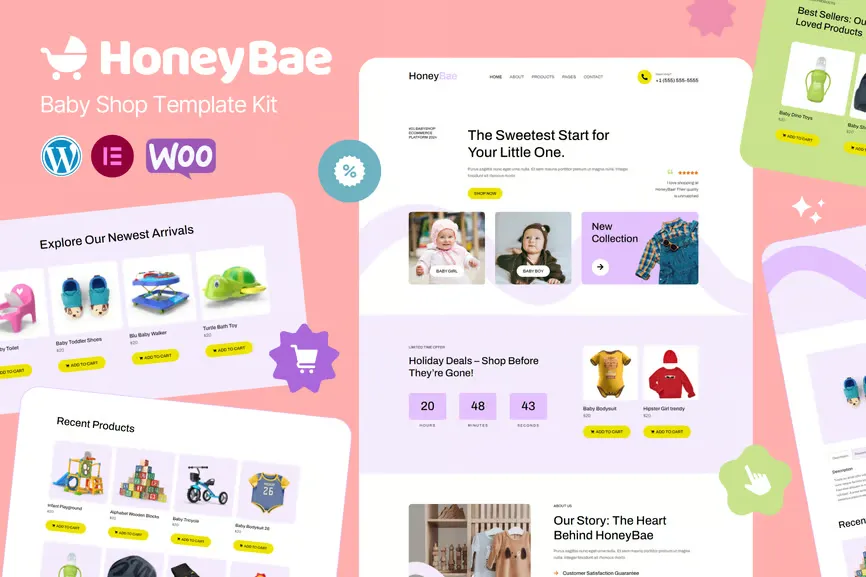
HoneyBae: The Baby Shop Template That Ships Today
Most people who want to sell baby products online spend weeks waiting on developers or thousands on agencies. HoneyBae cuts through that. It’s a complete Elementor template kit with WordPress and WooCommerce built in — no coding, no back-and-forth emails, no scope creep. Twelve pages are ready to go. You can have a live store before dinner.
What’s Inside the Kit
Not just a homepage with a pretty banner. Every page your shop actually needs.
- Homepage with hero section, product showcases, and trust signals
- Shop and archive pages that display products in clean, organized grids
- Single product pages with image galleries, pricing blocks, and add-to-cart flows
- About page to tell your story
- Blog layout for parenting content that pulls in organic search traffic
- Contact page with working form integration
All of it hooks into WooCommerce out of the box. Product grids, cart, checkout — everything functions immediately after you hit import. No hunting for extra plugins or pasting snippets from forums.
Who It’s For
This works for anyone selling to parents and expecting families.
- First-time store owners starting with baby clothing, toys, or nursery gear
- Small businesses moving from Instagram or Etsy to a proper branded site
- Freelancers who need to ship a client project by end of week
- Existing WordPress users looking for a clean redesign without starting over
Swaddles, strollers, baby food, children’s books, nursery furniture — the neutral color palette and soft typography adapt to whatever you’re selling. No niche is too specific.
How It Works
Download from Elementor, import the pages you want, drop in your own photos and text, publish. The drag-and-drop editor means you’re building in real time — no tab-switching between an editor and a preview. You see the final result as you create it.
The learning curve is gentle. If you’ve managed a Facebook page or designed something in Canva, you can handle this. No HTML knowledge required. No CSS. No developer on speed dial needed. Change colors, fonts, layouts — whatever fits your brand.
The Price Reality
A custom baby shop website usually runs $2,000-$5,000 and takes 4-8 weeks minimum. HoneyBae delivers the same outcome — a modern, conversion-focused WooCommerce store — for a single one-time payment. Download, install, publish. Same day.
Your purchase includes:
- Commercial license — build client sites or your own store, no restrictions
- Lifetime updates — the template stays compatible as WordPress and Elementor release new versions
- One-time payment — no subscriptions, no monthly fees
- Lifetime support — someone to help if you get stuck
The design itself is conversion-minded. Layouts guide visitors toward your products. Typography reads well on phones. The warm color scheme builds the kind of trust that makes parents click “add to cart” instead of hitting back.
Start Building Now
The baby product market keeps growing. A branded store sets you apart from every other seller using the same marketplace template. HoneyBae gives you the foundation to compete with established shops — without the agency price tag. Download the kit, open Elementor, and your site can be live tonight.
Only logged in customers who have purchased this product may leave a review.
How to use Kit:
Install and activate the “Template Kit – Import” plugin from Plugins > Add New in WordPress.
Do not unzip.
Go to Template Kit – Import > Upload Template Kit Zip File button.
Before importing a template, ensure the Install Requirements button is clicked to activate required plugins.
For best results, do not import more than one template at a time.
RELATED PRODUCTS

DIVI – Original License | One Time Payment – Exclusive Deal

Elementor Pro 4.1.3 + Elementorism Landing Pages WordPress Plugin

907 5.3.6 – Responsive Multi-Purpose WordPress Theme

Element Pack Pro 9.1.0 – Addon For Elementor

Lifetime Mini Membership





 Mobile Apps
 php script
 How to
Reviews
There are no reviews yet