
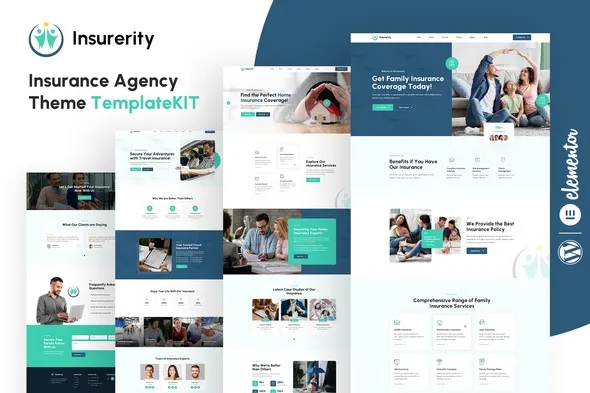
Insurerity – Insurance Agency Elementor Template Kit
- Updated on May 2, 2026
- 100% Original Product & Well Documented
- Unlimited Domain Usage
*Important Note:
The image should not be Part of the template kit. You need to use your own reliable Source.


- Coupon "b2g1" has expired.
- Coupon "b2g1" has expired.
- Coupon "b2g1" has expired.
- Coupon "b2g1" has expired.
- Coupon "b2g1" has expired.
Original price was: ₹999.00.₹299.00Current price is: ₹299.00.
Turn visitors into clients with a polished insurance website — no coding required. Insurerity gives you 8 ready-to-use pages, a clean design system, and Elementor’s drag-and-drop builder. Download now and have your agency site live in days, not months.
- Secured & Scanned by Virus total & McAfee.
- Access to Free updates for Lifetime
- All products are Under GPL License (Unlimited Domain Usage)
- We Not Provide any Support For this Product

Lifetime Membership
Access 6700+ Premium WordPress Themes & Plugins, Elementor Templates, Mobile Apps, PHP scripts with Lifetime Updates.
Join Premium MembershipRecently Viewed
Insurerity: Professional Insurance Website Template Kit
Your insurance agency needs a website that actually books calls. Not one that sits there looking pretty while leads bounce to a competitor. Insurerity is built for insurance pros who want a polished, trust-building online presence — without touching code or waiting three months for a developer.
Eight pre-built pages. Home, about, services, testimonials, quote forms, contact. Everything your clients expect to see when they’re deciding whether to trust you with their coverage. The design is clean and professional — the kind of site that says “established” and “legitimate” instead of “side project.”
What’s Included
No blank canvas. No staring at a white screen wondering where to start. This kit gives you the whole foundation.
- 8 Pages: Home, About Us, Services, Service Details, Testimonials, Get a Quote, Contact, and Team
- Ready-to-use sections: Hero banners, service grids, testimonial sliders, call-to-action blocks, FAQ areas
- Insurance-specific: Quote forms, coverage comparison tables, agent profiles, trust indicators
- Mobile-ready: Looks sharp on phones, tablets, and desktops
- Clean typography: Fonts and spacing that make your content easy to read and your brand look established
Who It’s For
Insurerity fits if you’re:
- An independent agent building your personal brand from scratch
- A small agency tired of your outdated site hurting your credibility
- An insurance broker juggling auto, home, life, and business coverage
- A financial advisor adding insurance services to your practice
- A new agency that needs to look established fast
Technical stuff holding you back? This removes that wall. Elementor’s free version handles everything. You just customize and launch.
Setup in Under an Hour
Once WordPress and Elementor are running, import the kit through Elementor’s templates library. Pick your pages, swap in your info, update the colors to match your brand. Add your team photos. Customize the quote forms however you collect leads.
Built with native Elementor widgets, so you don’t need extra plugins. Growth-friendly — if you want to add booking or advanced forms later, the structure handles it.
Why It Works for Insurance
Insurance is a trust business. When someone lands on your site, they decide in seconds whether you seem legitimate. A clean, modern site tells them you’re established. An outdated one sends them elsewhere.
Insurerity gets you there without custom development costs. Commercial license included — use it for your own agency or client projects. One payment, lifetime access.
Get Your Site Live
Your website is either winning you clients or losing them. Insurerity gives you the foundation to actually convert visitors — with the tools you already know. Download, customize in Elementor, and have your new insurance site live within days.
Only logged in customers who have purchased this product may leave a review.
How to use Kit:
Install and activate the “Template Kit – Import” plugin from Plugins > Add New in WordPress.
Do not unzip.
Go to Template Kit – Import > Upload Template Kit Zip File button.
Before importing a template, ensure the Install Requirements button is clicked to activate required plugins.
For best results, do not import more than one template at a time.
RELATED PRODUCTS

DIVI – Original License | One Time Payment – Exclusive Deal

Elementor Pro 4.1.3 + Elementorism Landing Pages WordPress Plugin

907 5.3.6 – Responsive Multi-Purpose WordPress Theme

Element Pack Pro 9.1.0 – Addon For Elementor

Lifetime Mini Membership





 Mobile Apps
 php script
 How to

Reviews
There are no reviews yet