
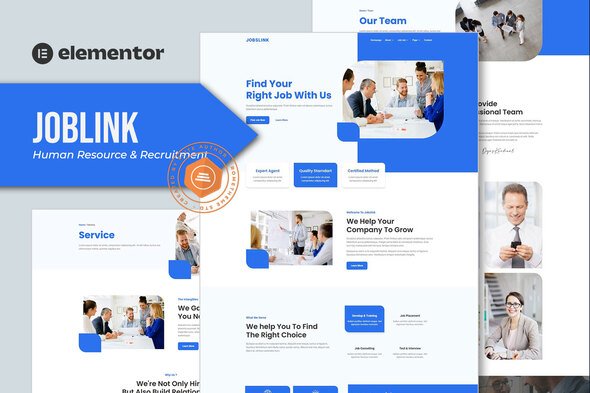
Jobslink – Human Resource & Recruitment Agency Elementor Template Kit
- Updated on April 29, 2026
- 100% Original Product & Well Documented
- Unlimited Domain Usage
*Important Note:
The image should not be Part of the template kit. You need to use your own reliable Source.


Original price was: ₹999.00.₹299.00Current price is: ₹299.00.
Launch a recruitment agency website that actually looks like you hired a pro. Jobslink gives you 12 pre-built pages, one-click import, and zero monthly fees.
- Secured & Scanned by Virus total & McAfee.
- Access to Free updates for Lifetime
- All products are Under GPL License (Unlimited Domain Usage)
- We Not Provide any Support For this Product

Lifetime Membership
Access 6700+ Premium WordPress Themes & Plugins, Elementor Templates, Mobile Apps, PHP scripts with Lifetime Updates.
Join Premium MembershipRecently Viewed
Jobslink – Human Resource & Recruitment Agency Elementor Template Kit
Most recruitment agencies launch their website and immediately wish they’d done something differently. Maybe the colors look dated, or the job board feels clunky, or it just doesn’t convey the professionalism you’ve worked so hard to build. Jobslink solves this by giving you a head start — a professionally designed foundation you can customize in an afternoon, not a blank page staring back at you.
What Is Jobslink?
This is a template kit built for HR agencies, staffing firms, and recruitment companies that want to look established from day one. It includes complete page layouts for job listings, candidate profiles, service pages, team showcases, and contact forms. You don’t need to hire a developer. You don’t need to learn code. You need Elementor (the free version works), and you need this kit.
The package covers: your homepage, about page, services section, job listings, blog, and contact pages. Everything slots into Elementor’s drag-and-drop builder — move sections around, swap images, change fonts. Your site, your rules.
Key Features
Here’s the full breakdown:
- Homepage with hero section, service highlights, and client testimonials — the three things visitors check first
- Job listing page plus individual job detail templates (post once, display beautifully everywhere)
- Clean candidate registration and profile layouts — makes your intake process feel professional
- Services page and pricing section — useful if you offer different staffing tiers
- Team showcase with bio cards — helps potential clients put faces to names
- Blog template for career advice and industry insights — builds credibility without much effort
- Contact forms set up for CRM integration — no losing leads to forgotten email threads
Who Is It For?
Small to mid-size recruitment agencies getting started online. HR consultants building their personal brand. Staffing firms tired of clunky job boards. Even corporate HR departments setting up internal career pages. And if you build websites for recruitment clients, this cuts your project time significantly — import, customize, deliver.
How To Use It
Three steps. First, install Elementor. Second, import the template kit from Elementor’s library. Third, replace the placeholder content with your own — logo, colors, text, images.
Most people spend 2-3 hours on the initial setup, then a few more tweaking colors and adding their actual job listings. Documentation walks you through everything. If you get stuck, support is available.
Why Buy This Template Kit?
You get a polished site without the designer invoice or months of back-and-forth revisions. One payment covers everything — license, updates, support. No subscriptions eating into your budget year after year. Jobslink adapts automatically whenever WordPress or Elementor release updates.
Stop spending your budget on developers who disappear. Get Jobslink now and have a live, professional site this week. Instant access. Commercial license. No subscriptions.
Only logged in customers who have purchased this product may leave a review.
How to use Kit:
Install and activate the “Template Kit – Import” plugin from Plugins > Add New in WordPress.
Do not unzip.
Go to Template Kit – Import > Upload Template Kit Zip File button.
Before importing a template, ensure the Install Requirements button is clicked to activate required plugins.
For best results, do not import more than one template at a time.
RELATED PRODUCTS

DIVI – Original License | One Time Payment – Exclusive Deal

Elementor Pro 4.1.3 + Elementorism Landing Pages WordPress Plugin

907 5.3.6 – Responsive Multi-Purpose WordPress Theme

Element Pack Pro 9.1.0 – Addon For Elementor

Lifetime Mini Membership





 Mobile Apps
 php script
 How to
Reviews
There are no reviews yet