
Katy – Kids Birthday Party Planner & Invitation Elementor Template Kit
- Updated on April 28, 2026
- 100% Original Product & Well Documented
- Unlimited Domain Usage
*Important Note:
The image should not be Part of the template kit. You need to use your own reliable Source.


Original price was: ₹999.00.₹299.00Current price is: ₹299.00.
Build a kids birthday party website in minutes with this Elementor template kit. Includes party planner layouts, invitation designs, and playful elements. Commercial license included.
- Secured & Scanned by Virus total & McAfee.
- Access to Free updates for Lifetime
- All products are Under GPL License (Unlimited Domain Usage)
- We Not Provide any Support For this Product

Lifetime Membership
Access 6700+ Premium WordPress Themes & Plugins, Elementor Templates, Mobile Apps, PHP scripts with Lifetime Updates.
Join Premium MembershipRecently Viewed
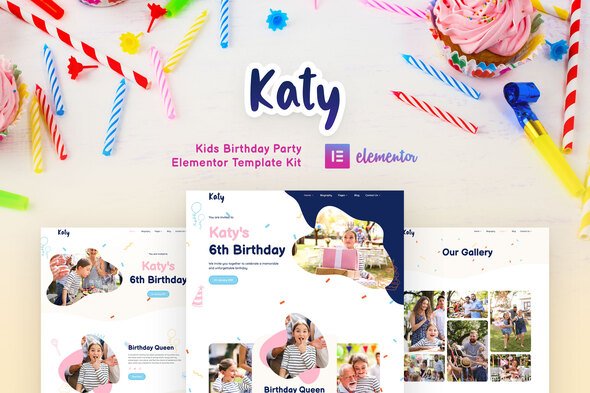
Kids Birthday Party Planner & Invitation Template Kit
Most parents spend weeks waiting on web designers. You don’t have to. Katy is a complete Elementor Template Kit that gets you from zero to live site today. No coding, no design degree, no problem.
It’s built for birthday party planners, event coordinators, and invitation designers who want a site that actually looks good without hiring a pro. The color palette is bright without being eye-watering, and the layouts keep everything easy to find.
What’s Included
Everything you need for a complete kids’ party website:
- Homepage with hero section, service highlights, and clear call-to-action
- Service pages with pricing tiers and feature breakdowns
- Invitation gallery and design showcase layouts
- About page for your team or business story
- Contact section with booking forms
- Conversion-focused sections throughout
Works With Free Elementor
No Pro version needed for most features. Tweak colors, fonts, and images right inside the editor. Purple and teal not your thing? Swap them for your brand colors in seconds. Swap stock photos for your actual party shots. Update pricing without touching code.
Responsive design means it looks solid on phones, tablets, and desktops. Parents mostly browse on their phones while planning — your site needs to handle that without looking janky.
Who Is This For?
Katy works well for:
- New party planners building an online presence
- Event coordinators who need a real website without agency prices
- Freelancers creating client sites quickly
- Party supply stores branching into digital services
- Children’s entertainers (clowns, magicians, face painters, you name it)
- Designers putting together invitation portfolios
Starting fresh or refreshing an old site — either way, this saves you time.
Instant Download & Commercial License
Download immediately after purchase. Use it for unlimited client projects or your own business. The commercial license means you can sell sites built with this kit — no strings.
Documentation walks you through importing and customizing in WordPress. Fairly straightforward, but if you hit a snag, support is available.
Why Not Custom Design?
Custom web design costs thousands and takes months. Katy gives you professional results without the wait or the price tag:
- Consistent, polished design across every page
- Layouts that actually fit the kids’ services niche
- Mobile-friendly templates (because everyone’s on their phone)
- One-time payment — no subscriptions or monthly fees
- Free lifetime updates
Skip the generic website builders and overpriced templates that don’t fit your niche. Katy was designed specifically for kids’ birthday parties.
Get Started
Download now, install in minutes, and start booking parties faster. Your professional kids’ party website is ready when you are.
Only logged in customers who have purchased this product may leave a review.
How to use Kit:
Install and activate the “Template Kit – Import” plugin from Plugins > Add New in WordPress.
Do not unzip.
Go to Template Kit – Import > Upload Template Kit Zip File button.
Before importing a template, ensure the Install Requirements button is clicked to activate required plugins.
For best results, do not import more than one template at a time.
RELATED PRODUCTS

DIVI – Original License | One Time Payment – Exclusive Deal

Elementor Pro 4.1.3 + Elementorism Landing Pages WordPress Plugin

907 5.3.6 – Responsive Multi-Purpose WordPress Theme

Element Pack Pro 9.1.0 – Addon For Elementor

Lifetime Mini Membership





 Mobile Apps
 php script
 How to
Reviews
There are no reviews yet