
KeyGenie – Locksmith & Key Maker Service Elementor Template Kit
- Updated on April 30, 2026
- 100% Original Product & Well Documented
- Unlimited Domain Usage
*Important Note:
The image should not be Part of the template kit. You need to use your own reliable Source.


- Coupon "b2g1" has expired.
- Coupon "b2g1" has expired.
- Coupon "b2g1" has expired.
- Coupon "b2g1" has expired.
- Coupon "b2g1" has expired.
Original price was: ₹999.00.₹299.00Current price is: ₹299.00.
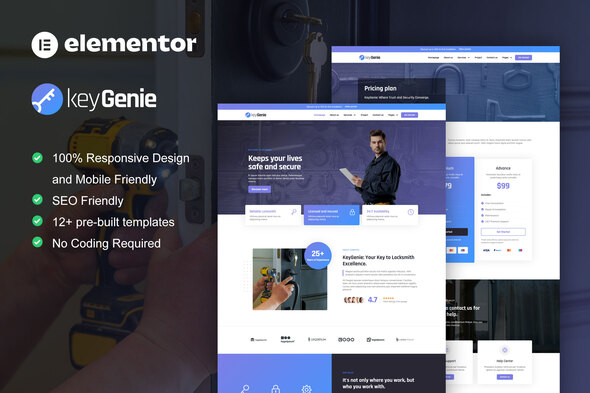
Your locksmith website, built in an afternoon. KeyGenie gives you a professional, ready-to-use Elementor template kit with instant download, commercial license, and lifetime updates.
- Secured & Scanned by Virus total & McAfee.
- Access to Free updates for Lifetime
- All products are Under GPL License (Unlimited Domain Usage)
- We Not Provide any Support For this Product

Lifetime Membership
Access 6700+ Premium WordPress Themes & Plugins, Elementor Templates, Mobile Apps, PHP scripts with Lifetime Updates.
Join Premium MembershipRecently Viewed
Build Your Locksmith Website Without Hiring a Designer
Every hour you spend wrestling with website builders is an hour away from your actual business. KeyGenie changes that. This Elementor Template Kit gives locksmiths and key makers a complete, professional website in a fraction of the time it would take to start from scratch. No coding required. No expensive designer fees. Just open Elementor, import the templates, and launch.
What You Get With KeyGenie
This kit includes everything you need to create a complete locksmith service website. Each template is fully editable in Elementor’s drag-and-drop builder — no code, no complications.
- Homepage — Hero section with your services, emergency call-out banner, and trust-building elements
- About Us — Showcase your team, certifications, and years of experience
- Services — Dedicated sections for emergency lockout, key cutting, lock replacement, and automotive services
- Service Areas — Show which neighborhoods and cities you cover
- Contact Page — Phone number, email, business hours, and a working contact form
- Pricing — Transparent rates for common services to build customer trust
- Testimonials — Social proof section for reviews from happy customers
Who It’s Built For
KeyGenie works for anyone who needs a locksmith or key maker website fast. Individual locksmiths running their own business get a polished online presence without spending weeks on design. Small locksmith companies can present multiple services and service areas professionally. Web developers building sites for locksmith clients can deliver quality work in hours instead of days.
Ready to Use on Any Device
Your clients will find your site on phones more often than desktops. Every page in KeyGenie looks sharp on mobile devices, tablets, and desktop screens. The layouts adjust automatically, so you never have to worry about broken designs on smaller screens.
Simple Setup, No Technical Skills Required
You do not need to be a web developer to use KeyGenie. If you can use drag-and-drop tools, you can build your website with this kit. Import the templates into Elementor, replace the placeholder text with your business information, swap in your own images, and publish. The entire process takes most users a single afternoon.
Why Buy This Template Kit
Custom website designs for locksmiths cost thousands of dollars and take weeks to complete. KeyGenie gives you the same professional result for a fraction of that price. You get instant access after purchase, a commercial license that covers client projects or your own business use, lifetime free updates as the template improves, and dedicated support if you run into questions.
This is not a generic template with a few keywords changed. KeyGenie was designed specifically for locksmith and key maker services, with layouts that match what customers expect from a trusted security professional.
Get Started Today
Your website should work as hard as you do. KeyGenie gives you a complete, professional Elementor template kit that launches today. One-time payment. Lifetime access. Instant download.
Only logged in customers who have purchased this product may leave a review.
How to use Kit:
Install and activate the “Template Kit – Import” plugin from Plugins > Add New in WordPress.
Do not unzip.
Go to Template Kit – Import > Upload Template Kit Zip File button.
Before importing a template, ensure the Install Requirements button is clicked to activate required plugins.
For best results, do not import more than one template at a time.
RELATED PRODUCTS

DIVI – Original License | One Time Payment – Exclusive Deal

Elementor Pro 4.1.3 + Elementorism Landing Pages WordPress Plugin

907 5.3.6 – Responsive Multi-Purpose WordPress Theme

Element Pack Pro 9.1.0 – Addon For Elementor

Lifetime Mini Membership





 Mobile Apps
 php script
 How to
Reviews
There are no reviews yet