
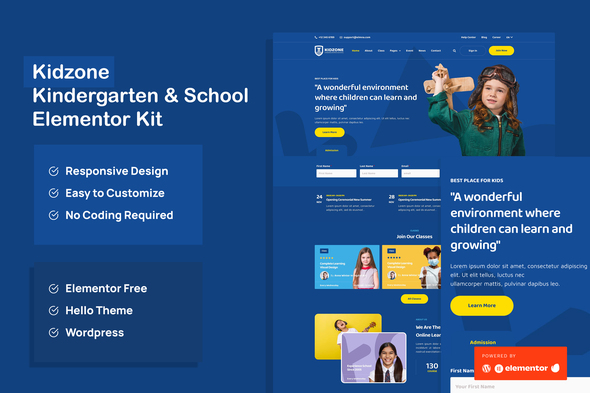
Kidzone – Kindergarten & School Elementor Template Kit
- Updated on May 1, 2026
- 100% Original Product & Well Documented
- Unlimited Domain Usage
*Important Note:
The image should not be Part of the template kit. You need to use your own reliable Source.


Original price was: ₹999.00.₹299.00Current price is: ₹299.00.
Your kindergarten needs a real website — not a Facebook page held together with prayers. Kidzone gives you 10+ pre-built pages, drag-and-drop editing, and zero coding required. Download today, launch tomorrow.
- Secured & Scanned by Virus total & McAfee.
- Access to Free updates for Lifetime
- All products are Under GPL License (Unlimited Domain Usage)
- We Not Provide any Support For this Product

Lifetime Membership
Access 6700+ Premium WordPress Themes & Plugins, Elementor Templates, Mobile Apps, PHP scripts with Lifetime Updates.
Join Premium MembershipRecently Viewed
Kidzone — The Kindergarten & School Website Template Built for Educators, Not Developers
Building a website for your kindergarten, preschool, or childcare center shouldn’t take months — or cost thousands. Kidzone is a complete Elementor Template Kit designed specifically for early childhood education businesses that need a professional, parent-friendly website. Import the demo. Drop in your photos. Hit publish. That’s it.
What Kidzone Is
It’s a ready-to-use website template package built for Elementor — the world’s most popular free WordPress page builder. The kit includes 10+ pre-designed pages covering every section your kindergarten website needs: homepage, about us, programs, daily schedule, admissions, staff directory, gallery, blog, contact form, and more.
Every layout uses warm colors, friendly typography, and visual elements that appeal to parents of young children — without looking unprofessional or like every other template out there.
Key Features
Kidzone handles the design work so you can focus on running your school.
- 10+ pre-built pages covering all essential kindergarten website sections
- Fully responsive layouts — parents browse on their phones during drop-off, and your site looks great
- Warm, inviting color palette already chosen — one less decision on your plate
- Customizable headers and footers with contact info and social links
- Contact forms, enrollment CTAs, and gallery layouts ready to go
- Works with the free Elementor plugin — no premium subscriptions needed
If you can use a word processor, you can use Kidzone.
Who It’s For
Kindergarten owners and preschool directors who need a website live this week, not this quarter. Childcare center owners managing multiple locations. School administrators refreshing an outdated site. Early education entrepreneurs launching a new program.
If your current web presence is a Facebook page and a prayer, Kidzone solves that problem immediately.
How To Use It
After purchase, you’ll get a download with installation instructions. Install the free Elementor plugin on your WordPress site, upload the template kit, and import the demo content with one click.
Then replace the placeholder text and images with your school’s information. Swap in photos of your classrooms. Update the contact details. Publish when you’re ready. Most users finish in under two hours.
Why Buy Kidzone
First, the commercial license is included — use it for your own school or sell websites built with it to clients. Second, you get lifetime free updates. If WordPress or Elementor changes, your template stays compatible at no extra cost. Third, one-time payment means no monthly fees draining your budget. Fourth, no developer needed — and no developer bills.
Generic website builders don’t understand early education. Kidzone does. The layouts, the imagery placeholders, the section flow — all of it is built for how parents evaluate kindergartens. That context matters when you’re competing for enrollment.
Ready to Get Your Kindergarten Website Live?
Stop paying monthly fees for a builder that doesn’t get your industry. Stop waiting on a developer who keeps pushing deadlines. Kidzone gives you everything you need to launch a professional kindergarten website today — instant download, lifetime updates, and direct support if you get stuck.
Only logged in customers who have purchased this product may leave a review.
How to use Kit:
Install and activate the “Template Kit – Import” plugin from Plugins > Add New in WordPress.
Do not unzip.
Go to Template Kit – Import > Upload Template Kit Zip File button.
Before importing a template, ensure the Install Requirements button is clicked to activate required plugins.
For best results, do not import more than one template at a time.
RELATED PRODUCTS

DIVI – Original License | One Time Payment – Exclusive Deal

Elementor Pro 4.1.3 + Elementorism Landing Pages WordPress Plugin

907 5.3.6 – Responsive Multi-Purpose WordPress Theme

Element Pack Pro 9.1.0 – Addon For Elementor

Lifetime Mini Membership





 Mobile Apps
 php script
 How to
Reviews
There are no reviews yet