
Kidzonia – Kindergarten & Child Care Elementor Template Kit
- Updated on May 1, 2026
- 100% Original Product & Well Documented
- Unlimited Domain Usage
*Important Note:
The image should not be Part of the template kit. You need to use your own reliable Source.


- Coupon "b2g1" has expired.
- Coupon "b2g1" has expired.
- Coupon "b2g1" has expired.
- Coupon "b2g1" has expired.
- Coupon "b2g1" has expired.
Original price was: ₹999.00.₹299.00Current price is: ₹299.00.
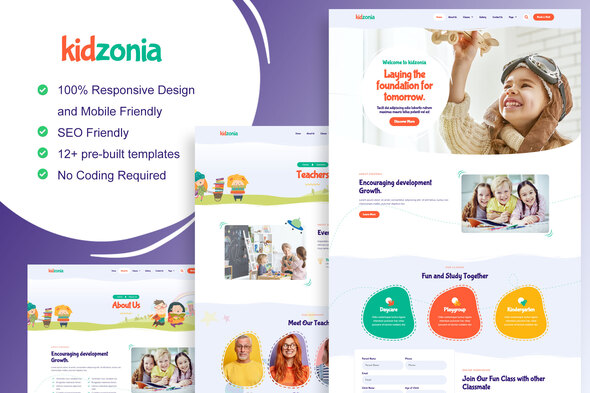
Kidzonia is a ready-to-use Elementor template kit for kindergartens and daycares. 8 pages, playful design, and no coding required. Launch your site today.
- Secured & Scanned by Virus total & McAfee.
- Access to Free updates for Lifetime
- All products are Under GPL License (Unlimited Domain Usage)
- We Not Provide any Support For this Product

Lifetime Membership
Access 6700+ Premium WordPress Themes & Plugins, Elementor Templates, Mobile Apps, PHP scripts with Lifetime Updates.
Join Premium MembershipRecently Viewed
Build a Kindergarten Website Parents Actually Want to Visit
Your website is doing more work than you think. Parents are judging your center before they ever call. Kidzonia gives you a warm, professional design that makes a great first impression — and it takes minutes to set up, not days.
What Kidzonia Actually Is
A complete Elementor Template Kit made for kindergartens, daycares, nurseries, and playgroups. Eight pre-built pages handle everything: admissions, teacher bios, class schedules, galleries, the works. It runs inside Elementor (the free WordPress builder), so you can edit text, swap photos, and change colors without touching code.
Who This Is For
Kidzonia fits if you:
- Run a kindergarten or preschool and need a website, like, yesterday
- Manage a daycare and want something that looks more professional than a Facebook page
- Own a playgroup or nursery and need credibility online
- Design websites for childcare clients and want to move faster
No tech skills needed. Pick a layout, drop in your photos, update your phone number — that’s it.
8 Pages, Ready to Customize
- Homepage — Welcoming hero with a clear enrollment button
- About Us — Your story, your mission, your team
- Programs — Curriculum details, age groups, daily schedules
- Admissions — Enrollment forms and tuition info in one place
- Gallery — Classrooms, activities, happy kids (parents love this page)
- Our Teachers — Staff profiles that feel human, not corporate
- Blog — Post updates, parenting tips, school events
- Contact — Address, hours, phone, plus an inquiry form
Design That Actually Feels Like a Kindergarten
Most childcare websites look like medical offices. Kidzonia uses soft gradients, rounded edges, friendly illustrations, and warm colors that feel nurturing — not sterile. The layouts breathe. They’re easy to navigate on a phone while a parent’s juggling a toddler, which is exactly how they’ll see it.
How Long Does Setup Take?
Most people finish in under 30 minutes:
- Install Elementor on your WordPress site
- Upload the Kidzonia template kit
- Import the pages you need
- Swap in your school’s info
- Hit publish
No hunting for plugins. No code errors. No $2,000 developer bill.
What’s Included With Your Download
Commercial license — use it for one school or fifty. Your own projects or client work. Lifetime free updates, so it stays compatible as WordPress and Elementor improve. If you hit a snag, our support team can help.
We built this to solve the problems we kept seeing: confusing templates, outdated designs, overpriced developers for basic sites.
Ditch the monthly website builder fees. Skip the three-week wait for a developer. Kidzonia gets you a real, professional kindergarten website today.
Ready to Launch?
Download Kidzonia and have a complete, polished site ready before the end of the day. Every page is built to turn visitors into enrolled families — just add your school’s personal touch.
Only logged in customers who have purchased this product may leave a review.
How to use Kit:
Install and activate the “Template Kit – Import” plugin from Plugins > Add New in WordPress.
Do not unzip.
Go to Template Kit – Import > Upload Template Kit Zip File button.
Before importing a template, ensure the Install Requirements button is clicked to activate required plugins.
For best results, do not import more than one template at a time.
RELATED PRODUCTS

DIVI – Original License | One Time Payment – Exclusive Deal

Elementor Pro 4.1.3 + Elementorism Landing Pages WordPress Plugin

907 5.3.6 – Responsive Multi-Purpose WordPress Theme

Element Pack Pro 9.1.0 – Addon For Elementor

Lifetime Mini Membership





 Mobile Apps
 php script
 How to
Reviews
There are no reviews yet