
Knights – Horse Riding Club Elementor Template Kit
- Updated on May 1, 2026
- 100% Original Product & Well Documented
- Unlimited Domain Usage
*Important Note:
The image should not be Part of the template kit. You need to use your own reliable Source.


- Coupon "b2g1" has expired.
- Coupon "b2g1" has expired.
- Coupon "b2g1" has expired.
- Coupon "b2g1" has expired.
Original price was: ₹999.00.₹299.00Current price is: ₹299.00.
Your riding club needs a website that actually works. Knights gives you 15+ pages, drag-and-drop editing, and a setup that takes under an hour — no developer required.
- Secured & Scanned by Virus total & McAfee.
- Access to Free updates for Lifetime
- All products are Under GPL License (Unlimited Domain Usage)
- We Not Provide any Support For this Product

Lifetime Membership
Access 6700+ Premium WordPress Themes & Plugins, Elementor Templates, Mobile Apps, PHP scripts with Lifetime Updates.
Join Premium MembershipRecently Viewed
Knights Horse Riding Club Template Kit for Elementor
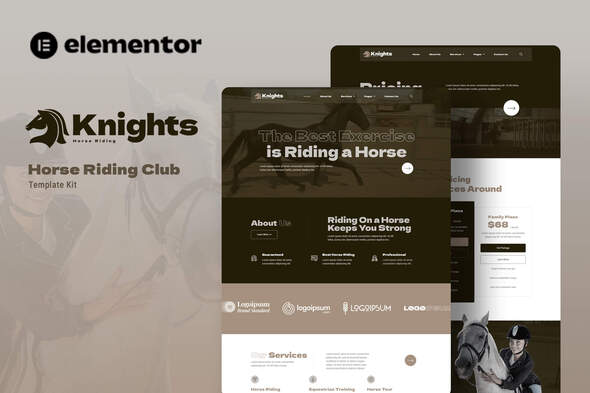
Most horse riding clubs are stuck between two bad options: pay a developer thousands or build something that looks like 2008. Knights solves that. It’s a ready-made Elementor Template Kit built specifically for equestrian businesses — riding schools, horse clubs, boarding stables, the works. You get a site that looks like you paid someone, without actually having to pay someone.
The kit ships with everything you need to launch: homepage layouts, pages for lessons and trail rides, an instructor team section, event calendars, photo galleries, and contact forms. Clean typography, earthy tones, images that make horses look good. Swap in your own photos using Elementor’s visual editor — it takes minutes, not hours.
What You Get with Knights Template Kit
15+ pages and sections covering the full riding club website:
- Homepage: hero banner, services overview, testimonials, and a call-to-action that converts
- Dedicated pages for riding lessons, trail rides, horse boarding, and event hosting
- Instructor profiles with photo, bio, and credentials
- Photo and video gallery layouts for horses, facilities, and events
- Contact page with forms and Google Maps built in
- Pricing tables for membership plans and lesson packages
Mobile-responsive, so your site looks good on phones and tablets. Works with popular WordPress SEO plugins, which helps local riders find you when they search for lessons nearby.
Who Is This Template Kit For?
Knights fits anyone who needs a professional equestrian website without the custom development cost:
- Riding schools: group lessons, private coaching, summer camps
- Horse stables and boarding facilities
- Equestrian clubs running shows, clinics, and community events
- Freelance designers building sites for horse business clients
- WordPress beginners who want full design control
Starting fresh or updating an old site? Knights gives you a foundation to build on. Use it as-is or tweak every element to match your brand.
How to Set Up Knights on Your WordPress Site
Most people are live within an hour. Install the free Elementor plugin on your WordPress site, import the Knights kit from the library, and start inserting pages. Replace the placeholder text and images with your own. That’s it.
No coding. Elementor’s drag-and-drop builder handles everything — move sections, change colors, update fonts in real time. The design system keeps things consistent as you add your own blocks later.
Why Buy Knights Template Kit
Commercial license included. Use it for client projects, personal sites, or multiple riding club websites — no restrictions. One payment, lifetime access. No subscriptions. Updates come free as the kit improves.
Need help setting up? Support is available. Questions get answered, even if you’re building your first WordPress site.
Ready to Get Started?
Stop paying agency fees for a simple riding club site. Knights Elementor Template Kit gets you a professional, functional website today. Download instantly, install in minutes, and start attracting new riders now.
Only logged in customers who have purchased this product may leave a review.
How to use Kit:
Install and activate the “Template Kit – Import” plugin from Plugins > Add New in WordPress.
Do not unzip.
Go to Template Kit – Import > Upload Template Kit Zip File button.
Before importing a template, ensure the Install Requirements button is clicked to activate required plugins.
For best results, do not import more than one template at a time.
RELATED PRODUCTS

DIVI – Original License | One Time Payment – Exclusive Deal

Elementor Pro 4.1.3 + Elementorism Landing Pages WordPress Plugin

907 5.3.6 – Responsive Multi-Purpose WordPress Theme

Element Pack Pro 9.1.0 – Addon For Elementor

Lifetime Mini Membership





 Mobile Apps
 php script
 How to
Reviews
There are no reviews yet