
KRAFTY – Construction & Industry Elementor Template Kit
- Updated on May 1, 2026
- 100% Original Product & Well Documented
- Unlimited Domain Usage
*Important Note:
The image should not be Part of the template kit. You need to use your own reliable Source.


- Coupon "b2g1" has expired.
- Coupon "b2g1" has expired.
- Coupon "b2g1" has expired.
- Coupon "b2g1" has expired.
- Coupon "b2g1" has expired.
Original price was: ₹999.00.₹299.00Current price is: ₹299.00.
Build a professional construction website in a single afternoon — no code, no developer fees. KRAFTY gives you 10+ Elementor pages, a commercial license, and free lifetime updates. Perfect for freelancers who need to ship client sites faster.
- Secured & Scanned by Virus total & McAfee.
- Access to Free updates for Lifetime
- All products are Under GPL License (Unlimited Domain Usage)
- We Not Provide any Support For this Product

Lifetime Membership
Access 6700+ Premium WordPress Themes & Plugins, Elementor Templates, Mobile Apps, PHP scripts with Lifetime Updates.
Join Premium MembershipRecently Viewed
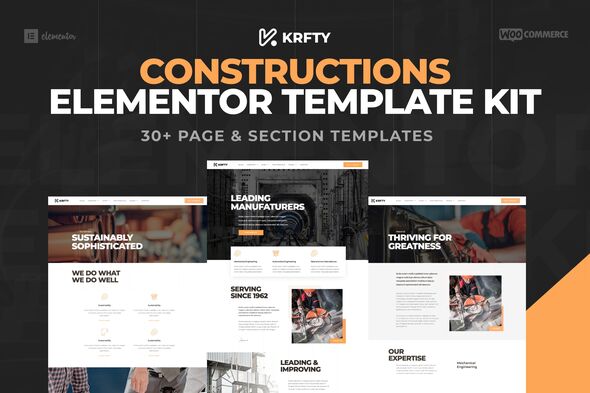
Build a Professional Construction Website with KRAFTY Elementor Template Kit
Contractors, industrial businesses, and architecture firms need websites that look like they cost tens of thousands. KRAFTY gets you there without the agency price tag. It’s a complete Elementor Template Kit built specifically for the trades — no generic layouts, no cluttered templates cobbled together from outdated tutorials.
What KRAFTY Brings to Your Project
Ten pre-built pages, all organized and ready to customize. You’ll find a homepage with a full-width hero, service pages, project galleries, an about section, team profiles, and a contact form with map placeholder. The layouts follow construction industry conventions — because clients in this space don’t want flashy or trendy, they want clear, professional, and trustworthy.
Key Features of KRAFTY Template Kit
- 10+ ready pages: Homepage, Services, Projects, About, Team, Contact, and more
- Built entirely with Elementor free — no Pro subscription needed
- Responsive designs that hold up on phones, tablets, and desktops
- Clean section structure — swap out content without accidentally breaking the layout
- Demo import file and setup guide included
The homepage hero leads with a bold image area and a quick services overview. Project galleries use a masonry layout that makes completed work look polished. Team bios get breathing room. And the contact form? Clients just drop in their Google Maps embed and they’re done.
Who KRAFTY Is Built For
Freelance web designers: this cuts typical project timelines significantly. Import the template, drop in your client’s photos and text, and deliver. Business owners: get a professional site without touching code or paying a developer $3,000 for something basic. Agencies: keep this in your stack for fast turnarounds when the client brief fits.
How to Use KRAFTY
- Purchase and download — files are ready immediately
- Install through Elementor and import the demo content
- Swap placeholder text and images with your own
- Publish — zero coding required
Since it works with the free Elementor plugin, there are no subscription costs to worry about. Changing colors, fonts, and logos takes a few minutes. Your clients can make updates themselves afterward, no developer needed.
Why Pay for KRAFTY Instead of Using Free Templates?
Free templates are fine for a hobby blog. But for construction clients? They expect industry-appropriate design, not a WordPress theme from 2019 with outdated styling and no support when things break. KRAFTY comes with a commercial license — use it for client work, personal projects, whatever. And lifetime updates mean you never pay again for improvements.
One payment. Instant download. Commercial license included. Stop rebuilding the same layouts from scratch every time a contractor needs a website.
Ready to Get Started?
Download KRAFTY and have a live construction or industrial website today. One-time purchase. Instant access.
Only logged in customers who have purchased this product may leave a review.
How to use Kit:
Install and activate the “Template Kit – Import” plugin from Plugins > Add New in WordPress.
Do not unzip.
Go to Template Kit – Import > Upload Template Kit Zip File button.
Before importing a template, ensure the Install Requirements button is clicked to activate required plugins.
For best results, do not import more than one template at a time.
RELATED PRODUCTS

DIVI – Original License | One Time Payment – Exclusive Deal

Elementor Pro 4.1.3 + Elementorism Landing Pages WordPress Plugin

907 5.3.6 – Responsive Multi-Purpose WordPress Theme

Element Pack Pro 9.1.0 – Addon For Elementor

Lifetime Mini Membership





 Mobile Apps
 php script
 How to
Reviews
There are no reviews yet