
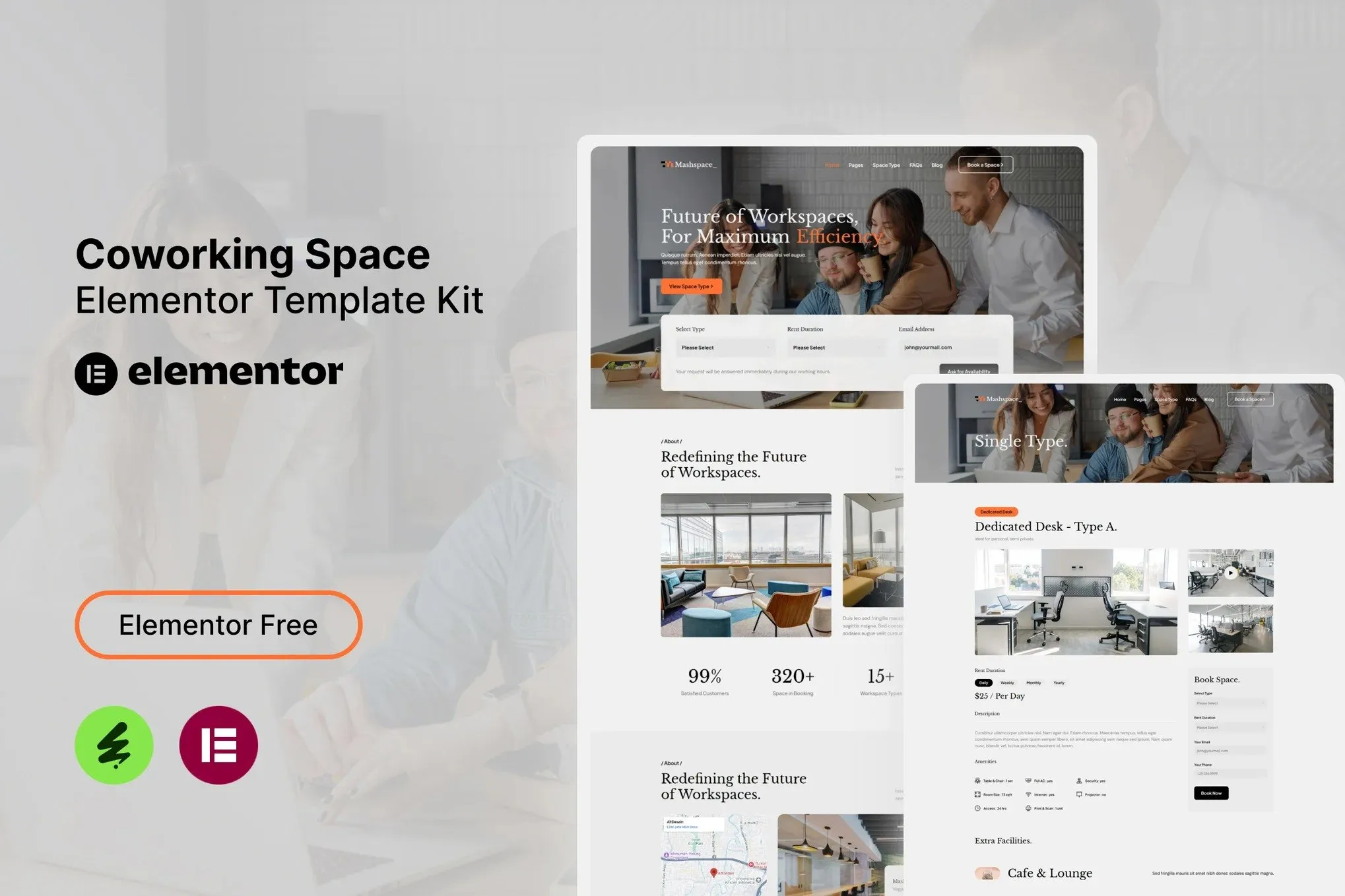
Mashspace – Coworking Space Elementor Template Kit
- Updated on May 3, 2026
- 100% Original Product & Well Documented
- Unlimited Domain Usage
*Important Note:
The image should not be Part of the template kit. You need to use your own reliable Source.


- Coupon "b2g1" has expired.
- Coupon "b2g1" has expired.
- Coupon "b2g1" has expired.
- Coupon "b2g1" has expired.
- Coupon "b2g1" has expired.
Original price was: ₹999.00.₹299.00Current price is: ₹299.00.
Build a stunning coworking space website in minutes with Mashspace — the professional Elementor template kit designed for shared workspaces. Instant download, lifetime updates, and one-time payment. Get it now!
- Secured & Scanned by Virus total & McAfee.
- Access to Free updates for Lifetime
- All products are Under GPL License (Unlimited Domain Usage)
- We Not Provide any Support For this Product

Lifetime Membership
Access 6700+ Premium WordPress Themes & Plugins, Elementor Templates, Mobile Apps, PHP scripts with Lifetime Updates.
Join Premium MembershipRecently Viewed
Mashspace – Coworking Space Elementor Template Kit
Your coworking space deserves a website that captures the energy and community feel of your workspace. Mashspace delivers exactly that — a professionally designed Elementor template kit that transforms how shared offices present themselves online. Built specifically for coworking brands, this template kit includes everything you need to launch a conversion-ready website without hiring a developer or spending weeks on development.
What the Mashspace Template Kit Includes
This Elementor template kit comes packed with pre-designed pages that cover every aspect of a coworking space website. The home page features bold hero sections that immediately communicate your workspace vibe, while dedicated pages showcase meeting rooms, private offices, hot desks, and community spaces. Each layout balances visual appeal with clear calls-to-action that guide visitors toward booking tours or signing up for memberships.
The template kit includes multiple inner pages designed for real coworking space needs:
- Home page with hero banner, featured amenities, and membership pricing
- About page to share your workspace story and team
- Space showcase with gallery layouts for different work areas
- Membership plans page with pricing tables and comparison features
- Contact page with location map, inquiry form, and tour booking options
- Blog layout for sharing workspace news and industry insights
Key Features Built for Coworking Spaces
Mashspace goes beyond basic template design. Every element is crafted for coworking space marketing. The amenity showcase blocks highlight high-speed internet, conference rooms, phone booths, coffee bars, and relaxation zones. Membership pricing tables make it easy for visitors to compare plans and find the right fit. The template also includes testimonial sections where you can display reviews from current members — social proof that builds trust with potential leads.
Elementor’s drag-and-drop builder means you can customize every section without touching code. Change colors to match your brand, swap images with your actual workspace photos, and adjust text to highlight your unique offerings. The responsive design ensures your site looks polished on mobile devices — critical since many professionals research coworking options on their phones.
Who Should Download the Mashspace Template Kit
This template kit works best for coworking space owners launching new websites, existing shared offices refreshing their online presence, and freelance designers building client sites on a budget. If you’re managing a hot desk hub, private office complex, or mixed-use workspace community, Mashspace gives you a professional foundation that saves 40+ hours of design work.
The kit also suits property managers transitioning traditional office buildings into flexible workspace concepts. The layouts accommodate different space types — from single desks to full-floor private suites — making it simple to present diverse offerings in one cohesive website.
How to Get Your Coworking Website Live Fast
Getting started takes minutes. Install the free Elementor plugin on your WordPress site, purchase and download the Mashspace template kit, then import the templates directly into your WordPress dashboard. From there, customize the placeholder content with your branding, upload photos of your actual workspace, and publish.
Most users complete the full setup in under three hours. The template kit includes documentation on Elementor import process and tips for optimizing your coworking website for local search — helping nearby professionals discover your space when searching online.
Why Choose Mashspace Over Other Templates
Unlike generic business templates, Mashspace understands the coworking industry. The design language reflects modern workspace culture — open layouts, creative typography, and color schemes that feel collaborative rather than corporate. Every page element serves a purpose: building trust, communicating value, and converting visitors into members.
Your purchase includes a commercial license covering unlimited use on client projects or your own business. No recurring subscriptions, no hidden fees. Download once and use the templates for as many coworking websites as you build. You also receive free updates when we add new sections or improve existing layouts.
Ready to Launch Your Coworking Website?
Stop spending weeks on website development or paying premium agency fees. The Mashspace coworking space Elementor template kit gives you a professional, conversion-focused website at a fraction of the cost. Download instantly, customize in Elementor, and start attracting members to your shared workspace today. This one-time purchase includes lifetime updates and dedicated support whenever you need help.
Only logged in customers who have purchased this product may leave a review.
How to use Kit:
Install and activate the “Template Kit – Import” plugin from Plugins > Add New in WordPress.
Do not unzip.
Go to Template Kit – Import > Upload Template Kit Zip File button.
Before importing a template, ensure the Install Requirements button is clicked to activate required plugins.
For best results, do not import more than one template at a time.
RELATED PRODUCTS

DIVI – Original License | One Time Payment – Exclusive Deal

Elementor Pro 4.1.3 + Elementorism Landing Pages WordPress Plugin

907 5.3.6 – Responsive Multi-Purpose WordPress Theme

Element Pack Pro 9.1.0 – Addon For Elementor

Lifetime Mini Membership





 Mobile Apps
 php script
 How to
Reviews
There are no reviews yet