
Mybags – Modern Commerce Elementor Template Kit
- Updated on May 2, 2026
- 100% Original Product & Well Documented
- Unlimited Domain Usage
*Important Note:
The image should not be Part of the template kit. You need to use your own reliable Source.


Original price was: ₹999.00.₹299.00Current price is: ₹299.00.
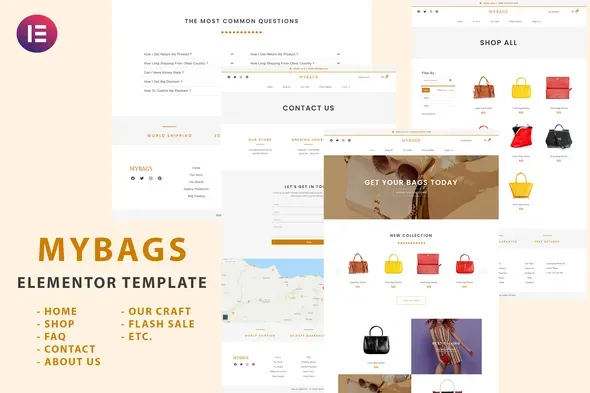
Skip the developer fees. This 8-page Elementor kit gets your bag shop live today — pre-built layouts, WooCommerce-ready, yours to use forever with a commercial license.
- Secured & Scanned by Virus total & McAfee.
- Access to Free updates for Lifetime
- All products are Under GPL License (Unlimited Domain Usage)
- We Not Provide any Support For this Product

Lifetime Membership
Access 6700+ Premium WordPress Themes & Plugins, Elementor Templates, Mobile Apps, PHP scripts with Lifetime Updates.
Join Premium MembershipRecently Viewed
Mybags Modern Commerce Elementor Template Kit
Custom e-commerce websites cost money. A lot of it. We’re talking $3,000 to $10,000 if you’re hiring someone decent, way more if you want something actually unique. But if you’re selling bags, wallets, or accessories, you probably don’t have that budget sitting around.
Mybags changes the equation. This template kit gives you a fully-functional online store in one afternoon. No coding. No developer. No wrestling with WordPress themes that promised “everything included” but delivered frustration instead.
The eight page layouts work together as a complete storefront — not a landing page with some buttons hoping you’ll figure out the rest.
What’s Inside
Homepage — Hero image that sells, collections grid, email signup that actually converts
Shop page — Product grid with filters. Customers find what they want without digging.
Single product pages — Image gallery, size guide, “you might also like” section. The stuff that moves product.
Cart + checkout — Simplified flow. Fewer abandoned carts.
About + contact — Where you tell your story and capture leads
Blog template — For the content marketing angle, if that’s your thing
Everything’s responsive. A customer browsing on an iPhone sees the same quality as someone on a desktop. The design stays out of your products’ way — clean layouts, good spacing, typography that doesn’t fight for attention.
How It Works With Your Store
WooCommerce handles the commerce side. Inventory tracking, product variations, secure payments, order management — all the features you actually need, none of the bloat you don’t.
Elementor’s builder runs the show. Drag, drop, edit text, swap images. If you’ve used any website builder, you know the drill. No code. No templates-within-templates that break when you change something.
Who’s It For
First-time store owners — Your competition hired a developer and spent four months debating color palettes. You’ll be live tonight.
Established sellers moving to WordPress — You’ve done the theme-hopping dance. This gives you a real starting point so you can focus on your inventory, not your infrastructure.
Freelancers and agencies — Commercial license covers client work. Use it, customize it, bill for the creative direction. No licensing headaches.
Setup Process
Three steps:
1. Install free Elementor + WooCommerce on WordPress
2. Import the template kit, activate the pages you need
3. Swap placeholder images and text with your own
Most people finish in under two hours. The included docs walk you through every screen — nothing assumes you already know this stuff.
Download comes immediately after purchase. Works with free Elementor, plays nice with Elementor Pro. Pairs best with lightweight WordPress themes.
The Numbers
Custom design from an agency: $3,000–$10,000+
This template kit: significantly less
One payment. No subscriptions. Lifetime updates included.
Future WordPress updates occasionally break things. When that happens, you get the fix for free. That’s the update promise.
Bottom Line
You’ve got the product. You’ve got the drive. What’s been missing is a storefront that doesn’t look like a weekend project gone wrong. This kit fixes that. Pick it up, spend a Sunday afternoon on setup, and wake up Monday with a real shop.
Only logged in customers who have purchased this product may leave a review.
How to use Kit:
Install and activate the “Template Kit – Import” plugin from Plugins > Add New in WordPress.
Do not unzip.
Go to Template Kit – Import > Upload Template Kit Zip File button.
Before importing a template, ensure the Install Requirements button is clicked to activate required plugins.
For best results, do not import more than one template at a time.
RELATED PRODUCTS

DIVI – Original License | One Time Payment – Exclusive Deal

Elementor Pro 4.2.1 + Elementorism Landing Pages WordPress Plugin

907 5.3.6 – Responsive Multi-Purpose WordPress Theme

Element Pack Pro 9.1.0 – Addon For Elementor






 Mobile Apps
 php script
 How to
Reviews
There are no reviews yet