
Neftize – NFT Portfolio & Digital Items Elementor Template Kit
- Updated on April 28, 2026
- 100% Original Product & Well Documented
- Unlimited Domain Usage
*Important Note:
The image should not be Part of the template kit. You need to use your own reliable Source.


- Coupon "b2g1" has expired.
- Coupon "b2g1" has expired.
- Coupon "b2g1" has expired.
- Coupon "b2g1" has expired.
- Coupon "b2g1" has expired.
Original price was: ₹999.00.₹299.00Current price is: ₹299.00.
Your NFT collection deserves more than a Linktree. This Elementor kit builds a full portfolio site in hours — not weeks. Instant download, commercial license, lifetime updates included. One flat fee, zero recurring costs.
- Secured & Scanned by Virus total & McAfee.
- Access to Free updates for Lifetime
- All products are Under GPL License (Unlimited Domain Usage)
- We Not Provide any Support For this Product

Lifetime Membership
Access 6700+ Premium WordPress Themes & Plugins, Elementor Templates, Mobile Apps, PHP scripts with Lifetime Updates.
Join Premium MembershipRecently Viewed
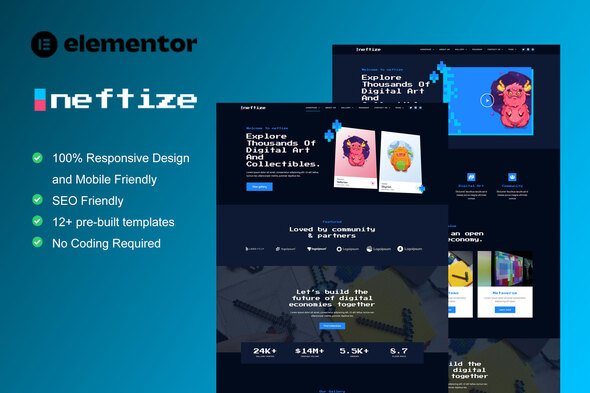
Neftize Elementor Template Kit for NFT Portfolio Websites
You created the art. You minted the collection. Now you need somewhere to show it off that doesn’t scream “I built this on a free platform at 2am.” Neftize gives you a complete Elementor template kit built specifically for NFT portfolios and digital item showcases. No coding knowledge required. No week-long setup marathons. Just professional results you can have live today.
What Neftize Offers
This isn’t a generic website template with NFT stickers pasted on top. Neftize comes pre-designed with sections that actually make sense for digital collectibles — hero areas that showcase your best pieces, gallery layouts that let visitors browse collections without hunting, bidding interfaces, and team profiles for those building bigger operations.
It works with the free Elementor plugin. You won’t need to subscribe to Elementor Pro or buy any additional page builders. Swap out the colors, swap out the fonts, drop in your own content. Done.
Key Features of This Template Kit
- 6 pre-built pages: homepage, portfolio grid, single item details, about, and more
- Responsive layout that holds together on desktop, tablet, and mobile — no awkward stretching
- NFT-specific elements: countdown timers, price displays, collection filters, and bidding placeholders
- Runs on Elementor free version — no Pro subscription required
- Clean, modern design that puts your digital art front and center
Who Is This For
NFT artists launching their first portfolio. Crypto influencers who are tired of directing people to OpenSea. Agencies picking up Web3 client work. If you need to present digital items professionally without dropping $2,000+ on a developer, this kit covers the foundation.
Digital product sellers who want a storefront without Shopify monthly fees will find this useful too.
Getting Started
After purchase, you get a download link immediately. Open Elementor, import the kit, swap the placeholder content with your own, hit publish. Most people finish in under an hour. If you get stuck, the included documentation walks through each step.
Why Pay Instead of Using Free Templates
Free options exist. Most are either generic website templates that don’t account for how NFTs actually work, or they require heavy customization that eats up your weekend anyway. Neftize comes ready with layouts designed around digital item showcases specifically.
Commercial licensing is included — build client sites without extra fees. Lifetime updates keep your design current as Web3 trends shift. One payment. No recurring charges.
This gives you a professional starting point that would cost substantially more to custom-build. Whether you’re launching your own collection or building sites for others, Neftize handles the design work so you can focus on creating.
Ready to Launch?
Download the kit, customize it in Elementor, and have your NFT portfolio live today. Instant access. Lifetime updates. Commercial license included.
Only logged in customers who have purchased this product may leave a review.
How to use Kit:
Install and activate the “Template Kit – Import” plugin from Plugins > Add New in WordPress.
Do not unzip.
Go to Template Kit – Import > Upload Template Kit Zip File button.
Before importing a template, ensure the Install Requirements button is clicked to activate required plugins.
For best results, do not import more than one template at a time.
RELATED PRODUCTS

DIVI – Original License | One Time Payment – Exclusive Deal

Elementor Pro 4.1.3 + Elementorism Landing Pages WordPress Plugin

907 5.3.6 – Responsive Multi-Purpose WordPress Theme

Element Pack Pro 9.1.0 – Addon For Elementor

Lifetime Mini Membership





 Mobile Apps
 php script
 How to
Reviews
There are no reviews yet