
Nexa – Startup Digital Agency Elementor Template Kit
- Updated on May 3, 2026
- 100% Original Product & Well Documented
- Unlimited Domain Usage
*Important Note:
The image should not be Part of the template kit. You need to use your own reliable Source.


Original price was: ₹999.00.₹299.00Current price is: ₹299.00.
Skip the development delays. 15+ pages, drag-and-drop builder, commercial license included. Your agency website, live tonight for $39.
- Secured & Scanned by Virus total & McAfee.
- Access to Free updates for Lifetime
- All products are Under GPL License (Unlimited Domain Usage)
- We Not Provide any Support For this Product

Lifetime Membership
Access 6700+ Premium WordPress Themes & Plugins, Elementor Templates, Mobile Apps, PHP scripts with Lifetime Updates.
Join Premium MembershipRecently Viewed
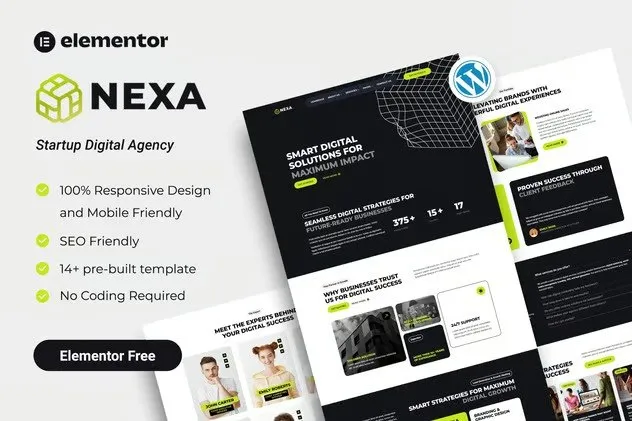
Professional Website for Startup Digital Agencies
Your website is usually the first conversation with a potential client. For startup digital agencies, that intro needs to show competence, creativity, and reliability — all at once. Building that from scratch, though, takes time you probably don’t have.
Nexa flips that equation. This Elementor Template Kit gives startup digital agencies a complete, professional website ready to go live in hours instead of weeks.
What Is Nexa?
Nexa is a pre-built website template built for digital agencies, startups, and freelance creatives. It runs on Elementor — the most popular WordPress page builder — and requires zero coding. Pick your pages, swap in your branding, publish.
The kit gives you 15+ professionally designed pages covering every section a modern agency website needs. Homepage, services, portfolio, about, contact, pricing tables, team pages, and blog layouts — all there. The design looks current and polished without being so narrow that it only works for one type of agency.
Run an SEO consultancy? Social media agency? Full-service digital shop? Nexa’s layouts adapt to your brand. Client testimonials, case studies, and service breakdowns display cleanly and persuasively.
Key Features of Nexa Template Kit
- 15+ pre-designed pages ready for customization
- 100% responsive — looks solid on any device
- No coding required — drag, drop, and publish with Elementor
- Commercial license included for client and commercial projects
- Lifetime free updates — your site stays current
- SEO-friendly structure for better search visibility
- Fast-loading templates that won’t slow you down
- Fully customizable colors, fonts, and branding
Who It’s For
Nexa works best for:
- Startup digital agencies launching their first website
- Freelance designers and developers building client sites
- Established agencies refreshing their online presence
- Marketing consultants wanting a professional portfolio
Need to look credible online without spending months on development? This kit delivers. It’s especially useful for agencies that already have projects to show but lack the internal resources to build a website from scratch.
How to Use It
Getting started takes minutes. Install Elementor on your WordPress site, import the Nexa kit, and start editing. Every section uses Elementor’s drag-and-drop interface — change headlines, upload your logo, swap in your portfolio images, adjust colors to match your brand.
No developer needed. No design degree required. The hard work’s already done. You just customize and launch.
Why Buy This Template Kit?
Compared to hiring a web designer or building from scratch, Nexa is fast and affordable. You get a complete, professional website for a fraction of the cost — and you can have it live today.
One payment. Lifetime access. Commercial license included means you can use it for client projects without paying extra licensing fees.
Your competitors have professional websites. Now you will too.
Ready to Get Started?
Get Nexa now and launch your professional agency website. Instant download included. One-time payment of $39 — no subscriptions, no hidden fees.
Only logged in customers who have purchased this product may leave a review.
How to use Kit:
Install and activate the “Template Kit – Import” plugin from Plugins > Add New in WordPress.
Do not unzip.
Go to Template Kit – Import > Upload Template Kit Zip File button.
Before importing a template, ensure the Install Requirements button is clicked to activate required plugins.
For best results, do not import more than one template at a time.
RELATED PRODUCTS

DIVI – Original License | One Time Payment – Exclusive Deal

Elementor Pro 4.1.3 + Elementorism Landing Pages WordPress Plugin

907 5.3.6 – Responsive Multi-Purpose WordPress Theme

Element Pack Pro 9.1.0 – Addon For Elementor

Lifetime Mini Membership





 Mobile Apps
 php script
 How to
Reviews
There are no reviews yet