
Nextrecord – Recording & Sound Studio Elementor Template Kit
- Updated on May 2, 2026
- 100% Original Product & Well Documented
- Unlimited Domain Usage
*Important Note:
The image should not be Part of the template kit. You need to use your own reliable Source.


Original price was: ₹999.00.₹299.00Current price is: ₹299.00.
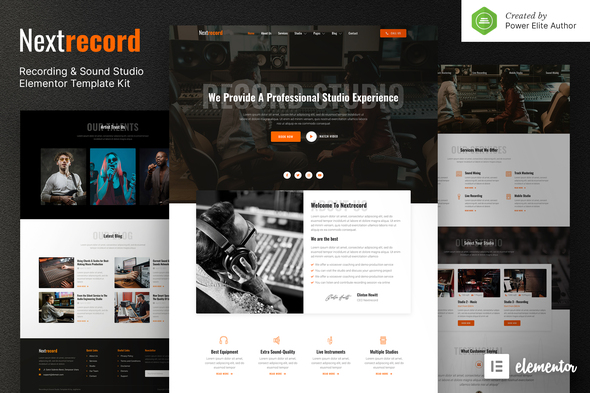
Your studio’s been recording hits — now it’s time your website matched that quality. Nextrecord gives you 8 pages built specifically for recording studios: equipment showcases, booking forms, portfolio galleries, and pricing tables. Open in Elementor, swap in your photos, go live. Templates sent immediately after purchase.
- Secured & Scanned by Virus total & McAfee.
- Access to Free updates for Lifetime
- All products are Under GPL License (Unlimited Domain Usage)
- We Not Provide any Support For this Product

Lifetime Membership
Access 6700+ Premium WordPress Themes & Plugins, Elementor Templates, Mobile Apps, PHP scripts with Lifetime Updates.
Join Premium MembershipRecently Viewed
Nextrecord – Recording & Sound Studio Website Template
Nextrecord is an Elementor template kit built for recording studios, sound engineers, music producers, and audio professionals who want a real website without hiring a designer.
The pages are organized the way studios actually need them. Hero sections show off your space. Service pages cover mixing, mastering, and recording rates. There’s an equipment gallery, a portfolio for finished work, booking inquiry forms, and a contact page. All of it pre-built, ready for your content.
No code. No drag-and-drop anxiety. Just install the free Elementor plugin, import what you want, and start editing.
What’s Included
8 pre-built pages:
- Homepage, About, Services, and Studio Gallery
- Equipment showcase with gear imagery placeholders
- Pricing tables for studio time, mixing, mastering, and session rates
- Contact page with booking inquiry forms
- Custom 404 page
Fully responsive. Every layout adapts to mobile, tablet, and desktop without breaking.
Built for Audio People
This isn’t a generic business template with your industry shoehorned in. Nextrecord was designed with recording studios in mind from the start:
- Audio waveform visual elements and music-inspired accents
- Equipment sections that show off your gear collection
- Studio booking forms right on the page — clients can reach you without hunting for an email
- Portfolio layout for finished tracks, artist collaborations, and project showcases
- Pricing tables already structured for session rates and hourly studio time
Who It’s For
- Recording studios wanting to book more artists and bands
- Sound engineers building a portfolio that books clients
- Music producers with a home setup going professional online
- Podcast studios and voice-over recording spaces
- Commercial recording facilities of any size
If you run a studio or work freelance in audio, this gives you a foundation that looks legitimate from day one.
Getting Started
Requirements: the free Elementor plugin (or Elementor Pro if you want all the bells and whistles).
Process: install the kit through Templates → Import, pick your pages, and start dropping in your own images and text. Most studios have a basic version live within a few hours.
Global styles keep your branding consistent. Once the structure’s in place, you tweak colors, fonts, and photos until it sounds like your studio.
Why Pay Instead of Using a Free Template?
Free options often come with watermarks, limited pages, layouts that don’t fit audio businesses, and no help when something breaks. Nextrecord includes:
- Commercial license — use it for client work or your own studio
- Lifetime updates — new sections and improvements as the template evolves
- Lifetime support — real help when you need it, not just business hours
- One-time payment — no subscriptions, no monthly fees
- Instant download — build your site the same day you buy
Ready?
A basic website makes your studio look like every other option out there. Nextrecord gives you a professional foundation that actually fits the recording industry — all in the Elementor editor you already know. Download it and have your new site running before your next session.
Only logged in customers who have purchased this product may leave a review.
How to use Kit:
Install and activate the “Template Kit – Import” plugin from Plugins > Add New in WordPress.
Do not unzip.
Go to Template Kit – Import > Upload Template Kit Zip File button.
Before importing a template, ensure the Install Requirements button is clicked to activate required plugins.
For best results, do not import more than one template at a time.
RELATED PRODUCTS

DIVI – Original License | One Time Payment – Exclusive Deal

Elementor Pro 4.1.3 + Elementorism Landing Pages WordPress Plugin

907 5.3.6 – Responsive Multi-Purpose WordPress Theme

Element Pack Pro 9.1.0 – Addon For Elementor

Lifetime Mini Membership





 Mobile Apps
 php script
 How to
Reviews
There are no reviews yet