
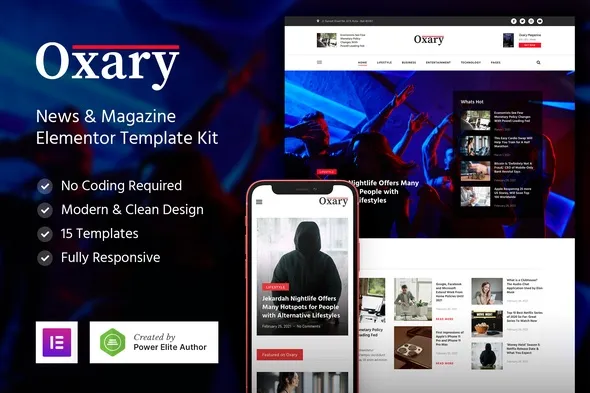
Oxary – News & Magazine Elementor Template Kit
- Updated on May 2, 2026
- 100% Original Product & Well Documented
- Unlimited Domain Usage
*Important Note:
The image should not be Part of the template kit. You need to use your own reliable Source.


- Coupon "b2g1" has expired.
- Coupon "b2g1" has expired.
- Coupon "b2g1" has expired.
- Coupon "b2g1" has expired.
- Coupon "b2g1" has expired.
Original price was: ₹999.00.₹299.00Current price is: ₹299.00.
Stop paying monthly platform fees for your publication. Oxary gives you 12 professional news and magazine layouts — install Elementor, import your favorite design, swap in your content, and go live today.
- Secured & Scanned by Virus total & McAfee.
- Access to Free updates for Lifetime
- All products are Under GPL License (Unlimited Domain Usage)
- We Not Provide any Support For this Product

Lifetime Membership
Access 6700+ Premium WordPress Themes & Plugins, Elementor Templates, Mobile Apps, PHP scripts with Lifetime Updates.
Join Premium MembershipRecently Viewed
Build a Professional News or Magazine Site with Elementor
Most template kits look stunning in demos. Then you try to run an actual publication and everything falls apart. They’re built for portfolios and small business sites — not for the way news and editorial content actually flows. Oxary is different. This is a purpose-built Elementor Template Kit designed specifically for news portals, digital magazines, and personal editorial blogs — ready to use the same day you download it.
You get 12 homepage variations so you can match your publication’s tone. Running a serious daily news site? Pick a layout built for density and hierarchy. Running a visually driven lifestyle magazine? There’s a layout for that too. Every template is structured for real content: featured stories, category grids, trending sections, author bylines, and review ratings that look credible.
What’s Included in Oxary
- 12 homepage layouts built for news and magazine sites
- Header and footer designs made for high-traffic editorial pages
- Category archive templates for organizing content by section
- Single post and article layouts with sidebar options and review score systems
- About, contact, and author profile inner pages
- Trending posts widget and tag-based content highlights
Every template renders cleanly on mobile, tablet, and desktop. Critical for any publication where readers arrive from social shares and search results on their phones.
Who Is Oxary Built For?
News publishers tired of bleeding money on monthly SaaS fees. Editors who want full control over their digital presence. Bloggers ready to upgrade from basic themes into something that actually commands attention. Freelancers building client sites will appreciate that each template feels custom without the custom development bill.
How to Get Started
Install Elementor (the free version works fine). Install the Oxary template kit. Import the layouts you want. Swap in your logo, colors, and content — the structure handles the rest. Most people are fully live within a single afternoon. No PHP edits. No child themes. No waiting on developers.
Why Oxary Is Different
Other template kits give you beautiful screens that choke under real editorial demands. Oxary prioritizes content hierarchy, readability, and the structural scaffolding that keeps readers moving through dozens of articles. It’s not a theme — it’s a complete set of layouts you control fully within Elementor’s visual editor.
Commercial license is included. Use it for client projects, commercial sites, or your own publication — no attribution required, no recurring fees. Ever. Future updates to keep Oxary compatible with the latest Elementor and WordPress versions come free for life.
Ready to Get Started?
Skip the lengthy agency quote. Oxary delivers a professional news or magazine site at a fraction of the cost, with a commercial license included and lifetime support standing by. Buy today and have your publication online by tomorrow.
Only logged in customers who have purchased this product may leave a review.
How to use Kit:
Install and activate the “Template Kit – Import” plugin from Plugins > Add New in WordPress.
Do not unzip.
Go to Template Kit – Import > Upload Template Kit Zip File button.
Before importing a template, ensure the Install Requirements button is clicked to activate required plugins.
For best results, do not import more than one template at a time.
RELATED PRODUCTS

DIVI – Original License | One Time Payment – Exclusive Deal

Elementor Pro 4.1.3 + Elementorism Landing Pages WordPress Plugin

907 5.3.6 – Responsive Multi-Purpose WordPress Theme

Element Pack Pro 9.1.0 – Addon For Elementor

Lifetime Mini Membership





 Mobile Apps
 php script
 How to
Reviews
There are no reviews yet