
Partiwi – Barbershop Elementor Template Kit
- Updated on May 2, 2026
- 100% Original Product & Well Documented
- Unlimited Domain Usage
*Important Note:
The image should not be Part of the template kit. You need to use your own reliable Source.


- Coupon "b2g1" has expired.
- Coupon "b2g1" has expired.
- Coupon "b2g1" has expired.
- Coupon "b2g1" has expired.
- Coupon "b2g1" has expired.
Original price was: ₹999.00.₹299.00Current price is: ₹299.00.
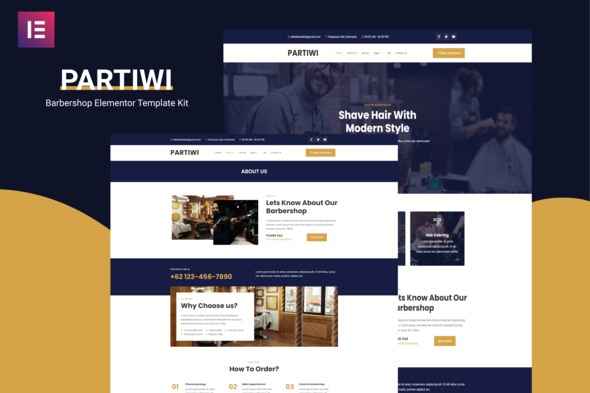
Skip the developer quote. This barbershop template gives you 10+ pages, booking forms, and a clean design — import into Elementor and go live today.
- Secured & Scanned by Virus total & McAfee.
- Access to Free updates for Lifetime
- All products are Under GPL License (Unlimited Domain Usage)
- We Not Provide any Support For this Product

Lifetime Membership
Access 6700+ Premium WordPress Themes & Plugins, Elementor Templates, Mobile Apps, PHP scripts with Lifetime Updates.
Join Premium MembershipRecently Viewed
What Is the Partiwi Barbershop Elementor Template Kit?
Building a professional barbershop website usually means weeks of back-and-forth with a developer, expensive revisions, and a final bill that makes your eyes water. The Partiwi kit changes that. It’s a pre-built collection of pages and sections made specifically for men’s grooming businesses — import it into Elementor and have something live in a few hours.
No clip-art scissors. No generic stock photos that scream ‘I downloaded this template.’ Just clean layouts that let your work take center stage, service pages that actually explain what you offer, and a booking section that makes scheduling frictionless.
Key Features of the Partiwi Template Kit
- 10+ pages covering Home, About, Services, Gallery, Team, Booking, and Contact
- Responsive layout — looks good on phones, tablets, and desktops alike
- Drag-and-drop editing through Elementor — no touching code
- Runs on free Elementor and Starter Templates — no Pro subscription required
- Commercial license included — use it for client work without additional fees
- Lifetime updates — new features and fixes come at no extra cost
- One-time payment — no subscriptions, no annual renewals
- Lifetime support — reach out if something goes sideways during setup
Who Is This Template Kit For?
This kit fits:
- Solo barbers building their personal brand
- Established shops tired of their outdated website
- Freelance designers who need a quick, professional foundation for client projects
- Any grooming business that wants a real website without learning web development
Whether you’re starting from scratch or upgrading from something embarrassing,Partiwi gives you a clean slate to work from.
How To Use the Partiwi Template Kit
It’s straightforward: download after purchase, import into your WordPress site, replace the placeholder text and images with your own, and publish. The hardest part is picking which photos of your best cuts to feature.
Every section follows a logical structure — headers, service listings, gallery grids, team profiles, contact forms — so swapping content in and out doesn’t break anything.
Why Buy This Barbershop Template Kit?
Most barbershop websites fall into two categories: DIY builders that look DIY, or custom builds that cost thousands. This kit sits in the middle — polished results without the custom price tag, and you own it outright after one payment.
No annual fees. No marketplace subscriptions eating into your margins. Pay once, download, use it forever on unlimited projects.
That commercial license also means you can customize it for clients and charge your full service rate — the template handles the heavy lifting while you keep the profit.
Ready to Get Started?
No developer waitlist. No custom quote. Get the Partiwi Barbershop Elementor Template Kit and have a professional site running by tomorrow.
Only logged in customers who have purchased this product may leave a review.
How to use Kit:
Install and activate the “Template Kit – Import” plugin from Plugins > Add New in WordPress.
Do not unzip.
Go to Template Kit – Import > Upload Template Kit Zip File button.
Before importing a template, ensure the Install Requirements button is clicked to activate required plugins.
For best results, do not import more than one template at a time.
RELATED PRODUCTS

DIVI – Original License | One Time Payment – Exclusive Deal

Elementor Pro 4.1.3 + Elementorism Landing Pages WordPress Plugin

907 5.3.6 – Responsive Multi-Purpose WordPress Theme

Element Pack Pro 9.1.0 – Addon For Elementor

Lifetime Mini Membership





 Mobile Apps
 php script
 How to
Reviews
There are no reviews yet