
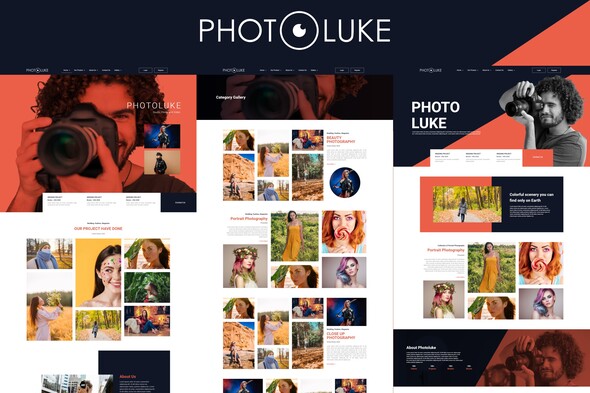
Photoluke – Photography Elementor Template Kit
- Updated on May 2, 2026
- 100% Original Product & Well Documented
- Unlimited Domain Usage
*Important Note:
The image should not be Part of the template kit. You need to use your own reliable Source.


Original price was: ₹999.00.₹299.00Current price is: ₹299.00.
Photoluke gives photographers a stunning, ready-to-use website in minutes — no coding or design skills needed. Get instant access with a commercial license included and start booking more clients today.
- Secured & Scanned by Virus total & McAfee.
- Access to Free updates for Lifetime
- All products are Under GPL License (Unlimited Domain Usage)
- We Not Provide any Support For this Product

Lifetime Membership
Access 6700+ Premium WordPress Themes & Plugins, Elementor Templates, Mobile Apps, PHP scripts with Lifetime Updates.
Join Premium MembershipRecently Viewed
Photoluke – Photography Elementor Template Kit
Your photography business deserves a website that looks like you hired a professional designer — without the designer price tag or the weeks of back-and-forth. Photoluke is a premium Elementor template kit built specifically for photographers who want to showcase their work, attract ideal clients, and spend less time on tech and more time behind the camera.
This isn’t a generic website template with stock photos and boring layouts. Every section, every button, every spacing choice was made with one goal: helping photographers convert visitors into paying clients. The design puts your images front and center while providing all the trust signals clients need before booking.
What You’re Getting
This complete Elementor template kit includes everything you need to launch a professional photography website in a single afternoon. No WordPress experience required — if you can drag and drop, you can build your site.
- Multiple homepage layouts to match your photography style
- Portfolio and gallery sections designed to display images beautifully
- Services pages with pricing display options
- About section that builds trust and connects with potential clients
- Contact page with booking integration-ready forms
- Blog page layout for sharing behind-the-scenes content
Who It’s Built For
This photography template kit works best for:
- Wedding and portrait photographers launching their first website
- Established photographers ready to upgrade from outdated sites
- Freelance photographers who need a professional online portfolio
- Photography studios wanting to streamline their client discovery process
Whether you’re just starting out or looking to rebrand, Photoluke gives you a foundation that looks expensive without the premium price. You bring your images and your story — the template handles the rest.
How To Get Started
Setting up Photoluke takes less than 30 minutes. Install the free Elementor plugin on your WordPress site, import the template kit with one click, and replace the placeholder content with your own images and text. The responsive design ensures your site looks perfect on mobile phones, tablets, and desktops — because your clients are browsing on all three. Customizing colors, fonts, and layouts is as simple as editing text in a document.
Why This Template Kit Wins
Three things set Photoluke apart from other photography website templates:
- Commercial license included — Use it for client projects or your own business without worrying about extra fees
- Beginner-friendly structure — No coding, no shortcodes, no technical headaches
- Fast loading and SEO-ready — Google-friendly structure helps potential clients find you faster
Stop wasting time trying to build a website in generic page builders. Get the tool designed for photographers, by someone who understands the industry.
Ready to Get Started?
Download Photoluke now and have a professional photography website live today. One-time payment, lifetime access, instant delivery. Your portfolio deserves to be seen — make sure your website makes that happen.
Only logged in customers who have purchased this product may leave a review.
How to use Kit:
Install and activate the “Template Kit – Import” plugin from Plugins > Add New in WordPress.
Do not unzip.
Go to Template Kit – Import > Upload Template Kit Zip File button.
Before importing a template, ensure the Install Requirements button is clicked to activate required plugins.
For best results, do not import more than one template at a time.
RELATED PRODUCTS

DIVI – Original License | One Time Payment – Exclusive Deal

Elementor Pro 4.1.3 + Elementorism Landing Pages WordPress Plugin

907 5.3.6 – Responsive Multi-Purpose WordPress Theme

Element Pack Pro 9.1.0 – Addon For Elementor

Lifetime Mini Membership





 Mobile Apps
 php script
 How to

Reviews
There are no reviews yet