
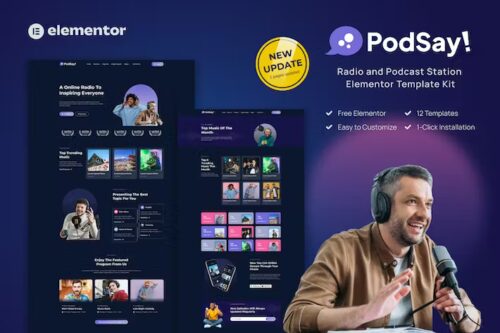
PodSay – Radio & Podcast Station Elementor Template Kit
- Updated on May 4, 2026
- 100% Original Product & Well Documented
- Unlimited Domain Usage

*Important Note:
The image should not be Part of the template kit. You need to use your own reliable Source.


- Coupon "b2g1" has expired.
- Coupon "b2g1" has expired.
- Coupon "b2g1" has expired.
- Coupon "b2g1" has expired.
- Coupon "b2g1" has expired.
Original price was: ₹999.00.₹299.00Current price is: ₹299.00.
Your podcast needs a home online. PodSay gives you a complete Elementor template kit for radio shows and podcasts — styled, structured, and ready to publish today.
- Secured & Scanned by Virus total & McAfee.
- Access to Free updates for Lifetime
- All products are Under GPL License (Unlimited Domain Usage)
- We Not Provide any Support For this Product

Lifetime Membership
Access 6700+ Premium WordPress Themes & Plugins, Elementor Templates, Mobile Apps, PHP scripts with Lifetime Updates.
Join Premium MembershipRecently Viewed
PodSay Podcast Website Template — Build Your Station Online
Every podcast needs a website. It’s where listeners go to find old episodes, sign up for updates, and figure out who you are. PodSay handles the design so you don’t have to — a complete Elementor template kit that looks professional from the first click and takes minutes to customize.
Seven pre-built pages come ready to go: homepage, episode archive, about section, contact, featured episode layout, and more. Each one is styled and spaced. You open Elementor, swap in your content, hit publish. No code. No agency invoices. No staring at a blank editor wondering where to start.
What Is PodSay?
It’s a podcast website template built for Elementor. Made for individual podcasters, radio hosts, audio creators, and anyone running a digital station who wants a polished site without learning design.
The aesthetic is dark and modern — bold type, high contrast, clean episode grids. It puts your content first while looking like someone paid a designer to build it.
What’s Inside the Kit
The kit ships with layouts for everything a podcast site needs:
- Homepage with hero section, latest episode showcase, and subscriber CTA
- Episode archive page with card grids
- Single episode pages with audio player support
- About page for your station or personal brand
- Contact page with styled form
- Fully responsive — works on phones, tablets, and desktop
- Integration zones for Apple Podcasts, Spotify, and other feeds
- Social links built into every layout
- Organized section naming for quick editing in Elementor
Every section is modular. Use one page or all of them. Color schemes, fonts, and spacing are pre-set so your whole site looks cohesive without touching CSS.
Who Is This For?
PodSay fits:
- Solo podcasters starting a show or interview series
- Radio stations and community broadcasters going digital
- Podcast networks managing several shows under one roof
- Content creators building a media hub
If you’ve been putting off your website because the design feels daunting, this kit removes that wall. The structure exists — you just fill it in.
How It Works
After purchase, you download a zip file and import it into Elementor. The templates load into your WordPress library. Assign them to pages, update text and images, connect your podcast feed, and publish. Works with Elementor Free or Pro on any standard WordPress install. No bundled plugins — just template files and a quick import guide.
What You Get
- Instant download after checkout
- Commercial license — build client sites or your own
- Beginner-friendly setup — just Elementor
- One-time payment — no subscriptions
- Lifetime updates when the kit gets refreshed
- Direct support if you get stuck
Ready to Launch?
Your audience expects a website. Get PodSay, import it into WordPress, and have a live podcast site this week.
Only logged in customers who have purchased this product may leave a review.
How to use Kit:
Install and activate the “Template Kit – Import” plugin from Plugins > Add New in WordPress.
Do not unzip.
Go to Template Kit – Import > Upload Template Kit Zip File button.
Before importing a template, ensure the Install Requirements button is clicked to activate required plugins.
For best results, do not import more than one template at a time.
RELATED PRODUCTS

DIVI – Original License | One Time Payment – Exclusive Deal

Elementor Pro 4.1.3 + Elementorism Landing Pages WordPress Plugin

907 5.3.6 – Responsive Multi-Purpose WordPress Theme

Element Pack Pro 9.1.0 – Addon For Elementor

Lifetime Mini Membership





 Mobile Apps
 php script
 How to
Reviews
There are no reviews yet