
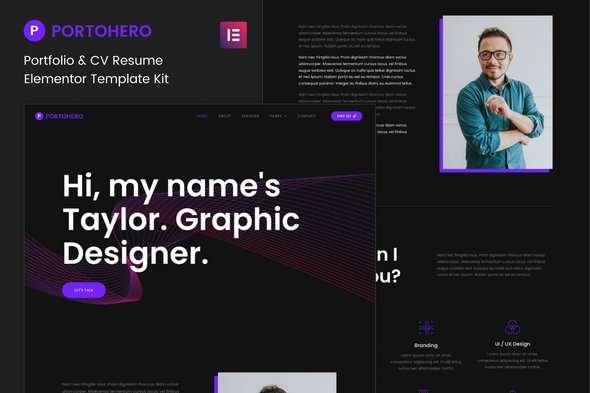
Portohero – Personal Portfolio & CV Elementor Template Kit
- Updated on April 28, 2026
- 100% Original Product & Well Documented
- Unlimited Domain Usage
*Important Note:
The image should not be Part of the template kit. You need to use your own reliable Source.


- Coupon "b2g1" has expired.
- Coupon "b2g1" has expired.
- Coupon "b2g1" has expired.
- Coupon "b2g1" has expired.
Original price was: ₹999.00.₹299.00Current price is: ₹299.00.
Stop sending people a LinkedIn profile when they ask for your portfolio. Portohero is an Elementor template kit built for freelancers who want a real site up today — not after a weekend of wrestling with WordPress. Commercial license included.
- Secured & Scanned by Virus total & McAfee.
- Access to Free updates for Lifetime
- All products are Under GPL License (Unlimited Domain Usage)
- We Not Provide any Support For this Product

Lifetime Membership
Access 6700+ Premium WordPress Themes & Plugins, Elementor Templates, Mobile Apps, PHP scripts with Lifetime Updates.
Join Premium MembershipRecently Viewed
Portohero – Personal Portfolio & CV Elementor Template Kit
You want a portfolio site that actually books clients — not one that disappears into the same generic WordPress template everyone else uses. Portohero is a ready-to-use template kit built for personal portfolios, CV websites, and freelancer showcases. It runs on the free Elementor page builder, so you get a professional result without touching code.
Out of the box, you get: header, hero section, portfolio grid, about page, services, testimonials, contact form, and footer. Pre-designed. Pre-laid-out. You add your content, hit publish, and you’re done.
What’s Included in Portohero
This kit has everything most freelancers need to launch same day:
- 12 pre-built sections: hero, portfolio, services, skills, testimonials, contact, and more
- Layouts that actually work on mobile — not an afterthought
- Typography and color settings you can tweak in minutes
- One-click import via Elementor Templates library
- Works with both free and Pro versions of Elementor
- Zero coding — drag, tweak, publish
- Commercial license included — use it for client work without buying extras
Who Should Use Portohero?
This fits if you’re:
- A freelancer or solopreneur who needs an online presence without the agency quote
- A web developer or designer tired of building the same portfolio from scratch
- Job hunting and want something that stands out from the resume pile
- An agency owner building a personal brand page
- Any creative — photographer, writer, marketer, consultant — who needs clients to take you seriously
Starting fresh or fixing an old site? Portohero gets you to launch faster than another weekend down the customizer rabbit hole.
How to Use This Template Kit
From install to live takes under 30 minutes:
- Install Elementor on your WordPress site (free version works fine)
- Import Portohero through the Elementor Templates library
- Swap in your own text, images, and links
- Tweak fonts and colors if you want — or leave it as-is
- Hit publish
No developer. No designer. If you’ve used a drag-and-drop editor, you can handle this.
Why Portohero Over Free Themes or Generic Builders?
Free themes come with bloated code, limited customization, and designs that scream “I didn’t have time to make this.” Portohero gives you:
- Actual design thinking — built by people who understand layout, hierarchy, and what makes portfolios convert
- Same-day launch — no blank page staring back at you
- Commercial license — charge clients for sites built with this, no add-ons needed
- Lifetime updates — keeps working as Elementor evolves
- Direct support — not a forum thread from 2019
One payment. No subscriptions. No surprise charges.
Ready to Get Started?
Your portfolio is usually the first thing a potential client sees. Make it memorable. Portohero gives you a professional foundation that lets you look credible from the first click — without spending a week building it.
Instant download. Commercial license included.
Only logged in customers who have purchased this product may leave a review.
How to use Kit:
Install and activate the “Template Kit – Import” plugin from Plugins > Add New in WordPress.
Do not unzip.
Go to Template Kit – Import > Upload Template Kit Zip File button.
Before importing a template, ensure the Install Requirements button is clicked to activate required plugins.
For best results, do not import more than one template at a time.
RELATED PRODUCTS

DIVI – Original License | One Time Payment – Exclusive Deal

Elementor Pro 4.1.3 + Elementorism Landing Pages WordPress Plugin

907 5.3.6 – Responsive Multi-Purpose WordPress Theme

Element Pack Pro 9.1.0 – Addon For Elementor

Lifetime Mini Membership





 Mobile Apps
 php script
 How to
Reviews
There are no reviews yet