
Powerix – Solar & Renewable Energy Elementor Template Kit
- Updated on May 3, 2026
- 100% Original Product & Well Documented
- Unlimited Domain Usage
*Important Note:
The image should not be Part of the template kit. You need to use your own reliable Source.


Original price was: ₹999.00.₹299.00Current price is: ₹299.00.
Get your solar website live today. 10+ pre-built pages, drag-and-drop editing, instant download, and a commercial license — zero coding required.
- Secured & Scanned by Virus total & McAfee.
- Access to Free updates for Lifetime
- All products are Under GPL License (Unlimited Domain Usage)
- We Not Provide any Support For this Product

Lifetime Membership
Access 6700+ Premium WordPress Themes & Plugins, Elementor Templates, Mobile Apps, PHP scripts with Lifetime Updates.
Join Premium MembershipRecently Viewed
Powerix: Build Your Solar & Renewable Energy Website in Minutes
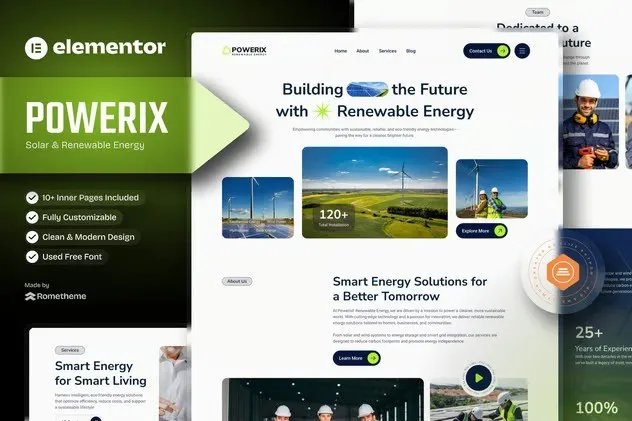
Building a website from scratch takes time. Hiring a developer costs money. And starting with a blank page makes both problems worse. Powerix sidesteps all of that. This Elementor Template Kit gives you a complete, conversion-focused solar website — ready to customize, no code needed.
You get 10+ pre-designed pages. Homepage, services, about us, testimonials, team profiles, FAQs, contact forms, and a solar quote calculator. Built for the renewable energy industry, styled with a color palette that reinforces your eco-friendly brand without screaming it.
What’s Inside the Kit
These aren’t skeleton layouts with lorem ipsum. Each page has real structure — modern typography, proper spacing, and sections that actually make sense for solar businesses.
- Homepage with hero, service highlights, and conversion-focused calls-to-action
- Services page with pricing tables and feature breakdowns
- About page with team profiles and company timeline
- Blog layout for solar tips and industry news
- Contact page with integrated form and map placeholder
- Solar quote calculator template for capturing leads
- Testimonials section with client spotlight layouts
- FAQ accordion for common solar questions
Who Is This For
Solar installers. Wind energy companies. Energy consultants. Green tech startups. Environmental nonprofits. If your work involves renewable energy, these pages adapt to your brand.
Web designers, take note: the commercial license covers client projects. Build faster, charge the same rate.
No technical skills required. Elementor’s drag-and-drop editor handles everything. Import into WordPress, swap your logo, update colors, add your content, publish.
What You Actually Get
- Pages built specifically for solar and renewable energy businesses
- Fully responsive — phones, tablets, desktops all look solid
- Clean structure that search engines understand
- Lightweight code that loads fast
- Works with popular WordPress themes
- Commercial license included — no restrictions on client work
Getting Started
Download link arrives instantly after purchase. Import into Elementor (takes about 10 minutes). Pick the pages you want, customize them, go live.
Each template is organized logically. You don’t have to build everything at once. Start with the homepage, layer in your services, add testimonials and contact info as you gather them.
The Business Case
Every day your website isn’t live, potential customers find your competitors instead. A custom design costs thousands. This kit costs a fraction of that — one payment, lifetime access, no subscriptions.
If you build websites for clients, the commercial license pays for itself on your first project.
Ready to Launch?
Download Powerix and have a complete solar energy website running within 24 hours. The kit works out of the box, requires no technical background, and includes everything you need to get started.
Only logged in customers who have purchased this product may leave a review.
How to use Kit:
Install and activate the “Template Kit – Import” plugin from Plugins > Add New in WordPress.
Do not unzip.
Go to Template Kit – Import > Upload Template Kit Zip File button.
Before importing a template, ensure the Install Requirements button is clicked to activate required plugins.
For best results, do not import more than one template at a time.
RELATED PRODUCTS

DIVI – Original License | One Time Payment – Exclusive Deal

Elementor Pro 4.1.3 + Elementorism Landing Pages WordPress Plugin

907 5.3.6 – Responsive Multi-Purpose WordPress Theme

Element Pack Pro 9.1.0 – Addon For Elementor

Lifetime Mini Membership





 Mobile Apps
 php script
 How to
Reviews
There are no reviews yet