
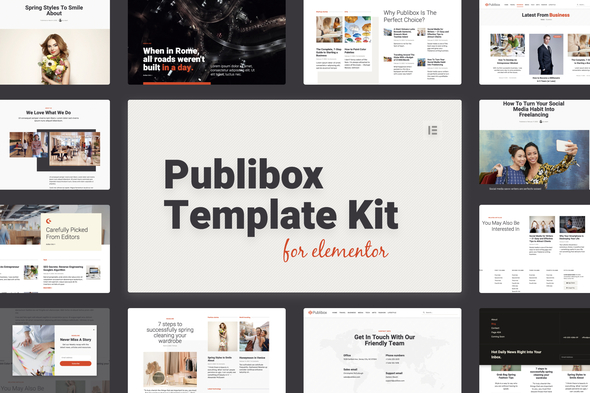
Publibox – Blog & Magazine Elementor Template Kit
- Updated on May 2, 2026
- 100% Original Product & Well Documented
- Unlimited Domain Usage
*Important Note:
The image should not be Part of the template kit. You need to use your own reliable Source.


- Coupon "b2g1" has expired.
- Coupon "b2g1" has expired.
- Coupon "b2g1" has expired.
- Coupon "b2g1" has expired.
- Coupon "b2g1" has expired.
Original price was: ₹999.00.₹299.00Current price is: ₹299.00.
Stop building blog themes from scratch. Publibox gives you 15+ ready-made pages, a commercial license for client projects, and a design that looks custom-built — all without touching code.
- Secured & Scanned by Virus total & McAfee.
- Access to Free updates for Lifetime
- All products are Under GPL License (Unlimited Domain Usage)
- We Not Provide any Support For this Product

Lifetime Membership
Access 6700+ Premium WordPress Themes & Plugins, Elementor Templates, Mobile Apps, PHP scripts with Lifetime Updates.
Join Premium MembershipRecently Viewed
Publibox Elementor Template Kit — Build Your Blog or Magazine in Minutes
You could spend weeks wrestling with code, hiring developers, or piecing together mismatched themes. Or download Publibox today and have a fully functional publication site ready before dinner.
This isn’t a basic theme. It’s a complete design system built specifically for blogs, news sites, and online magazines. Every page, section, and component works together out of the box — no design degree required.
What You Get With Publibox
- 15+ pre-designed pages covering homepage, category archives, single posts, about, contact, and more
- Newsletter-ready sections, ad placement zones, and social media integration
- Category templates designed for niche blogs, tech news, lifestyle publications, and general magazines
- Responsive layouts that look sharp on mobile devices and load fast
- Drag-and-drop customization through Elementor — change colors, fonts, and images without touching code
Built For Speed and Professional Results
Stop building from scratch. Publibox handles the design foundation so you can focus on what matters — creating content, growing your audience, and monetizing your site. Every section maintains visual consistency across your entire publication.
Need to tweak the homepage hero? Update your category layouts? Adjust typography across dozens of pages? Elementor’s interface makes these changes in minutes. The template kit gives you flexibility without the usual headache.
Who It’s For
- Bloggers ready to upgrade from basic themes to a professional design
- Online magazine publishers launching new digital publications
- Freelance designers looking for a polished foundation for client sites
- Agencies needing to deliver quality blog sites faster
- News portals and media sites requiring a ready-to-go template solution
How to Use Publibox
Getting started takes minutes. Install the free Elementor plugin, import the template kit into your WordPress dashboard, and start customizing. Every element works as-is, or you can modify everything to fit your brand. Lifetime support comes with every purchase if you get stuck.
Why Buy This Template Kit
- Commercial license included — use it for client projects without paying extra
- Lifetime free updates — your site stays current as WordPress and Elementor evolve
- One-time payment — no subscriptions, no recurring fees, ever
- Affordable professional solution — the kind of design work that normally costs thousands
Publibox gives you the design quality of a custom build at a fraction of the cost. Built by developers who understand what publishers actually need.
Ready to Get Started?
Stop paying for subscriptions or spending weeks building from zero. Get Publibox today, import the templates, and have your blog or magazine live before the weekend. One purchase. Lifetime access. Instant download.
Only logged in customers who have purchased this product may leave a review.
How to use Kit:
Install and activate the “Template Kit – Import” plugin from Plugins > Add New in WordPress.
Do not unzip.
Go to Template Kit – Import > Upload Template Kit Zip File button.
Before importing a template, ensure the Install Requirements button is clicked to activate required plugins.
For best results, do not import more than one template at a time.
RELATED PRODUCTS

DIVI – Original License | One Time Payment – Exclusive Deal

Elementor Pro 4.1.3 + Elementorism Landing Pages WordPress Plugin

907 5.3.6 – Responsive Multi-Purpose WordPress Theme

Element Pack Pro 9.1.0 – Addon For Elementor

Lifetime Mini Membership





 Mobile Apps
 php script
 How to
Reviews
There are no reviews yet