
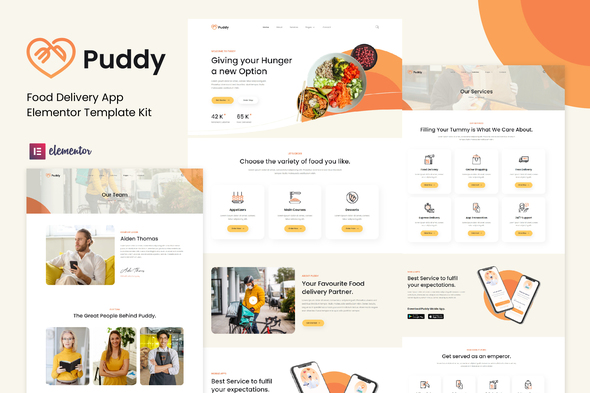
Puddy – Food Delivery App Elementor Template Kit
- Updated on April 30, 2026
- 100% Original Product & Well Documented
- Unlimited Domain Usage
*Important Note:
The image should not be Part of the template kit. You need to use your own reliable Source.


- Coupon "b2g1" has expired.
- Coupon "b2g1" has expired.
- Coupon "b2g1" has expired.
- Coupon "b2g1" has expired.
- Coupon "b2g1" has expired.
Original price was: ₹999.00.₹299.00Current price is: ₹299.00.
Skip the dev queue and launch faster. Puddy gives you 14 ready-built pages for menus, ordering, tracking, and checkout — all built for Elementor. Swap in your branding, hit publish.
- Secured & Scanned by Virus total & McAfee.
- Access to Free updates for Lifetime
- All products are Under GPL License (Unlimited Domain Usage)
- We Not Provide any Support For this Product

Lifetime Membership
Access 6700+ Premium WordPress Themes & Plugins, Elementor Templates, Mobile Apps, PHP scripts with Lifetime Updates.
Join Premium MembershipRecently Viewed
Puddy – Food Delivery App Elementor Template Kit
Websites take forever. Puddy doesn’t. This template kit has everything food delivery services, restaurants, and meal prep businesses need to get online fast — home page, menu system, cart, checkout, order tracking, and contact pages. All designed around how people actually order food.
Built for two audiences: designers and agencies who need to deliver without starting from zero, and restaurant owners who want a real website without the developer invoice. Puddy hands you a working foundation instead of a blank editor screen.
What’s Inside the Kit
Fourteen pages and sections that cover the full customer journey. The home page puts dishes front and center. The menu handles categories, prices, and food photos cleanly. Cart and checkout flow the way customers expect. There’s a track order page, contact form, and about section too.
Everything uses Elementor’s native widgets. Drag, drop, edit, done. The free version of Elementor handles all of it — no Pro license needed. Layouts shift automatically for phones, tablets, and desktops.
Built for Food Delivery
- Menu templates with category filters and item cards
- Cart and checkout pages for single-page ordering
- Order tracking with status indicators
- Dish showcase sections for food photography
- Delivery zone placeholder sections
- Testimonial blocks for reviews
- Contact and reservation forms
Who It’s For
Freelance designers and agencies working with restaurant clients: Puddy cuts 20+ hours off each project. Instead of building basic structures every time, you drop in the kit and focus on customization. Works across multiple restaurant clients without repeating the same foundational work.
Restaurant owners and food startups: Pizza shops, meal prep services, food trucks, catering companies. Get a site that looks established from day one — no agency required.
Marketing agencies: Faster turnaround means clients who come back.
Getting Started
Install Elementor (free), import the kit, start editing. No premium plugins needed for the core templates. Replace the placeholder logo with yours, update menu items, add your food photos, and connect payments when you’re ready.
Colors, fonts, section order — all adjustable in the visual editor. The kit handles the framework. You handle the personality.
Why Puddy Over Free Themes
Free themes hand you bones. Puddy gives you a working body. Pages link logically, sections convert, and every layout choice serves the food ordering experience. You won’t spend hours staring at empty widget panels wondering what goes where.
Commercial license covers client work. One payment, lifetime updates as Elementor and WordPress change. Download takes five minutes — you’re editing immediately.
Launch a food delivery website that looks sharp, loads fast, and turns visitors into paying customers. Let Puddy handle the structure so you can focus on the food.
Get Puddy
Instant download includes all 14 pages, lifetime updates, and commercial license rights. No monthly fees, no coding required. Start editing today.
Only logged in customers who have purchased this product may leave a review.
How to use Kit:
Install and activate the “Template Kit – Import” plugin from Plugins > Add New in WordPress.
Do not unzip.
Go to Template Kit – Import > Upload Template Kit Zip File button.
Before importing a template, ensure the Install Requirements button is clicked to activate required plugins.
For best results, do not import more than one template at a time.
RELATED PRODUCTS

DIVI – Original License | One Time Payment – Exclusive Deal

Elementor Pro 4.1.3 + Elementorism Landing Pages WordPress Plugin

907 5.3.6 – Responsive Multi-Purpose WordPress Theme

Element Pack Pro 9.1.0 – Addon For Elementor

Lifetime Mini Membership





 Mobile Apps
 php script
 How to
Reviews
There are no reviews yet