
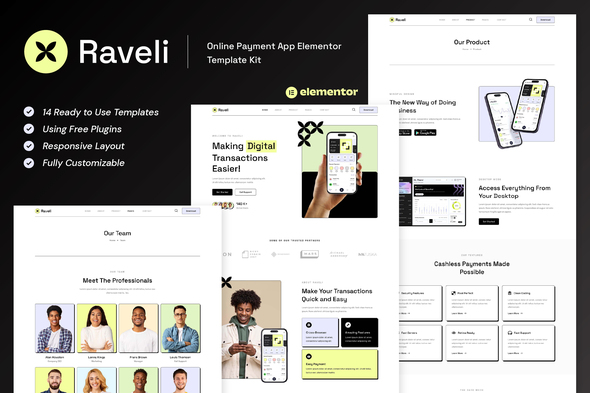
Raveli – Online Payment App Elementor Template Kit
- Updated on May 2, 2026
- 100% Original Product & Well Documented
- Unlimited Domain Usage
*Important Note:
The image should not be Part of the template kit. You need to use your own reliable Source.


Original price was: ₹999.00.₹299.00Current price is: ₹299.00.
Launch your fintech payment app website in hours, not weeks. Raveli gives you 15+ professional pages, Elementor drag-and-drop editing, and everything you need to go live today. Get instant access.
- Secured & Scanned by Virus total & McAfee.
- Access to Free updates for Lifetime
- All products are Under GPL License (Unlimited Domain Usage)
- We Not Provide any Support For this Product

Lifetime Membership
Access 6700+ Premium WordPress Themes & Plugins, Elementor Templates, Mobile Apps, PHP scripts with Lifetime Updates.
Join Premium MembershipRecently Viewed
Raveli – Professional FinTech Website Template for Online Payment Apps
Building a financial technology website shouldn’t take months of design work and developer hours. Raveli is a complete Elementor Template Kit built specifically for online payment apps, digital wallets, and fintech startups. You get 15+ pre-designed pages that look premium out of the box — no coding required, no starting from scratch.
Every section, layout, and component in this kit works with the free Elementor page builder. That means you can edit text, swap images, and rearrange blocks using a simple drag-and-drop interface. Whether you’re launching a new payment platform or refreshing an existing fintech brand, Raveli helps you move fast without sacrificing quality.
What Raveli Includes
This template kit covers every page a modern payment app website needs. The homepage features bold hero sections, feature showcases, app download CTAs, and trust-building testimonials. Inner pages include pricing tables, FAQ sections, team profiles, blog layouts, and contact forms — all styled to match fintech industry standards.
- 15+ pre-built pages ready for customization in Elementor
- Homepage, About, Services, Pricing, FAQ, Blog, Contact, and more
- Mobile-responsive layouts that look great on any device
- Compatible with free Elementor and Elementor Pro
- Clean, modern design tailored for financial services brands
Who Is Raveli For?
This kit works best for freelance designers who need to deliver a fintech client project fast, small business owners launching a digital payment service, and WordPress developers who want a professional starting point without building from zero. If you need a trustworthy, polished website for your payment app — and you need it now — this template kit gets you there.
How to Use Raveli
After purchase, you download the kit files directly and import them into your WordPress site. The template kit installs through Elementor like any other theme or template bundle. From there, you replace placeholder content with your brand details, logo, and app screenshots. Each page is organized logically, so you can build your entire site in an afternoon if needed. No PHP knowledge, no custom code, no waiting on developers.
Why Buy Raveli Instead of Starting From Scratch?
Custom fintech web design costs thousands and takes weeks. Freelance designers charging $50–$100 per hour will bill you for 20–40 hours of work just to build the structure. Raveli gives you that same professional foundation at a fraction of the cost — and you own it forever with a one-time purchase. You also get lifetime free updates and commercial licensing included, so you can use it for client projects without any extra fees.
Stop wrestling with generic themes that don’t fit your industry. Raveli was designed from the ground up for payment apps, digital wallets, and fintech brands — the details that make financial services sites feel credible are already built in.
Ready to Get Started?
Download Raveli today and have a professional fintech website ready in hours. One payment, lifetime access, instant download included.
Only logged in customers who have purchased this product may leave a review.
How to use Kit:
Install and activate the “Template Kit – Import” plugin from Plugins > Add New in WordPress.
Do not unzip.
Go to Template Kit – Import > Upload Template Kit Zip File button.
Before importing a template, ensure the Install Requirements button is clicked to activate required plugins.
For best results, do not import more than one template at a time.
RELATED PRODUCTS

DIVI – Original License | One Time Payment – Exclusive Deal

Elementor Pro 4.1.3 + Elementorism Landing Pages WordPress Plugin

907 5.3.6 – Responsive Multi-Purpose WordPress Theme

Element Pack Pro 9.1.0 – Addon For Elementor

Lifetime Mini Membership





 Mobile Apps
 php script
 How to
Reviews
There are no reviews yet