
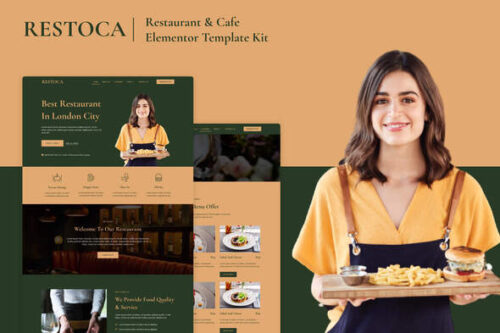
Restoca – Restaurant & Cafe Elementor Template Kit
- Updated on April 29, 2026
- 100% Original Product & Well Documented
- Unlimited Domain Usage

*Important Note:
The image should not be Part of the template kit. You need to use your own reliable Source.


- Coupon "b2g1" has expired.
- Coupon "b2g1" has expired.
- Coupon "b2g1" has expired.
- Coupon "b2g1" has expired.
Original price was: ₹999.00.₹299.00Current price is: ₹299.00.
Still paying a developer to build your restaurant website? Restoca gives you 8 ready-to-use sections, a complete menu layout, and reservation forms — all built for Elementor. Download today, be live this week.
- Secured & Scanned by Virus total & McAfee.
- Access to Free updates for Lifetime
- All products are Under GPL License (Unlimited Domain Usage)
- We Not Provide any Support For this Product

Lifetime Membership
Access 6700+ Premium WordPress Themes & Plugins, Elementor Templates, Mobile Apps, PHP scripts with Lifetime Updates.
Join Premium MembershipRecently Viewed
Restaurant Elementor Template Kit for Professional Food Business Websites
Building a restaurant website that actually reflects your vibe shouldn’t take three months and a developer retainer. Restoca is a ready-to-use Elementor Template Kit built specifically for restaurants, cafes, bistros, and food entrepreneurs who want a professional online presence without the custom design price tag.
This kit gives you eight complete page sections — a hero area, full menu display, gallery, team profiles, testimonials, reservation form, contact section, and footer. Every section is designed to showcase your food, your brand, and your space. Drop in your photos, update your menu items, and publish. That’s it.
What You Get With Restoca
- Hero Section — A bold full-width opener with your tagline and a reservation button front and center
- Menu Layout — Clean, scannable food category pages with room for pricing, descriptions, and dish photography
- Reservation Form — Built-in booking block that connects to the reservation tools your diners already use
- Gallery Grid — Photo-forward section to show off your interior, plating, and atmosphere
- About & Team — Tell your restaurant’s story and introduce your chef or leadership
- Testimonials — Client reviews displayed in an attractive card format
- Contact Section — Address, hours, phone number, and embedded map placeholder
- Footer — Social links, navigation, and newsletter signup
Who Is Restoca For?
This template kit works if you’re opening a new restaurant and need a website live before your soft launch. It works if you’re running an established cafe tired of a clunky, outdated site that doesn’t match your Instagram. It works if you’re a freelance designer building client sites and need a professional starting point you can customize in hours instead of days.
No coding experience required. If you’ve used WordPress and dragged a block in the block editor, you can work with Restoca. Elementor’s visual builder means every change you make is visible instantly — no preview tab, no guesswork.
How to Get Started
After purchase, you receive an instant download with the template kit files. Install the free Elementor plugin on your WordPress site, upload the kit, and begin editing. Every text, image, and color is editable directly in the builder. Swap the placeholder food photography for your own, add your menu items, and connect your reservation platform of choice.
Why Buy This Template Kit
- Commercial license included — Use it for client projects or your own business without additional fees
- One-time payment — No subscriptions, no monthly charges. Pay once, keep it forever
- Lifetime free updates — We improve the kit over time, and you get every update at no extra cost
- Beginner-friendly — Built for non-developers who want professional results without the headache
- Fully responsive — Every section adapts cleanly to mobile screens, where most restaurant browsers come from
Ready to Get Started?
Your diners are searching for you right now. They’re checking your hours, scrolling your menu, deciding whether to book a table. Restoca gives you a polished, mobile-ready restaurant website that handles all of that — and gets you online before your next dinner rush. Download the kit now and have your website live this week.
Only logged in customers who have purchased this product may leave a review.
How to use Kit:
Install and activate the “Template Kit – Import” plugin from Plugins > Add New in WordPress.
Do not unzip.
Go to Template Kit – Import > Upload Template Kit Zip File button.
Before importing a template, ensure the Install Requirements button is clicked to activate required plugins.
For best results, do not import more than one template at a time.
RELATED PRODUCTS

DIVI – Original License | One Time Payment – Exclusive Deal

Elementor Pro 4.1.3 + Elementorism Landing Pages WordPress Plugin

907 5.3.6 – Responsive Multi-Purpose WordPress Theme

Element Pack Pro 9.1.0 – Addon For Elementor

Lifetime Mini Membership





 Mobile Apps
 php script
 How to
Reviews
There are no reviews yet