
Riverflow – Creative Portfolio Elementor Template Kit
- Updated on May 2, 2026
- 100% Original Product & Well Documented
- Unlimited Domain Usage
*Important Note:
The image should not be Part of the template kit. You need to use your own reliable Source.


- Coupon "b2g1" has expired.
- Coupon "b2g1" has expired.
- Coupon "b2g1" has expired.
- Coupon "b2g1" has expired.
- Coupon "b2g1" has expired.
Original price was: ₹999.00.₹299.00Current price is: ₹299.00.
A complete Elementor portfolio kit for creatives who need a professional website live this week. 12+ templates, drag-and-drop editing, commercial license included. Download and publish today.
- Secured & Scanned by Virus total & McAfee.
- Access to Free updates for Lifetime
- All products are Under GPL License (Unlimited Domain Usage)
- We Not Provide any Support For this Product

Lifetime Membership
Access 6700+ Premium WordPress Themes & Plugins, Elementor Templates, Mobile Apps, PHP scripts with Lifetime Updates.
Join Premium MembershipRecently Viewed
Riverflow Creative Portfolio Elementor Template Kit
You’ve been putting off your portfolio for months. The excuse is always the same: “I’ll build it when I have time.” But time doesn’t materialize, and a portfolio that lives only in your head doesn’t land clients. Riverflow solves this. It’s a pre-built portfolio system that takes about two hours to customize and publish — not two months of wrestling with code or expensive developers.
What Riverflow Offers
This template kit targets one specific problem: creatives who know their work is strong but present it through a website that undermines everything. Every Riverflow layout prioritizes showing your work over showing off your web skills (because that’s not your job).
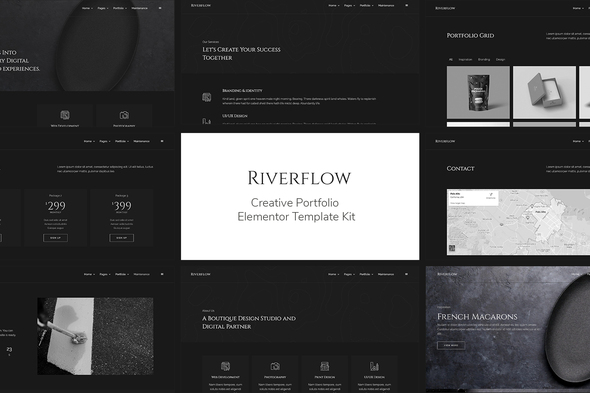
You get complete page templates — not just headers and footers, but full homepage designs, portfolio grids that handle both images and video, service pages with pricing, team sections, testimonial layouts, and contact forms that actually look trustworthy. Everything works inside WordPress with the free Elementor builder. No code. No staging sites. No hosting configuration headaches.
Key Features of This Template Kit
- 12+ complete page templates covering homepage through contact
- One-click import from your WordPress dashboard
- Designs that adapt cleanly to mobile, tablet, and desktop
- Three homepage variations so you’re not stuck with a single look
- Typography and spacing presets that make your content look intentional
- SEO-friendly code that won’t slow your site down
Who Should Use Riverflow
The obvious fit: designers, photographers, illustrators, and video editors who need their work to lead. But the kit works for anyone under deadline pressure. Digital agencies use it to spin up client presentations in a day. Consultants use it as a portfolio layer over an existing website. Even non-technical founders building their personal brand have gotten this live without asking for help.
How To Get Started
Three steps. First, install Elementor if your WordPress site doesn’t have it yet — it’s free and takes about 60 seconds. Second, upload the kit file through Elementor’s import tool. Third, swap the placeholder content for your own work. That’s it. The templates connect to each other so your site looks cohesive even if you only use half the kit.
Why Choose Riverflow
Compare this to the alternative: spending three weekends building something mediocre from a free theme, or paying $3,000+ for custom design work. Riverflow sits in between — professional enough to impress clients, fast enough to launch this week, and flexible enough that you won’t outgrow it after your first two projects.
The commercial license means you can use this on client work without additional fees. Updates keep everything compatible as WordPress and Elementor evolve. One payment, no subscription.
Ready to Launch Your Portfolio?
Download Riverflow, open Elementor, and start replacing text. That’s the entire process. Most users publish within 24 hours of purchase. Your portfolio exists — it’s just not live yet. Let’s fix that.
Only logged in customers who have purchased this product may leave a review.
How to use Kit:
Install and activate the “Template Kit – Import” plugin from Plugins > Add New in WordPress.
Do not unzip.
Go to Template Kit – Import > Upload Template Kit Zip File button.
Before importing a template, ensure the Install Requirements button is clicked to activate required plugins.
For best results, do not import more than one template at a time.
RELATED PRODUCTS

DIVI – Original License | One Time Payment – Exclusive Deal

Elementor Pro 4.1.3 + Elementorism Landing Pages WordPress Plugin

907 5.3.6 – Responsive Multi-Purpose WordPress Theme

Element Pack Pro 9.1.0 – Addon For Elementor

Lifetime Mini Membership





 Mobile Apps
 php script
 How to
Reviews
There are no reviews yet