
Rolso – Logistic Company Elementor Template Kit
- Updated on May 2, 2026
- 100% Original Product & Well Documented
- Unlimited Domain Usage
*Important Note:
The image should not be Part of the template kit. You need to use your own reliable Source.


- Coupon "b2g1" has expired.
- Coupon "b2g1" has expired.
- Coupon "b2g1" has expired.
- Coupon "b2g1" has expired.
- Coupon "b2g1" has expired.
Original price was: ₹999.00.₹299.00Current price is: ₹299.00.
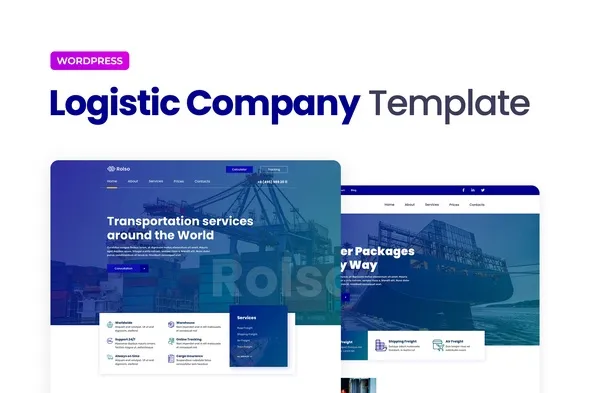
Rolso gives cargo and transport businesses a professional website without the designer price tag. Pre-built pages, mobile-ready layouts, and industry-specific sections — customize in Elementor and go live today.
- Secured & Scanned by Virus total & McAfee.
- Access to Free updates for Lifetime
- All products are Under GPL License (Unlimited Domain Usage)
- We Not Provide any Support For this Product

Lifetime Membership
Access 6700+ Premium WordPress Themes & Plugins, Elementor Templates, Mobile Apps, PHP scripts with Lifetime Updates.
Join Premium MembershipRecently Viewed
Rolso Elementor Template Kit for Logistics and Cargo Businesses
Let’s be honest: most logistics websites look like they were built in 2008. Generic stock photos, clunky layouts, zero personality. When a potential client lands on your page, they make split-second judgments about whether you’re legit. Rolso fixes that. It’s a logistics website template that actually looks like a logistics company — clean lines, professional structure, and the trust signals your clients expect.
No coding. No hiring a developer who doesn’t understand shipping. No spending three months wrestling with a WordPress theme that was clearly built for bloggers, not freight brokers. Just install, import, swap your logo, and publish.
What You Get with Rolso
Six complete page layouts, each designed for the logistics industry:
- Homepage — hero section, services breakdown, real numbers (not fluff), team cards, and client testimonials)
- About Us — credibility sections, company history, what sets you apart
- Services — cargo handling, freight forwarding, warehousing, specialized transport
- Contact — forms, map integration, office locations, phone numbers
- Blog templates — industry news, shipping tips, company updates
- Fully responsive — looks sharp on phones, tablets, and desktops
Built for Speed and Simplicity
Here’s the timeline: traditional web development takes 4-8 weeks minimum. With Rolso, you’re live in an afternoon. Install Elementor, import the template kit, add your colors and photos, hit publish.
Why it works: no premium plugins needed. If you run Elementor Free (or Pro), you’re set. The code is clean — your pages load fast, which matters for both Google rankings and user patience.
Who Should Buy This Template Kit
Rolso fits:
- Freight forwarders tired of clunky, outdated websites
- Transport companies ready to look as professional as their service
- Shipping businesses that want modern design without the agency quote
- Warehousing firms showcasing their capabilities online
- Logistics startups building credibility from day one
Small local operation or growing fleet? The layouts scale with you.
How to Use Rolso
Three steps:
1. Install Elementor on your WordPress site (free version works fine)
2. Download and upload the Rolso kit
3. Import pages, swap content, publish
Documentation is included. If you hit a snag, reach out and we’ll help.
Why Choose Rolso Over Other Options
Generic themes give you 200 features you’ll never touch and miss the stuff you actually need — service area maps, fleet showcases, freight rate sections. Rolso ships industry-ready because it was built for logistics, not adapted from a portfolio theme.
Commercial license included. Use it for your own business or client projects. One payment, lifetime access to updates.
compared to a web agency, you save $3,000+. Compared to building from scratch, you reclaim weeks of your life. The result: a logistics website that actually converts.
Ready to Launch?
Get Rolso, customize in Elementor, and have your new site live before dinner. Walk competitors who are still deciding whether to hire a developer.
Only logged in customers who have purchased this product may leave a review.
How to use Kit:
Install and activate the “Template Kit – Import” plugin from Plugins > Add New in WordPress.
Do not unzip.
Go to Template Kit – Import > Upload Template Kit Zip File button.
Before importing a template, ensure the Install Requirements button is clicked to activate required plugins.
For best results, do not import more than one template at a time.
RELATED PRODUCTS

DIVI – Original License | One Time Payment – Exclusive Deal

Elementor Pro 4.1.3 + Elementorism Landing Pages WordPress Plugin

907 5.3.6 – Responsive Multi-Purpose WordPress Theme

Element Pack Pro 9.1.0 – Addon For Elementor

Lifetime Mini Membership





 Mobile Apps
 php script
 How to
Reviews
There are no reviews yet