
Securize – CCTV & Security Elementor Template Kit
- Updated on May 2, 2026
- 100% Original Product & Well Documented
- Unlimited Domain Usage
*Important Note:
The image should not be Part of the template kit. You need to use your own reliable Source.


- Coupon "b2g1" has expired.
- Coupon "b2g1" has expired.
- Coupon "b2g1" has expired.
- Coupon "b2g1" has expired.
- Coupon "b2g1" has expired.
Original price was: ₹999.00.₹299.00Current price is: ₹299.00.
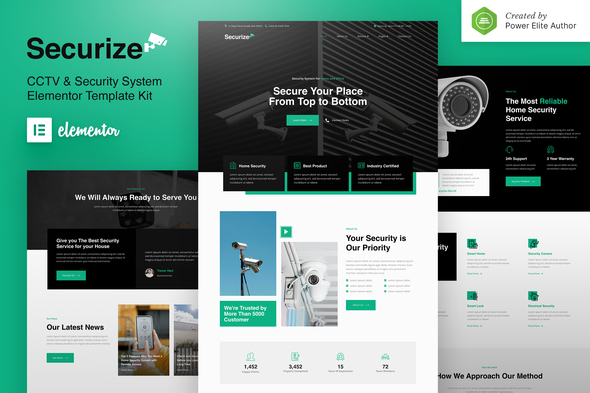
Launch a security company website that actually converts — without writing a single line of code. The Securize Elementor Template Kit gives your CCTV or security business a professional online presence in under an hour.
- Secured & Scanned by Virus total & McAfee.
- Access to Free updates for Lifetime
- All products are Under GPL License (Unlimited Domain Usage)
- We Not Provide any Support For this Product

Lifetime Membership
Access 6700+ Premium WordPress Themes & Plugins, Elementor Templates, Mobile Apps, PHP scripts with Lifetime Updates.
Join Premium MembershipRecently Viewed
CCTV and Security Website Template for Elementor
Most security companies lose clients before they even pick up the phone. Why? Their website looks like it was built in 2009. Securize fixes that. It’s a complete, ready-to-use website kit built specifically for CCTV installers, alarm companies, and security service providers. No coding. No waiting. Just a professional site that makes potential clients trust you enough to call.
What Is the Securize Template Kit?
Think of it as a website-in-a-box for the security industry. Securize comes with multiple pages and sections designed for what clients actually look for: your services, certifications, years in business, and how to reach you. You drag, drop, and edit — swapping in your logo, colors, and company details. Done in an afternoon.
Key Features of This Security Website Template
- Homepage with hero section, service showcase, and credibility boosters (certifications, testimonials, service areas)
- Service pages for CCTV installation, alarm systems, 24/7 monitoring, and access control
- About page template that lets you highlight your team, credentials, and why clients should pick you
- Contact page with form, map placeholder, and direct call-to-action buttons
- Looks sharp on phones — because that’s where half your traffic comes from
- Color palette and typography chosen to communicate authority and dependability
- Works with both the free Elementor plugin and Elementor Pro
Who Is This Template Kit For?
CCTV technicians launching their own business. Small security firms tired of paying agencies for basic sites. Freelancers building portfolios for security clients. Home security providers who want to show pricing and packages without the headache.
If you protect people and property, your website should reflect the same standard. Securize gives you that credibility on day one.
How to Use the Securize Template Kit
Here’s the honest timeline: 30 minutes, start to finish. Install Elementor on your WordPress site. Import the kit. Pick the pages you want — homepage, services, about, contact, or all of them. Swap in your own text, images, and branding. Hit publish. That’s literally it. No development knowledge, no back-and-forth with contractors.
Why Buy the Securize Template Kit?
You could spend $3,000+ on a developer who doesn’t understand the security industry. Or grab a generic template that looks like everyone else’s. Securize is neither — it’s industry-focused, affordable, and built by people who know what security clients look for online.
- Pay once, use forever — no subscriptions eating into your profits
- Commercial license included — build unlimited client sites with this kit
- Free updates whenever we expand or improve the design
- Direct support if you hit a snag during setup
- Download immediately — start building tonight
It’s simple enough for a first-time website owner. But experienced designers use it too — because sometimes you need to deliver a solid site in hours, not days.
Your Site Is Minutes Away
That outdated website is costing you leads right now. Download the Securize Elementor Template Kit, customize it with your details, and put something professional in front of your audience today. One payment. Instant access. Your security business deserves better than a template from 2014.
Only logged in customers who have purchased this product may leave a review.
How to use Kit:
Install and activate the “Template Kit – Import” plugin from Plugins > Add New in WordPress.
Do not unzip.
Go to Template Kit – Import > Upload Template Kit Zip File button.
Before importing a template, ensure the Install Requirements button is clicked to activate required plugins.
For best results, do not import more than one template at a time.
RELATED PRODUCTS

DIVI – Original License | One Time Payment – Exclusive Deal

Elementor Pro 4.1.3 + Elementorism Landing Pages WordPress Plugin

907 5.3.6 – Responsive Multi-Purpose WordPress Theme

Element Pack Pro 9.1.0 – Addon For Elementor

Lifetime Mini Membership





 Mobile Apps
 php script
 How to
Reviews
There are no reviews yet