
Sinau – Online Course & Education Elementor Template Kit
- Updated on May 3, 2026
- 100% Original Product & Well Documented
- Unlimited Domain Usage
*Important Note:
The image should not be Part of the template kit. You need to use your own reliable Source.


Original price was: ₹999.00.₹299.00Current price is: ₹299.00.
Launch a course website without hiring a developer. Sinau gives you 15+ pages — home, courses, pricing, blog, and more — ready to drop into WordPress tonight. Commercial license included for client work too.
- Secured & Scanned by Virus total & McAfee.
- Access to Free updates for Lifetime
- All products are Under GPL License (Unlimited Domain Usage)
- We Not Provide any Support For this Product

Lifetime Membership
Access 6700+ Premium WordPress Themes & Plugins, Elementor Templates, Mobile Apps, PHP scripts with Lifetime Updates.
Join Premium MembershipRecently Viewed
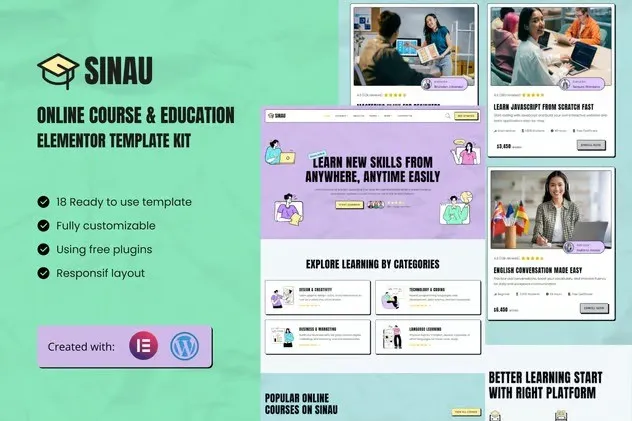
Sinau Elementor Template Kit for Online Courses and Education
Forget expensive developers and page builder frustration. Sinau is an Elementor template kit designed for course creators, educators, and training platforms who want to launch faster. Import 15+ pre-built pages into your WordPress site, swap in your branding, and go live. No monthly fees. No subscriptions. Just a professional site that actually works.
What You Get with This Education Template
These aren’t random layouts thrown together. Sinau covers the full student journey — homepages, course catalogs, individual lesson pages, instructor profiles, pricing tables, blog, contact forms. Everything an online course business needs, already styled and ready to import.
The layout keeps students focused. No cluttered menus or confusing navigation. Clear sections, readable text, and calls-to-action that actually convert.
Key Features That Set Sinau Apart
- 15+ pre-built pages — complete website, not just a homepage
- Responsive on mobile, tablet, and desktop
- Uses free Elementor and WordPress — no pro plugins needed
- Drag-and-drop editing — change fonts, colors, and content with clicks
- Commercial license — use for your own site or client projects
- One-time payment — no recurring costs, ever
- Free lifetime updates when new versions drop
- Direct support from the team that built it
Who Is This Elementor Template Kit For?
First-time course creators who need a professional site without the agency price tag. Freelance designers who want to deliver faster. Tutoring services, corporate training portals, membership sites — anyone who needs a solid starting point without a rigid framework locking them in.
Designers especially appreciate the commercial license. One purchase, client work covered, next project.
How to Use Sinau
Set up takes under 30 minutes. Install the free Elementor plugin, upload the template kit, and import the pages you need. Replace the placeholder content with your logo, copy, and courses. The hard design work is already done — you just make it yours.
No code. No design skills. If you can click and type, you can build this site.
Why Buy This Template Kit
A basic custom course website typically costs $2,000-$5,000 when you add up design, development, and revisions. Sinau gives you the same professional result at a fraction of that price. You get instant access, a license covering personal and client use, and a template built by people who understand how education sites work.
Updates come free forever. When WordPress or Elementor changes, Sinau updates with them. Your site won’t break because a third-party tool shifted.
Ready to Get Started?
Build your course website with a tool designed for the job. Download Sinau now and have a professional education site live today. One payment covers the template, all future updates, and support whenever you need it.
Only logged in customers who have purchased this product may leave a review.
How to use Kit:
Install and activate the “Template Kit – Import” plugin from Plugins > Add New in WordPress.
Do not unzip.
Go to Template Kit – Import > Upload Template Kit Zip File button.
Before importing a template, ensure the Install Requirements button is clicked to activate required plugins.
For best results, do not import more than one template at a time.
RELATED PRODUCTS

DIVI – Original License | One Time Payment – Exclusive Deal

Elementor Pro 4.1.3 + Elementorism Landing Pages WordPress Plugin

907 5.3.6 – Responsive Multi-Purpose WordPress Theme

Element Pack Pro 9.1.0 – Addon For Elementor

Lifetime Mini Membership





 Mobile Apps
 php script
 How to

Reviews
There are no reviews yet