
Skydiva – Skydiving & Extreme Air Sports Elementor Template Kit
- Updated on April 28, 2026
- 100% Original Product & Well Documented
- Unlimited Domain Usage
*Important Note:
The image should not be Part of the template kit. You need to use your own reliable Source.


Original price was: ₹999.00.₹299.00Current price is: ₹299.00.
8 pre-built pages. Drag-and-drop setup. Your skydiving site live today. Commercial license included.
- Secured & Scanned by Virus total & McAfee.
- Access to Free updates for Lifetime
- All products are Under GPL License (Unlimited Domain Usage)
- We Not Provide any Support For this Product

Lifetime Membership
Access 6700+ Premium WordPress Themes & Plugins, Elementor Templates, Mobile Apps, PHP scripts with Lifetime Updates.
Join Premium MembershipRecently Viewed
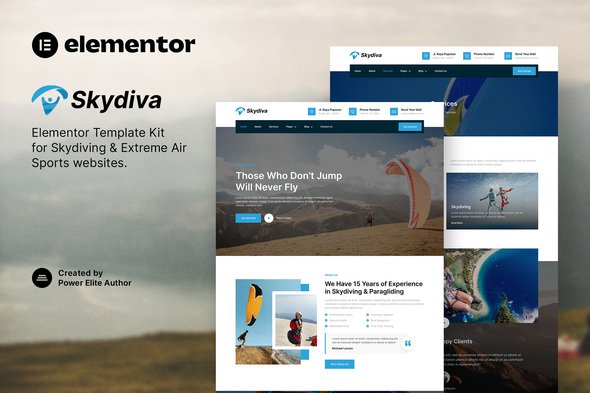
Skydiva Elementor Template Kit – Your Skydiving Website Goes Live Today
You’ve got the footage. You’ve got the bookings to prove it. Now you need a website that matches the adrenaline. Skydiva is a ready-to-use Elementor template kit built specifically for skydiving operations, paragliding schools, wind tunnel facilities, bungee operators, and every extreme air sport in between.
No coding required. No week-long development cycles. Install, drop in your photos, and watch your professional skydiving website take shape in an afternoon.
What’s Inside This Template Kit
Eight complete pages designed for adventure sports businesses:
- Homepage with hero section, service highlights, and trust-building testimonials
- About page for instructor bios and facility credentials
- Services/single experience pages built for skydiving, tandem jumps, AFF training, and group bookings
- Booking or contact page with clear calls-to-action
- Gallery page designed for high-impact action photography
- Pricing section that handles multiple experience tiers cleanly
- Blog layout for safety articles, jump reports, and SEO content
- Contact page with location, hours, and booking info
Every section uses native Elementor widgets. The template works with the free Elementor plugin. You don’t need Elementor Pro, premium add-ons, or custom code to get this running.
Who Should Buy This Template Kit
Freelance web designers building sites for adventure sports clients. Skip billing 20 hours for layout and design. Drop in Skydiva, customize colors and photos, deliver a polished result in a fraction of the time. The commercial license covers client projects.
Small skydiving businesses that can’t justify agency fees. You know your audience. You have great photos. Skydiva gives you the structure to put both online without hiring anyone.
Marketing teams at multi-location adventure sport companies. Consistency matters. Skydiva’s clean layouts and organized structure scale across different locations without looking like cookie-cutter template sites.
Built for Speed, Built to Last
Lightweight code. No bloat. Pages load fast even with large skydiving photography. The template follows WordPress best practices and plays nicely with caching plugins, SEO tools, and analytics.
- Pay once. No subscriptions, ever
- Free updates as WordPress and Elementor evolve
- Support for installation questions and troubleshooting
- Commercial license — use it for clients, yourself, or both
Set It Up in Three Steps
1. Install the free Elementor plugin on your WordPress site. 2. Upload the Skydiva template kit from your WordPress dashboard. 3. Import the pages you want, swap in your photos and text, and publish.
Beginners finish this in under an hour. Designers appreciate the organized structure and clean overrides. Agencies love the fast turnaround.
Ready to Get Started?
Download Skydiva today. Your skydiving website will be live before your next jump session.
Only logged in customers who have purchased this product may leave a review.
How to use Kit:
Install and activate the “Template Kit – Import” plugin from Plugins > Add New in WordPress.
Do not unzip.
Go to Template Kit – Import > Upload Template Kit Zip File button.
Before importing a template, ensure the Install Requirements button is clicked to activate required plugins.
For best results, do not import more than one template at a time.
RELATED PRODUCTS

DIVI – Original License | One Time Payment – Exclusive Deal

Elementor Pro 4.1.3 + Elementorism Landing Pages WordPress Plugin

907 5.3.6 – Responsive Multi-Purpose WordPress Theme

Element Pack Pro 9.1.0 – Addon For Elementor

Lifetime Mini Membership





 Mobile Apps
 php script
 How to
Reviews
There are no reviews yet