
StackStudio – A Minimalist Photography Studio & Portfolio Elementor Kit
- Updated on May 3, 2026
- 100% Original Product & Well Documented
- Unlimited Domain Usage
*Important Note:
The image should not be Part of the template kit. You need to use your own reliable Source.


- Coupon "b2g1" has expired.
- Coupon "b2g1" has expired.
- Coupon "b2g1" has expired.
- Coupon "b2g1" has expired.
- Coupon "b2g1" has expired.
Original price was: ₹999.00.₹299.00Current price is: ₹299.00.
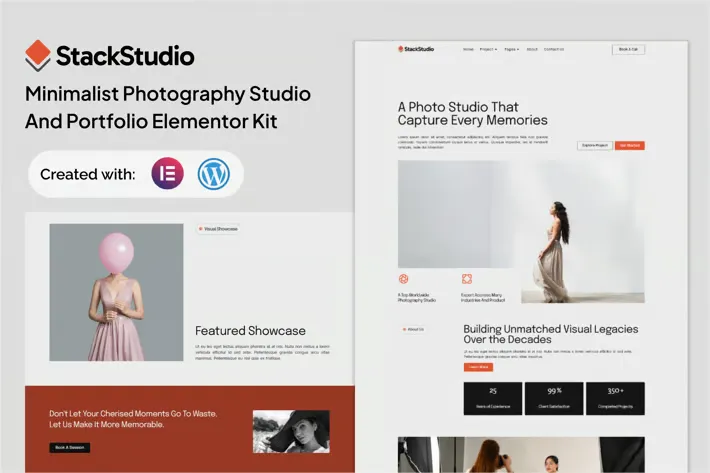
Showcase your photos without the website headache. StackStudio gives you a complete photography portfolio template — gallery layouts, about pages, service sections, and contact forms, all ready to customize in Elementor. No code. No designer needed. Just your work, front and center.
- Secured & Scanned by Virus total & McAfee.
- Access to Free updates for Lifetime
- All products are Under GPL License (Unlimited Domain Usage)
- We Not Provide any Support For this Product

Lifetime Membership
Access 6700+ Premium WordPress Themes & Plugins, Elementor Templates, Mobile Apps, PHP scripts with Lifetime Updates.
Join Premium MembershipRecently Viewed
StackStudio Elementor Template Kit for Photography Portfolios
You didn’t spend years perfecting your craft just to have a clunky website get in the way. StackStudio strips everything back to what matters — your photos. Clean gallery layouts, generous spacing, and typography that doesn’t compete with your work. Built for Elementor, so you can have a professional site running today without touching a single line of code.
What’s Included
Six homepage layouts. Multiple portfolio grid styles (masonry and standard). An about page designed for photographer stories, not generic bio filler. Service and pricing pages that actually convert. Contact forms and booking sections. Everything a functioning photography business site needs, none of the bloat.
Responsive across devices, global styling controls built in, and your images stay the star no matter where someone views them.
Key Features of StackStudio
- 6 homepage variations with hero sections and featured work displays
- Masonry and grid gallery layouts that handle hundreds of images
- About and biography sections tailored for photographer storytelling
- Service pages with space for 6+ offerings
- Contact form and booking section ready out of the box
- Fully responsive — tested on mobile, tablet, and desktop
- Global color and typography controls via Elementor
Who Is This For
StackStudio works if you’re:
- A freelancer tired of outdated WordPress themes that don’t fit your style
- A studio managing multiple photographers or service packages
- A portrait, wedding, or commercial photographer who needs clients to take you seriously online
- An educator or workshop leader building credibility
If you want a portfolio that looks like you hired a designer but without the designer price tag, this is for you.
Setup in Three Steps
Install Elementor (free plugin). Import the template kit from your WordPress dashboard. Swap the placeholder content with your own images and text using drag-and-drop. That’s it — no developer required, no ongoing subscriptions.
Why StackStudio Over Other Options
Most portfolio themes slow your site down and nickel-and-dime you with monthly fees. StackStudio is a one-time purchase with a commercial license included — use it for your own site or client work without additional costs. The lightweight code means faster load times, which matters when potential clients are browsing on their phones.
You own the site completely. Export it, move hosts, edit everything. No platform lock-in.
Download and Launch This Week
Instant delivery. Lifetime updates. Commercial license covers personal projects and client work. Get StackStudio and put your photography where it belongs — in front of people.
Only logged in customers who have purchased this product may leave a review.
How to use Kit:
Install and activate the “Template Kit – Import” plugin from Plugins > Add New in WordPress.
Do not unzip.
Go to Template Kit – Import > Upload Template Kit Zip File button.
Before importing a template, ensure the Install Requirements button is clicked to activate required plugins.
For best results, do not import more than one template at a time.
RELATED PRODUCTS

DIVI – Original License | One Time Payment – Exclusive Deal

Elementor Pro 4.1.3 + Elementorism Landing Pages WordPress Plugin

907 5.3.6 – Responsive Multi-Purpose WordPress Theme

Element Pack Pro 9.1.0 – Addon For Elementor

Lifetime Mini Membership





 Mobile Apps
 php script
 How to
Reviews
There are no reviews yet