
Sybergad – Cybersecurity Services Elementor Template Kit
- Updated on May 3, 2026
- 100% Original Product & Well Documented
- Unlimited Domain Usage
*Important Note:
The image should not be Part of the template kit. You need to use your own reliable Source.


- Coupon "b2g1" has expired.
- Coupon "b2g1" has expired.
- Coupon "b2g1" has expired.
- Coupon "b2g1" has expired.
- Coupon "b2g1" has expired.
Original price was: ₹999.00.₹299.00Current price is: ₹299.00.
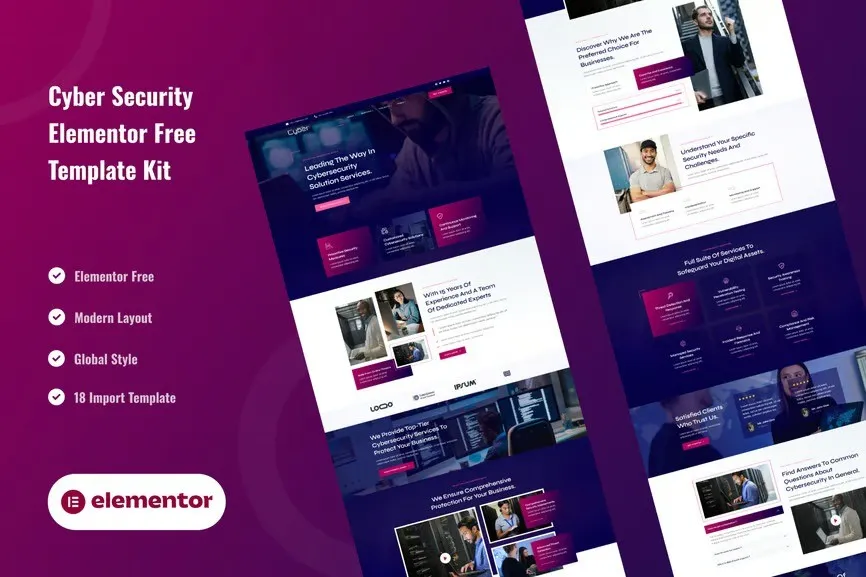
A professional, conversion-focused website template designed specifically for cybersecurity companies. Build instant credibility with clients using pre-built layouts for services, security stats, and team showcases — no coding required. Get it now and launch your security firm website today.
- Secured & Scanned by Virus total & McAfee.
- Access to Free updates for Lifetime
- All products are Under GPL License (Unlimited Domain Usage)
- We Not Provide any Support For this Product

Lifetime Membership
Access 6700+ Premium WordPress Themes & Plugins, Elementor Templates, Mobile Apps, PHP scripts with Lifetime Updates.
Join Premium MembershipRecently Viewed
Professional Cybersecurity Services Website Template Kit
Your expertise deserves a website that commands trust. Sybergad gives cybersecurity consultants and security firms a ready-to-use website design built specifically for the industry. No staring at blank pages, no hiring developers — just pick your layout, drop in your content, and publish.
The template kit includes everything you need to show off your security services with authority. Service showcases, statistics sections, team member displays, and client testimonial layouts — all designed to convert visitors into paying clients. Every element works on mobile, tablet, and desktop.
What You Get With Sybergad
This is a complete Elementor template kit, meaning you get pre-designed pages and sections that work together seamlessly. The layouts are structured for cybersecurity businesses: dark color schemes that feel technical and serious, clean typography that builds credibility, and call-to-action sections placed exactly where they drive results.
- Pre-built homepage with hero section, service overview, and statistics counters
- Dedicated service pages with icon-based feature layouts
- Team showcase section to display your security experts
- Client testimonial blocks for building social proof
- Contact and quote request forms designed for lead capture
- Fully responsive layouts that look great on every device
Who It’s Built For
Sybergad works best for cybersecurity consultants launching their personal brand, managed security service providers (MSSPs) needing a professional company site, IT security firms looking to refresh their online presence, and independent security researchers building credibility with prospective clients.
If you offer penetration testing, vulnerability assessments, security audits, or incident response services, this template kit gives you the professional foundation you need to compete with larger firms.
How to Use It
Sybergad runs inside WordPress with the Elementor page builder. No coding knowledge required. Install the template kit through Elementor, import the layouts you want, customize the text and images with Elementor’s drag-and-drop editor, and publish. That’s it. Most users launch their complete website in a single afternoon.
Why Buy This Template Kit
The biggest difference? You get commercial licensing included, meaning you can use this template for client projects without paying extra. Instant download means you start building in minutes. Lifetime free updates keep your site current as Elementor and WordPress evolve. And if you hit any snags, lifetime support connects you with experts who know the product.
No subscription fees. No hidden costs. One affordable price gets you professional cybersecurity web design without the agency price tag.
Ready to Launch Your Security Website?
Stop delaying your online presence. Sybergad gives you the professional, trustworthy design that cybersecurity clients expect — without the professional price tag. Download the template kit today, customize it to match your brand, and start attracting clients tomorrow.
Only logged in customers who have purchased this product may leave a review.
How to use Kit:
Install and activate the “Template Kit – Import” plugin from Plugins > Add New in WordPress.
Do not unzip.
Go to Template Kit – Import > Upload Template Kit Zip File button.
Before importing a template, ensure the Install Requirements button is clicked to activate required plugins.
For best results, do not import more than one template at a time.
RELATED PRODUCTS

DIVI – Original License | One Time Payment – Exclusive Deal

Elementor Pro 4.1.3 + Elementorism Landing Pages WordPress Plugin

907 5.3.6 – Responsive Multi-Purpose WordPress Theme

Element Pack Pro 9.1.0 – Addon For Elementor

Lifetime Mini Membership





 Mobile Apps
 php script
 How to
Reviews
There are no reviews yet