
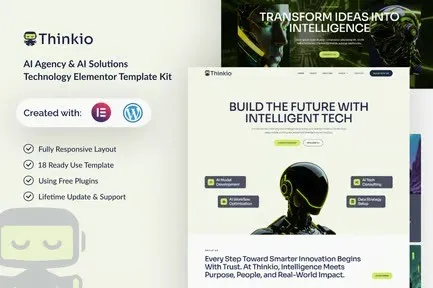
Thinkio – AI Agency & AI Solutions Technology Elementor Template Kit
- Updated on May 3, 2026
- 100% Original Product & Well Documented
- Unlimited Domain Usage
*Important Note:
The image should not be Part of the template kit. You need to use your own reliable Source.


Original price was: ₹999.00.₹299.00Current price is: ₹299.00.
Build your AI agency site in an afternoon. Thinkio gives you 10+ ready-to-use pages for Elementor — dark theme, conversion layouts, and a commercial license for client work.
- Secured & Scanned by Virus total & McAfee.
- Access to Free updates for Lifetime
- All products are Under GPL License (Unlimited Domain Usage)
- We Not Provide any Support For this Product

Lifetime Membership
Access 6700+ Premium WordPress Themes & Plugins, Elementor Templates, Mobile Apps, PHP scripts with Lifetime Updates.
Join Premium MembershipRecently Viewed
Best AI Agency Website Template for Elementor
Thinkio was built for one reason: helping AI agencies look as impressive online as they are in practice. This Elementor Template Kit gives you 10+ pages with that dark, futuristic aesthetic — glowing accents, sharp typography, the whole package. You can have a live site before dinner.
What Thinkio Offers
No more wrestling with page builders for days. This kit ships with complete page layouts for home, about, services, portfolio, team, pricing, blog, and contact — all formatted and ready to customize. The design team clearly understood what tech clients actually want: clean data visualization spaces, room to explain complex services without overwhelm, and contact points that don’t feel like pushy sales funnels.
- 12 pages total: home, about, services (3 variations), portfolio, team, pricing, FAQ, blog, contact, and coming soon page
- Mobile-first responsive design — tested across devices, not just desktop
- Dark theme default, easy to adjust to your brand colors
- Pre-built hero sections, service grids, and testimonial sliders
Key Features of This Template Kit
Here’s what actually matters: the hero sections are bold enough to stop scroll. The services layout handles technical explanations without looking cluttered. Pricing tables are built for SaaS tiers, not generic product boxes. And if you’re publishing blog content about AI or machine learning, the blog templates are structured for readability and SEO.
- AI-specific section patterns: feature showcases, data metric displays, tech stack sections
- Team grid layout with hover effects — great for showcasing your experts
- Pricing tables configured for monthly/annual SaaS billing
- Blog templates with optimal heading hierarchy for tech articles
Who It’s For
AI consulting firms, ML startups, data science agencies, tech consultancies — anyone selling intelligence services needs a site that signals competence. Thinkio positions your brand as established, not cobbled-together.
How To Use It
Requires the free Elementor plugin (no Pro needed for most features) and the free Hello Elementor theme. Import the kit, swap the placeholder text with your own content, adjust colors, hit publish. Most users are live within 2-3 hours.
Why Get Thinkio Today
Generic website builders charge monthly. This is a one-time purchase with a commercial license — use it for your own agency or client projects. You’ll also get free lifetime updates, so the template stays current as Elementor evolves.
- Instant download — files in your inbox immediately after purchase
- Commercial license — use for yourself or bill clients for implementation
- Lifetime updates included — no surprise costs later
- Works with free plugins only — no Pro subscription required
Ready to Get Started?
Download Thinkio, install Elementor, and have your agency site live this week. Everything you need to look professional and book more clients — one kit, one afternoon.
Only logged in customers who have purchased this product may leave a review.
How to use Kit:
Install and activate the “Template Kit – Import” plugin from Plugins > Add New in WordPress.
Do not unzip.
Go to Template Kit – Import > Upload Template Kit Zip File button.
Before importing a template, ensure the Install Requirements button is clicked to activate required plugins.
For best results, do not import more than one template at a time.
RELATED PRODUCTS

DIVI – Original License | One Time Payment – Exclusive Deal

Elementor Pro 4.2.3 + Elementorism Landing Pages WordPress Plugin

907 5.3.6 – Responsive Multi-Purpose WordPress Theme

Element Pack Pro 9.1.0 – Addon For Elementor






 Mobile Apps
 php script
 How to
Reviews
There are no reviews yet