
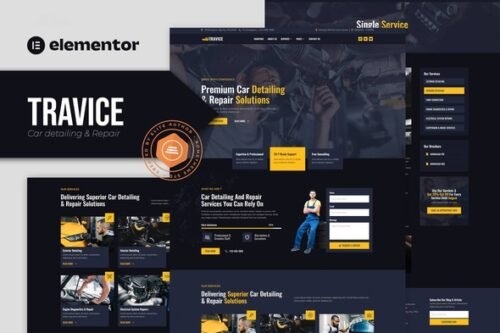
Travice – Car Detailing Service & Car Repair Elementor Template Kit
- Updated on April 29, 2026
- 100% Original Product & Well Documented
- Unlimited Domain Usage

*Important Note:
The image should not be Part of the template kit. You need to use your own reliable Source.


Original price was: ₹999.00.₹299.00Current price is: ₹299.00.
A sleek, conversion-focused website template built for car detailing pros and auto repair shops. Get a polished online presence in minutes — no coding required. Buy it today.
- Secured & Scanned by Virus total & McAfee.
- Access to Free updates for Lifetime
- All products are Under GPL License (Unlimited Domain Usage)
- We Not Provide any Support For this Product

Lifetime Membership
Access 6700+ Premium WordPress Themes & Plugins, Elementor Templates, Mobile Apps, PHP scripts with Lifetime Updates.
Join Premium MembershipRecently Viewed
Travice Car Detailing Elementor Template Kit — Your New Website in Hours, Not Weeks
You started your car detailing business to work on cars — not wrestle with website code. Travice gives you a stunning, professional website that looks like you spent thousands on design, without touching a single line of code. It’s a ready-to-use Elementor template kit built specifically for auto detailing shops, car repair services, and vehicle modification businesses.
Every section, layout, and interaction is designed with one goal in mind: helping local car care businesses look credible and book more jobs. From your hero section to your services page, Travice handles the heavy lifting so you can focus on what you do best.
What You Get With the Travice Template Kit
This isn’t a generic website theme dressed up for cars. Travice is a purpose-built layout system that works inside Elementor — the most popular WordPress page builder on the planet. That means if you can drag and drop, you can edit this template. No developers. No designers. No ongoing fees.
- Pre-built homepage, services, about, and contact pages ready to publish
- Mobile-responsive layouts that look sharp on every phone and tablet
- Service showcase sections with pricing tables and booking prompts
- Portfolio and gallery layouts to show off your detailing work
- Team member profiles, testimonials, and FAQ sections built in
- One-click color and font adjustments to match your brand
Who Is This Template Kit For?
Travice works best for auto detailing businesses, full-service car repair shops, car modification specialists, mobile detailing operators, and mechanic businesses that want a modern website without the agency price tag. Whether you’re a one-person operation or running a small team, this template scales to fit your needs.
If you’ve been putting off building your website because the process feels overwhelming or expensive, this kit removes every excuse. It’s affordable, it’s instant, and it’s designed to get your phone ringing.
How to Use This Template Kit
Here’s the simple process: install the free Elementor plugin on your WordPress site, upload the kit, and start editing. Swap in your logo, upload photos of your shop and completed work, update your phone number and address, and you’re live. Most users are fully operational within a single afternoon. The included documentation walks you through every step — even if you’ve never touched WordPress before.
Why Buy the Travice Template Kit?
Compared to hiring a web designer, you save hundreds — sometimes thousands — of dollars. Compared to using a generic drag-and-drop site builder, you get a design that actually understands the car detailing industry. Every visual choice, every section layout, every button placement is optimized for service-based businesses like yours.
This is a premium template kit at an affordable one-time price. No subscriptions. No hidden costs. Download it instantly and start building your site today.
Ready to Get Started?
Stop delaying your online presence. The Travice Elementor Template Kit gives you everything you need to launch a professional car detailing website in hours. Buy it once, use it forever, and watch your business grow. Download now and start building your site before your competitors do.
Only logged in customers who have purchased this product may leave a review.
How to use Kit:
Install and activate the “Template Kit – Import” plugin from Plugins > Add New in WordPress.
Do not unzip.
Go to Template Kit – Import > Upload Template Kit Zip File button.
Before importing a template, ensure the Install Requirements button is clicked to activate required plugins.
For best results, do not import more than one template at a time.
RELATED PRODUCTS

DIVI – Original License | One Time Payment – Exclusive Deal

Elementor Pro 4.1.3 + Elementorism Landing Pages WordPress Plugin

907 5.3.6 – Responsive Multi-Purpose WordPress Theme

Element Pack Pro 9.1.0 – Addon For Elementor

Lifetime Mini Membership





 Mobile Apps
 php script
 How to
Reviews
There are no reviews yet