
UpNext – Technology Blog & Magazine Elementor Template Kit
- Updated on May 3, 2026
- 100% Original Product & Well Documented
- Unlimited Domain Usage
*Important Note:
The image should not be Part of the template kit. You need to use your own reliable Source.


- Coupon "b2g1" has expired.
- Coupon "b2g1" has expired.
- Coupon "b2g1" has expired.
- Coupon "b2g1" has expired.
- Coupon "b2g1" has expired.
Original price was: ₹999.00.₹299.00Current price is: ₹299.00.
Launch a stunning technology blog in hours. UpNext gives you 8+ pre-designed pages, modern layouts, and zero coding required — ready to publish today. Get instant access now
- Secured & Scanned by Virus total & McAfee.
- Access to Free updates for Lifetime
- All products are Under GPL License (Unlimited Domain Usage)
- We Not Provide any Support For this Product

Lifetime Membership
Access 6700+ Premium WordPress Themes & Plugins, Elementor Templates, Mobile Apps, PHP scripts with Lifetime Updates.
Join Premium MembershipRecently Viewed
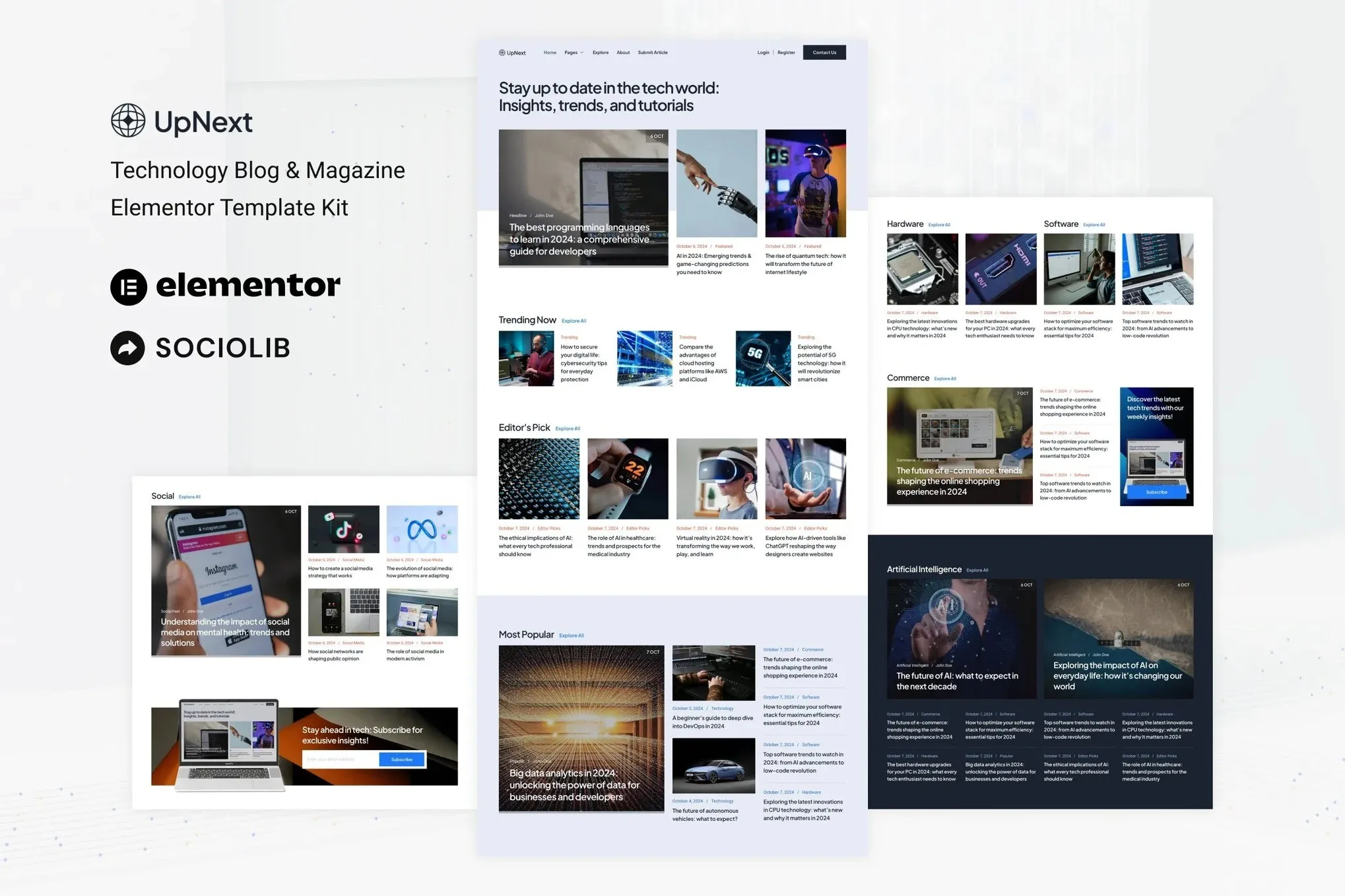
UpNext: Elementor Template Kit for Technology Blogs and Magazines
Building a professional technology publication from scratch takes time you probably don’t have. UpNext eliminates that wait. This complete Elementor template kit gives you a modern, sleek tech blog or magazine website — pre-built, pre-designed, and ready to customize in minutes. No coding. No design degree. No problems.
What You Get with UpNext
Everything you need to launch fast and look professional from day one. UpNext isn’t a basic layout — it’s a complete publication system built for tech content.
- 8+ pre-designed pages covering every section a tech site needs
- Modern homepage with featured articles, trending posts, and category grids
- Clean single post template optimized for readability and ad placement
- Category and archive pages that organize content beautifully
- About, contact, and newsletter signup pages included
- Fully responsive — looks perfect on phones, tablets, and desktops
Built for the Technology Niche
Unlike generic blog templates, UpNext speaks the language of tech. The design aesthetic fits gadget reviews, software tutorials, startup news, and developer content. Dark mode elements, bold typography, and strategic white space create that premium tech publication feel readers expect from sites like TechCrunch or The Verge.
The layout handles multiple content types gracefully: long-form articles, product reviews, video embeds, and quick news updates all have their place. Your readers stay engaged because the design keeps content organized and scannable.
Who Should Use UpNext?
This template kit works perfectly for:
- Aspiring tech bloggers launching their first site
- Established publications refreshing their online presence
- Freelance tech writers building a portfolio site
- Startup founders documenting their product journey
- Developers sharing tutorials and coding insights
How It Works
No complicated setup. No developer required. If you can use WordPress and drag elements in Elementor, you can build this site. Import the kit, customize the colors and logos to match your brand, replace the placeholder content with your articles, and publish. Most users have their site live the same day they download.
The kit works with the free Elementor plugin. Optional premium addons like ElementsKit unlock extra features, but nothing is required to get a beautiful, functional site up and running.
Why Buy This Template Kit
Hiring a designer to build a custom tech publication costs thousands and takes weeks. UpNext gives you that same professional result for a fraction of the price. Every page is designed by someone who understands both web design and the tech media space. You get commercial licensing included, lifetime updates, and direct support when you need help.
This is the fastest path from “I want a tech site” to “my tech site is live.”
Ready to Get Started?
Stop struggling with clunky themes that weren’t built for tech content. UpNext gives you a professional technology blog or magazine website, ready to download and customize in minutes. One-time payment. Lifetime access. Start building your tech publication today.
Only logged in customers who have purchased this product may leave a review.
How to use Kit:
Install and activate the “Template Kit – Import” plugin from Plugins > Add New in WordPress.
Do not unzip.
Go to Template Kit – Import > Upload Template Kit Zip File button.
Before importing a template, ensure the Install Requirements button is clicked to activate required plugins.
For best results, do not import more than one template at a time.
RELATED PRODUCTS

DIVI – Original License | One Time Payment – Exclusive Deal

Elementor Pro 4.1.3 + Elementorism Landing Pages WordPress Plugin

907 5.3.6 – Responsive Multi-Purpose WordPress Theme

Element Pack Pro 9.1.0 – Addon For Elementor

Lifetime Mini Membership





 Mobile Apps
 php script
 How to
Reviews
There are no reviews yet