
Veality – Virtual Reality Service Elementor Template Kits
- Updated on May 3, 2026
- 100% Original Product & Well Documented
- Unlimited Domain Usage
*Important Note:
The image should not be Part of the template kit. You need to use your own reliable Source.


Original price was: ₹999.00.₹299.00Current price is: ₹299.00.
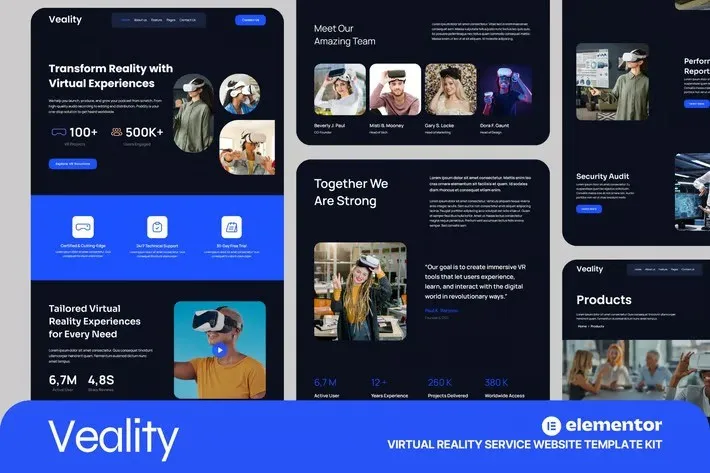
Launch a stunning virtual reality website in minutes — no coding required. This Elementor template kit delivers a sleek, conversion-optimized design built for VR studios, tech agencies, and immersive experience brands. Start building your VR website today.
- Secured & Scanned by Virus total & McAfee.
- Access to Free updates for Lifetime
- All products are Under GPL License (Unlimited Domain Usage)
- We Not Provide any Support For this Product

Lifetime Membership
Access 6700+ Premium WordPress Themes & Plugins, Elementor Templates, Mobile Apps, PHP scripts with Lifetime Updates.
Join Premium MembershipRecently Viewed
Virtual Reality Website Template Built for Speed and Professionalism
Building a VR service website that actually converts shouldn’t take months. Veality gives you a complete, ready-to-launch virtual reality website template that looks custom-designed — without the custom price tag. Whether you’re launching a VR studio, AR company, gaming service, or immersive tech startup, this template transforms your online presence from generic to premium in a single afternoon.
What Veality Delivers
This isn’t a basic layout pack. Veality is a fully-structured virtual reality website template designed specifically for tech-forward businesses in the VR and AR space. Every section — hero banners, service showcases, contact forms — communicates innovation and professionalism. The design speaks to clients who expect cutting-edge experiences.
- Homepage, services, portfolio, about, and contact pages ready to go
- Mobile-responsive layouts that look sharp on any device
- Color schemes and typography you can tweak to match your brand
- Conversion-focused sections that turn visitors into leads
- Works with free Elementor and Elementor Pro widgets
Who It’s Built For
Veality works best for virtual reality studios, augmented reality developers, gaming companies, tech agencies, and digital innovation firms. Freelancers or agencies serving VR clients can deliver polished sites without weeks of development work. Small business owners launching their own VR services can skip the developer fees entirely.
- VR/AR studios and service providers
- Tech startups and innovation companies
- Freelance designers building client sites
- Digital agencies needing fast turnarounds
- Gaming companies and metaverse businesses
How to Use This Template Kit
No technical skills required. Install the template kit through Elementor, import the pre-built pages, swap in your branding colors and logo, add your content, and publish. The entire process takes 2-4 hours for a complete site launch. Each section is designed to slot together cleanly, so you’re not wrestling with layout chaos or broken responsive views. When your client needs changes later, they can edit everything directly in Elementor’s visual editor.
Why Buy Veality Instead of Starting From Scratch
Custom VR website development runs $3,000-$10,000+ and takes 4-8 weeks minimum. Veality delivers the same professional result for a fraction of that cost and zero waiting. Every template comes with a commercial license, so you can use it for client projects or your own business without licensing concerns. One payment covers lifetime updates and dedicated support — no subscriptions, no surprises.
Ready to Launch Your VR Site?
Download Veality today and have a professional virtual reality website template live within hours. This Elementor kit includes instant access, lifetime updates, commercial licensing, and ongoing support. Stop paying for slow, expensive developers when a better solution is one click away. Get Veality now and position your brand at the forefront of the immersive tech industry.
Only logged in customers who have purchased this product may leave a review.
How to use Kit:
Install and activate the “Template Kit – Import” plugin from Plugins > Add New in WordPress.
Do not unzip.
Go to Template Kit – Import > Upload Template Kit Zip File button.
Before importing a template, ensure the Install Requirements button is clicked to activate required plugins.
For best results, do not import more than one template at a time.
RELATED PRODUCTS

DIVI – Original License | One Time Payment – Exclusive Deal

Elementor Pro 4.1.3 + Elementorism Landing Pages WordPress Plugin

907 5.3.6 – Responsive Multi-Purpose WordPress Theme

Element Pack Pro 9.1.0 – Addon For Elementor

Lifetime Mini Membership





 Mobile Apps
 php script
 How to
Reviews
There are no reviews yet