
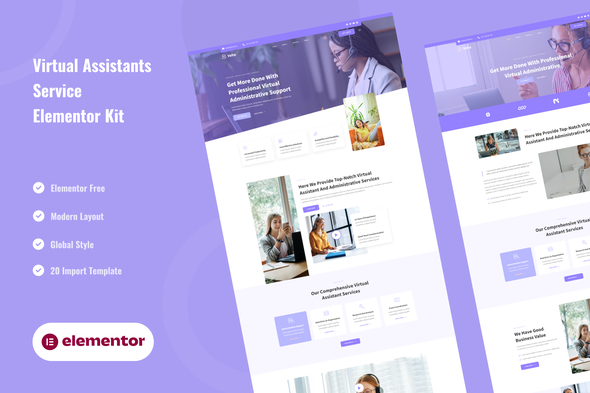
Veha – Virtual Assistant & Administrative Elementor Template Kit
- Updated on April 30, 2026
- 100% Original Product & Well Documented
- Unlimited Domain Usage
*Important Note:
The image should not be Part of the template kit. You need to use your own reliable Source.


Original price was: ₹999.00.₹299.00Current price is: ₹299.00.
Launch a stunning virtual assistant website in hours — no coding required. Veha gives you 8 professionally designed pages, Elementor drag-and-drop editing, and everything you need to book more clients.
- Secured & Scanned by Virus total & McAfee.
- Access to Free updates for Lifetime
- All products are Under GPL License (Unlimited Domain Usage)
- We Not Provide any Support For this Product

Lifetime Membership
Access 6700+ Premium WordPress Themes & Plugins, Elementor Templates, Mobile Apps, PHP scripts with Lifetime Updates.
Join Premium MembershipRecently Viewed
Veha – Virtual Assistant & Administrative Elementor Template Kit
Stop struggling with website builders that eat up your entire weekend. Veha is a ready-to-use Elementor template kit built specifically for virtual assistants and administrative professionals who want a polished, client-winning website — without hiring a developer or learning code. Open it in Elementor, swap in your text and images, and launch. That’s it.
What You Get With Veha
This template kit comes loaded with 8 complete pages designed to showcase your services, build trust, and convert visitors into paying clients. Every section, button, and layout has been crafted to work — no guessing what goes where.
- Homepage with hero section, service highlights, testimonials, and call-to-action
- Services page with clean pricing or feature cards
- About page that humanizes your brand and establishes expertise
- Contact page with integrated form layout
- Blog page template for content marketing
- FAQ section for handling common client questions
- Coming soon page for projects under development
- 404 error page that keeps visitors engaged
Built for WordPress and Elementor
Veha works inside the free Elementor page builder — one of the most popular WordPress plugins on the planet. If you’ve used Canva or Google Slides, you’ll feel right at home. Drag sections, adjust colors, swap fonts, and publish. The entire kit is responsive, meaning your site looks sharp on phones, tablets, and desktops without extra work.
Who Is This Template Kit For?
Veha is perfect for freelance virtual assistants launching their first website, administrative professionals expanding their online presence, VA agencies showcasing multiple service tiers, and coaches or consultants in the administrative space who need a quick, professional web presence. Whether you’re a total beginner or a seasoned WordPress user, you’ll appreciate how quickly this kit gets you from purchase to published site.
How to Use Veha
After purchase, you get an instant download. Install the template kit by importing it directly into Elementor — no FTP, no code, no technical headaches. Within an hour, you can have a complete website live. Customize colors to match your brand, add your own photos, write your service descriptions, and connect your preferred contact form plugin. The structure is ready. You just fill in the details.
Why Buy Veha Instead of Starting From Scratch
Building a professional site from a blank WordPress theme means wrestling with layouts, typography, spacing, and mobile responsiveness — skills that take months to master. Veha eliminates that learning curve entirely. You get a proven design system that communicates professionalism and trustworthiness, which is exactly what high-value clients look for. One-time payment, commercial license included, lifetime updates, and dedicated support when you need it.
No subscriptions. No hidden fees. Just a real website that works as hard as you do.
Ready to Get Started?
Your competitors already have professional websites. Don’t lose clients to someone who looks more established just because their site looks better. Download Veha today and have your virtual assistant website live by tomorrow. Instant access, commercial license, and support included.
Only logged in customers who have purchased this product may leave a review.
How to use Kit:
Install and activate the “Template Kit – Import” plugin from Plugins > Add New in WordPress.
Do not unzip.
Go to Template Kit – Import > Upload Template Kit Zip File button.
Before importing a template, ensure the Install Requirements button is clicked to activate required plugins.
For best results, do not import more than one template at a time.
RELATED PRODUCTS

DIVI – Original License | One Time Payment – Exclusive Deal

Elementor Pro 4.2.1 + Elementorism Landing Pages WordPress Plugin

907 5.3.6 – Responsive Multi-Purpose WordPress Theme

Element Pack Pro 9.1.0 – Addon For Elementor






 Mobile Apps
 php script
 How to
Reviews
There are no reviews yet