
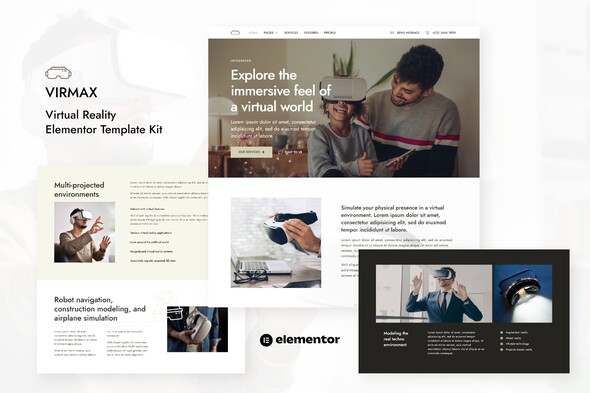
Virmax – Virtual Reality Services Elementor Template Kit
- Updated on April 30, 2026
- 100% Original Product & Well Documented
- Unlimited Domain Usage
*Important Note:
The image should not be Part of the template kit. You need to use your own reliable Source.


- Coupon "b2g1" has expired.
- Coupon "b2g1" has expired.
- Coupon "b2g1" has expired.
- Coupon "b2g1" has expired.
- Coupon "b2g1" has expired.
- Coupon "b2g1" has expired.
- Coupon "b2g1" has expired.
Original price was: ₹999.00.₹299.00Current price is: ₹299.00.
Skip the design agency bills. Virmax gives you a complete VR services website — pre-built layouts, drag-and-drop editing, and a commercial license. Live in a few hours.
- Secured & Scanned by Virus total & McAfee.
- Access to Free updates for Lifetime
- All products are Under GPL License (Unlimited Domain Usage)
- We Not Provide any Support For this Product

Lifetime Membership
Access 6700+ Premium WordPress Themes & Plugins, Elementor Templates, Mobile Apps, PHP scripts with Lifetime Updates.
Join Premium MembershipRecently Viewed
Virmax – Virtual Reality Services Elementor Template Kit
Most VR businesses spend months and thousands on website development, or end up with something that looks nothing like they imagined. Virmax flips that. It’s a complete, ready-to-customize template kit built specifically for virtual reality service providers — and you can have it live by end of day.
What’s Included
No hunting through mismatched templates or hiring a developer to tie everything together. Virmax gives you a cohesive system where every page connects visually and functionally.
- Multiple homepage designs — pick what fits your business, customize the rest
- Service showcase layouts with space for immersive imagery and clear descriptions
- Portfolio and case study templates to show off your VR projects
- Pricing tables designed for service packages, not products
- Contact forms and quote request pages — already connected and styled
- About, team, and testimonial pages for when clients want to know who they’re hiring
- Blog templates for sharing updates, project highlights, or industry insights
Who Uses This
VR studios, AR/VR agencies, independent VR developers, and tech startups offering virtual services. Web designers working with VR clients love the head start — it cuts project timelines significantly. If you want a professional-looking site without the custom development invoice, Virmax was made for you.
Built on Elementor
Elementor is the WordPress page builder most developers recommend, and for good reason. You get true drag-and-drop editing — swap images, change colors, adjust spacing, and customize every element through an interface that actually makes sense. The layouts respond automatically to different screen sizes, so your site looks sharp on phones, tablets, and desktops without extra work.
- Skip weeks of staring at blank pages and wireframes
- Design that doesn’t look like a template — because not everyone uses the same one
- Every essential page covered — no gaps, no patchwork solutions
- Drag, edit, publish — no code, no developer tickets
- Commercial license included — use it for your own site or client projects
One Payment, Lifetime Access
Download and install immediately after purchase. Pay once, and you get all future updates — if Elementor or WordPress changes how something works, the kit gets updated too. The commercial license covers both personal and client projects, so there are no surprise fees down the road.
Why This Template Kit
Custom websites involve hundreds of micro-decisions: layout hierarchy, font pairings, color relationships, responsive behavior. Virmax made those decisions already, based on what actually works for VR service businesses. You inherit a professional foundation that reflects the quality of your work — not a generic site that looks like everyone else’s. Your job becomes customization, not construction.
What You Get Today
All essential pages, commercial licensing, instant download, and lifetime updates. One payment. No subscriptions. Download now and spend the rest of the day customizing it to your brand instead of building it from scratch.
Only logged in customers who have purchased this product may leave a review.
How to use Kit:
Install and activate the “Template Kit – Import” plugin from Plugins > Add New in WordPress.
Do not unzip.
Go to Template Kit – Import > Upload Template Kit Zip File button.
Before importing a template, ensure the Install Requirements button is clicked to activate required plugins.
For best results, do not import more than one template at a time.
RELATED PRODUCTS

DIVI – Original License | One Time Payment – Exclusive Deal

Elementor Pro 4.2.1 + Elementorism Landing Pages WordPress Plugin

907 5.3.6 – Responsive Multi-Purpose WordPress Theme

Element Pack Pro 9.1.0 – Addon For Elementor






 Mobile Apps
 php script
 How to
Reviews
There are no reviews yet