
VoltaWork – Electrical Service Elementor Template Kit
- Updated on May 3, 2026
- 100% Original Product & Well Documented
- Unlimited Domain Usage

*Important Note:
The image should not be Part of the template kit. You need to use your own reliable Source.


Original price was: ₹999.00.₹299.00Current price is: ₹299.00.
Stop waiting on developers. This electrical service template gets you online in under an hour with 15+ pages, booking forms, service listings, and pricing tables that turn phone clicks into scheduled jobs.
- Secured & Scanned by Virus total & McAfee.
- Access to Free updates for Lifetime
- All products are Under GPL License (Unlimited Domain Usage)
- We Not Provide any Support For this Product

Lifetime Membership
Access 6700+ Premium WordPress Themes & Plugins, Elementor Templates, Mobile Apps, PHP scripts with Lifetime Updates.
Join Premium MembershipRecently Viewed
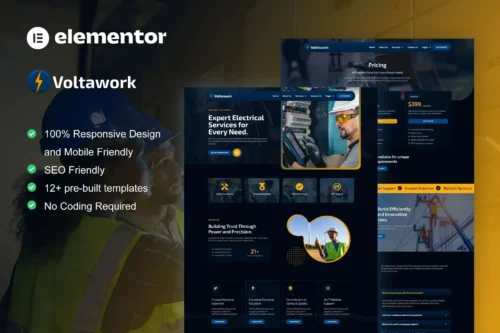
Professional Electrical Service Website Template for Elementor
Most electricians spend weeks chasing developers or settling for clunky DIY sites that don’t convert. VoltaWork changes that. Built specifically for electrical contractors who need a professional site without the agency price tag or endless email back-and-forth. Install, swap in your logo, add your services, and launch.
The kit gives you 15+ ready-to-go pages. Home pages that grab attention. Service pages that actually explain what you do. Testimonials that build trust. Booking forms that turn inquiries into scheduled appointments. All responsive — because most of your potential clients are searching on their phones.
What’s Inside the Kit
Works with the free Elementor page builder. No coding. No extra plugins to buy. Just install and customize.
- 15+ pre-built pages: home, services, about, testimonials, pricing, contact, and booking
- Dedicated sections for residential, commercial, and industrial electrical work
- Team member profiles for your certified electricians
- Gallery layouts to show off completed projects
- Contact and quote request forms already integrated
- Testimonial slider for quick credibility
- Fully responsive design tested across devices
Who This Template Is For
Electrical contractors running their own business who need an online presence yesterday. Freelance electricians building a client base and wanting something better than a Facebook page. Small electrical companies stuck on outdated websites but not ready to pay agency rates. Even WordPress developers working with multiple electrical clients can use this as a starting point for faster turnarounds.
Commercial license included. Use it for client projects without additional fees. One payment. No subscriptions. No surprises.
Setup in Under an Hour
Install the template kit through Elementor. Pick the pages you need. Replace the placeholder content with your business info. Add your logo, update contact details, list your service areas, and publish. The layout handles the design decisions so you can focus on the actual work.
Adding a new service? Copy an existing section, update the details, done. The modular structure means you’re never starting from scratch.
Why Not Just Use a Generic Template?
Generic templates make you build everything from scratch. VoltaWork is designed for electrical services, so the layout, color schemes, and content sections match what clients expect from professional electrical companies. It includes space for certifications, service areas, emergency callouts, and hourly rates — the details that actually matter in this industry.
Plus, lifetime updates are included. When WordPress or Elementor updates, your template stays compatible. One purchase, protected indefinitely.
Ready to Launch?
Download VoltaWork, install it in Elementor, and have a website that books jobs running today. Instant download. Commercial license included. Your professional electrical website is ready when you are.
Only logged in customers who have purchased this product may leave a review.
How to use Kit:
Install and activate the “Template Kit – Import” plugin from Plugins > Add New in WordPress.
Do not unzip.
Go to Template Kit – Import > Upload Template Kit Zip File button.
Before importing a template, ensure the Install Requirements button is clicked to activate required plugins.
For best results, do not import more than one template at a time.
RELATED PRODUCTS

DIVI – Original License | One Time Payment – Exclusive Deal

Elementor Pro 4.1.3 + Elementorism Landing Pages WordPress Plugin

907 5.3.6 – Responsive Multi-Purpose WordPress Theme

Element Pack Pro 9.1.0 – Addon For Elementor

Lifetime Mini Membership





 Mobile Apps
 php script
 How to
Reviews
There are no reviews yet