
WeddingKit – Invite & Gallery Event Elementor Template Kit
- Updated on April 29, 2026
- 100% Original Product & Well Documented
- Unlimited Domain Usage
*Important Note:
The image should not be Part of the template kit. You need to use your own reliable Source.


Original price was: ₹999.00.₹299.00Current price is: ₹299.00.
Transform your wedding website vision into reality with 15+ beautifully designed pages — no coding skills required. Includes commercial license, lifetime updates, and instant download.
- Secured & Scanned by Virus total & McAfee.
- Access to Free updates for Lifetime
- All products are Under GPL License (Unlimited Domain Usage)
- We Not Provide any Support For this Product

Lifetime Membership
Access 6700+ Premium WordPress Themes & Plugins, Elementor Templates, Mobile Apps, PHP scripts with Lifetime Updates.
Join Premium MembershipRecently Viewed
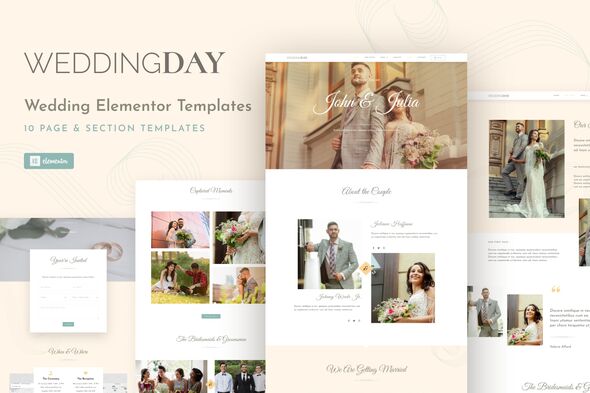
WeddingKit Elementor Template Kit — Build Stunning Wedding Websites in Minutes
Creating a wedding website that captures the romance and elegance of your clients’ special day shouldn’t take weeks of design work. WeddingKit gives you everything you need to launch a professional wedding invitation or event planning website fast — all built with Elementor, the world’s favorite WordPress page builder.
What WeddingKit Includes
This template kit delivers a complete wedding website solution with multiple pre-designed pages ready to customize. You get invitation layouts, gallery showcases, RSVP sections, couple story pages, event timelines, and vendor directories. Every element uses clean, semantic code that loads fast and looks beautiful on mobile devices.
- 15+ professionally designed pages and sections
- Invitation and RSVP page templates
- Photo gallery layouts with lightbox effects
- Event schedule and timeline designs
- Wedding party and vendor showcase pages
- Registry and gift page options
- Mobile-responsive layouts for all screen sizes
Who It’s Built For
WeddingKit works for anyone who needs a beautiful wedding website without hiring a developer. Wedding planners and event coordinators use it to create impressive client portfolios and proposal sites. Wedding photographers and videographers showcase their ceremony and reception work in style. Small wedding businesses build credible online presence without expensive agency fees. Even couples planning their own wedding create shareable invitation sites with this kit.
Easy Customization With Elementor
No coding knowledge required. WeddingKit works with the free Elementor plugin, letting you edit everything visually. Drag, drop, and customize headers, colors, fonts, and images directly in the editor. See your changes instantly as you make them. The intuitive interface means you spend time creating, not learning complicated tools.
- Visual drag-and-drop editing — no code needed
- Customizable color schemes and typography
- Replace placeholder images with your own in clicks
- Global style settings for consistent branding
Why Choose WeddingKit
Unlike generic templates that make wedding sites look templated, WeddingKit offers designs that feel personal and sophisticated. The layouts balance elegance with simplicity — romantic enough for couples, professional enough for business use.
One-time payment gets you permanent access. No subscriptions, no hidden fees. Commercial license means you use it for client projects, personal sites, or commercial work without restrictions. Lifetime free updates ensure your templates stay compatible with future WordPress and Elementor versions. If questions arise, reliable support helps you solve problems fast.
Ready to Build Your Wedding Website?
Skip the expensive developers and time-consuming custom design. Get WeddingKit now and launch a wedding website that impresses clients and captures the magic of their special day. Download instantly and start customizing in minutes.
Only logged in customers who have purchased this product may leave a review.
How to use Kit:
Install and activate the “Template Kit – Import” plugin from Plugins > Add New in WordPress.
Do not unzip.
Go to Template Kit – Import > Upload Template Kit Zip File button.
Before importing a template, ensure the Install Requirements button is clicked to activate required plugins.
For best results, do not import more than one template at a time.
RELATED PRODUCTS

DIVI – Original License | One Time Payment – Exclusive Deal

Elementor Pro 4.2.1 + Elementorism Landing Pages WordPress Plugin

907 5.3.6 – Responsive Multi-Purpose WordPress Theme

Element Pack Pro 9.1.0 – Addon For Elementor






 Mobile Apps
 php script
 How to
Reviews
There are no reviews yet